Android Decompilation Toolkit Tutorial (apktool, dex2jar, and JD-GUI)
A tutorial on using the popular Android decompilation toolkit consisting of apktool, dex2jar, and JD-GUI. The tools have been packaged and configured together so they can be used directly, avoiding the trouble of collecting them separately. Download address: …
Read in Chinese→Android Decompilation Toolkit Tutorial (apktool, dex2jar, and JD-GUI)
These are popular tools commonly used online. I am rewriting the tutorial to clarify the overall process.
There is a standard toolkit for APK decompilation: apktool, dex2jar, and JD-GUI.
I have packaged and configured the tools together so they can be used directly, saving you the trouble of collecting them separately.
Download address:
https://download.csdn.net/download/god_zzz/11241989
Brief Introduction to What Each Tool Does:
## apktool
It can decompile an application’s layout files, XML files, AndroidManifest.xml, images, and more.
## dex2jar
It decompiles an APK into Java source code. In other words, it converts classes.dex into a JAR file so that the source code can be decompiled.
## JD-GUI
It converts source files into JAR files. Open it to view the source code in a JAR directly.
**
Start Decompiling
- First, download the tools and the APK you want to test
- Then use them
Notes on Using apktool
- Make sure all three files are in the same folder. Then open CMD and switch to this path.
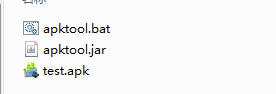
Run the command:``` apktool d -f ***.apk

-
- **For the second step, place the classes.dex file into the folder where dex2jar was extracted**
-
![Insert image description here](/images/2019061421481150.png
##One more thing to note: when running the command, make sure the path has been switched to the current directory
Then enter the command:```
d2j-dex2jar.bat classes.dex![Insert image description here](/images/20190614215124837.png The decompilation is now complete.
**
Final Step: Use JD-GUI to View the Source Code
**
**
- Now you have the JAR file
- Double-click to open JD-GUI
- Drag the JAR file directly into it to view the source code
![Insert image description here](/images/20190614215634222.png **
##That is the complete decompilation process
One final reminder: there is an issue when using the command line. If the generated file already exists, an error will occur without prompting you to overwrite it. Therefore, before running the command, check that no existing file has the same name.