Simple Use of Celery in Django
An introduction to using Celery as a distributed asynchronous task queue in Django, including brokers, result backends, task registration, invocation, and command-line startup.
Read in Chinese→Introduction to Celery
In addition to Redis, you can also use another powerful tool—Celery. Celery is an asynchronous task scheduling tool.
Celery is a Distributed Task Queue. “Distributed” means that multiple workers can exist, while “queue” indicates that operations are asynchronous—that is, there is a foreman who creates tasks and submits requirements, along with a group of programmers waiting to be assigned work.
When defining Celery in Python, we need to introduce a Broker. As its name suggests, the Broker acts as an intermediary here. When the foreman submits tasks, all tasks are placed in the Broker. At the other end of the Broker, a group of programmers waits to retrieve tasks one by one and begin working on them.
This model means that the entire system is inherently an open-loop system: the foreman does not know how well the programmers have completed their tasks. Therefore, we need to introduce a Backend to store the result of each task. This Backend is somewhat similar to the Broker, as it is also used to store task information, except that it stores the return results of those tasks. We can choose to have only tasks that encounter execution errors return results to the Backend. By retrieving those results, we can determine how many tasks failed.
Celery (“celery”) is an asynchronous task queue/job queue based on distributed message passing. It focuses on real-time operations but also provides excellent support for scheduling. Celery is used in production systems to process millions of tasks every day. Celery is written in Python, but its protocol can be implemented in any language. It can also interact with other languages through webhooks. Celery recommends RabbitMQ as its message queue, but provides limited support for Redis, Beanstalk, MongoDB, CouchDB, and databases (using SQLAlchemy or Django’s ORM). Celery is easy to integrate with Django, Pylons, and Flask by using the django-celery, celery-pylons, and Flask-Celery add-on packages.
Celery official website: http://www.celeryproject.org/
Celery official documentation (English): http://docs.celeryproject.org/en/latest/index.html
Celery official documentation (Chinese): http://docs.jinkan.org/docs/celery/
Project directory
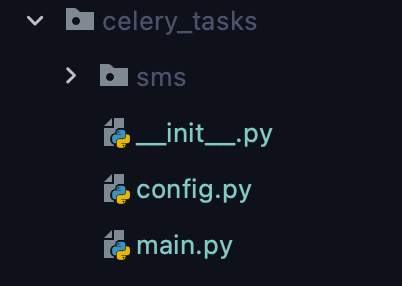
Config.py
# -*- coding: utf-8 -*-
"""
@author   : Zeo
@software : PyCharm2021
@docs     : https://docs.celeryproject.org/en/stable/userguide/configuration.html
"""

broker_url = 'redis://127.0.0.1:6379/2'  # 消息中间件配置

#result_backend = 'redis://127.0.0.1:6379/16'  # 默认不开启,后端用于存储任务结果(逻辑删除)
Main.py
# -*- coding: utf-8 -*-
"""
@author   : Zeo
@software : PyCharm2021
@docs     : https://docs.celeryproject.org/en/stable/
            https://github.com/celery/celery
"""

import os

from celery import Celery

# 为celery程序设置Django配置
os.environ.setdefault('DJANGO_SETTINGS_MODULE', 'drf_admin.settings.dev')

# 创建celery应用 app = Celery('admin')
app = Celery('scan')

# 导入celery配置
app.config_from_object('celery_tasks.config')

# 加载celery任务模块
app.autodiscover_tasks(['celery_tasks.sms', 'drf_admin.apps.vulscan'])

# 启动Celery命令, (修改celery任务后必须重启celery)
# celery -A celery_tasks.main  worker --loglevel=info

# win系统(celery4.0版本后不支持win, 需安装eventlet模块启动celery)
# celery -A celery_tasks.main  worker --loglevel=info -P eventlet
Create a task.py file (containing the main asynchronous program)
# author: Zeo
# python: 3.7
# datetime:2021/6/15 11:28 上午
# software: PyCharm

"""
文件说明:celery异步测试
"""
from random import random
from celery_tasks.main import app


@app.task(name='celerytest1')
def celerytest1(id):
    print("celery_tasks"+str(id))
Note that whenever a task is added, its task module must be registered
Main.py
# 加载celery任务模块
app.autodiscover_tasks(['celery_tasks.sms', 'drf_admin.apps.vulscan'])
Invoke the asynchronous task
    @action(methods=['post'], detail=False)
    def scan(self, request):
        data=request.data
        id = request.data.get('id')

        #celerytest1 异步任务,调用delay。(id)是传参
        celerytest1.delay(id)

        return HttpResponse(content='one_scan', content_type=None, status=200)
Starting from the Command Line
celery -A celery_tasks.main worker --loglevel=info