Basic CodeQL Syntax
An introduction to basic QL syntax, including query structure, predicates, sources and sinks, data flow, sanitizers, additional taint steps, batch scanning commands, and method queries.
Read in Chinese→Basic QL Syntax
CodeQL’s query syntax is somewhat similar to SQL. If you have learned basic SQL statements, the general pattern should look familiar.
Structure
import java // 导入使用的库

from int i /* ... 变量声明... */
where i = 100 /* ... 逻辑公式 ... */
select i /* ... 表达式 ... */
import java imports the library to be used, since the project we are analyzing is written in Java.
from int i indicates that we are defining a variable named i of type int, meaning that we retrieve all data of the int type.
where i = 100 indicates that the condition is met when i equals 1. (Here, = means “equals” ==; it is not an assignment.)
select i outputs i.

The QL classes we commonly use are roughly as follows:
| Name | Description |
|---|---|
| Method | Method class. Method method retrieves all methods in the current project. |
| MethodAccess | Method-call class. MethodAccess call retrieves all method calls in the current project. |
| Parameter | Parameter class. Parameter retrieves all parameters in the current project. |
All methods:
import java

from Method method
select method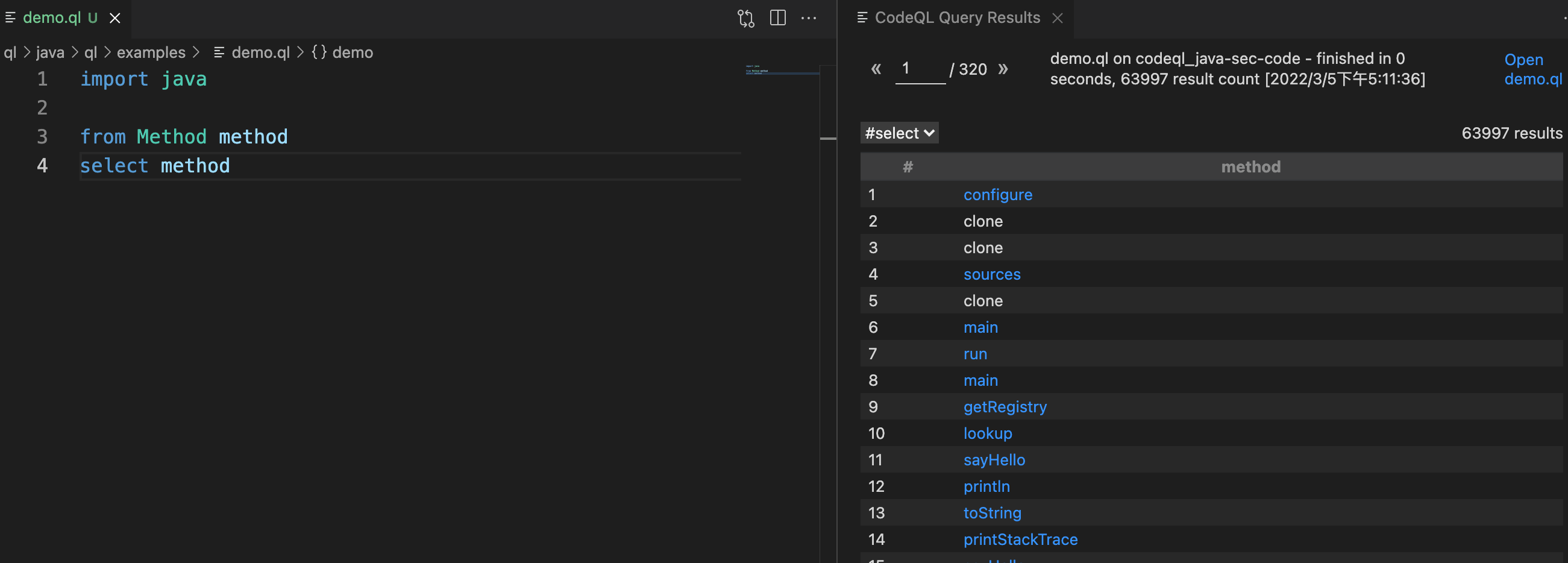
We can then use some of the built-in methods of the Method class to filter the results. For example, we can retrieve methods named CommandExec.
import java

from Method method
where method.hasName("CommandExec")
select method.getName(), method.getDeclaringType()
Predicates
As with SQL, if the query conditions in the where clause are too long, they can become difficult to read. CodeQL provides a mechanism that lets you encapsulate lengthy query statements as functions.
These functions are called predicates.
For example, the previous case can be written as follows, producing the same result:
import java

predicate isStudent(Method method) {
exists(|method.hasName("getStudent"))
}

from Method method
where isStudent(method)
select method.getName(), method.getDeclaringType()
Syntax explanation
predicateindicates that the current method has no return value.The
existssubquery is a very common syntactic structure in CodeQL predicates. It determines which data to select based on whether the internal subquery returns true or false.
Configuring Sources and Sinks
What are sources and sinks?
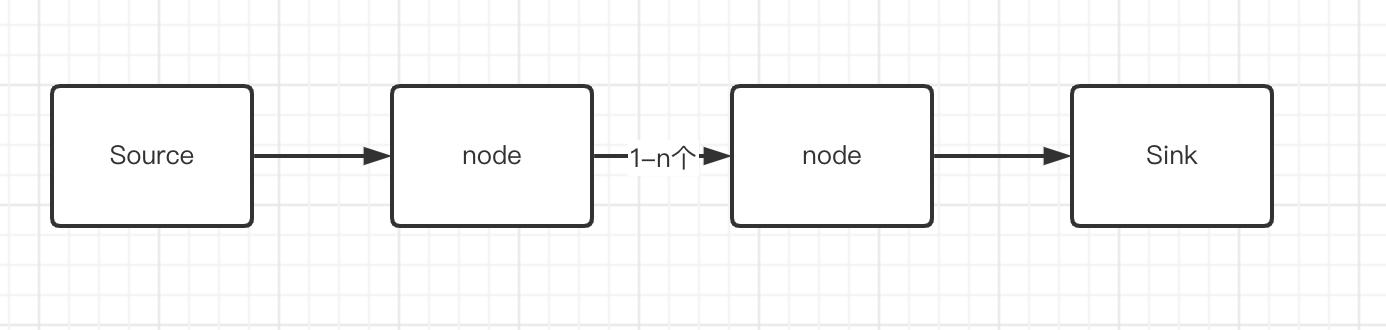
In automated code security auditing, one of the most fundamental concepts is the trio of (source, sink, and sanitizer).
A source is the input point of a vulnerability’s taint chain. For example, obtaining parameters from an HTTP request is an obvious source.
A sink is the execution point of a vulnerability’s taint chain. For an SQL injection vulnerability, for example, the function that ultimately executes the SQL statement is the sink (this function might be named query, exeSql, or something else).
A sanitizer, also called a sanitization function, is a method that blocks the propagation chain of a vulnerability.
A vulnerability exists only when both a source and a sink are present and there is an unobstructed path from the source to the sink.
Configuring a Source
In CodeQL, we use the following format:
override predicate isSource(DataFlow::Node src) {
具体方法。。。
}
Example
A standard Spring Boot application:
@RequestMapping(value="/list",method = {RequestMethod.GET, RequestMethod.POST})
	@ResponseBody
	public ResultData list(@ModelAttribute @ApiIgnore CategoryEntity category, HttpServletResponse response, HttpServletRequest request, @ApiIgnore ModelMap model, BindingResult result) {
		BasicUtil.startPage();
		List categoryList = categoryBiz.query(category);
		return ResultData.build().success(new EUListBean(categoryList,(int) BasicUtil.endPage(categoryList).getTotal()));
	}
In this example, the code used to configure the source is:
override predicate isSource(DataFlow::Node src) { src instanceof RemoteFlowSource }This is a built-in rule provided by SDK. It includes most commonly used source entry points. Spring Boot, which we are using, is also covered, so we can use it directly.
Note: The instanceof syntax is provided by CodeQL. We will discuss it later in the advanced CodeQL section.
Configuring a Sink
In CodeQL, we configure a sink through isSink:
override predicate isSink(DataFlow::Node sink) {
	具体方法。。。
}
Here, we simply define a construtorCall for the sink and restrict that construtorCall to processBuilder.
CodeQL officially provides an ExternalProcess.qll library containing an ArgumentToExec class, which covers this sink.
Therefore, we can simply write:
override predicate isSink(DataFlow::Node sink) {
        sink.asExpr() instanceof ArgumentToExec
}
This configures a command-execution sink.
Flow Data Flow
After configuring the source and sink, a vulnerability exists if a tainted variable can flow unobstructed into a dangerous function.
For example:
from VulConfig config, DataFlow::PathNode source, DataFlow::PathNode sink
where config.hasFlowPath(source, sink)
select source.getNode(), source, sink, "source"
We pass our defined source and sink to config.hasFlowPath(source, sink), and the system automatically determines whether a vulnerability exists.
This section is essentially boilerplate: it always describes the flow from the source to the sink, so there is no need to examine it too deeply.
Simple Demo
/**
 * @id java/examples/vuldemo
 * @name Rce
 * @description Rce
 * @kind path-problem
 * @problem.severity warning
 */

import java
import semmle.code.java.dataflow.FlowSources
import DataFlow::PathGraph


class VulConfig extends TaintTracking::Configuration {
  VulConfig() { this = "rceConfig" }

  override predicate isSource(DataFlow::Node src) {
      src instanceof RemoteFlowSource
    }

  override predicate isSink(DataFlow::Node sink) {
    sink.asExpr() instanceof ArgumentToExec
    }
}


from VulConfig config, DataFlow::PathNode source, DataFlow::PathNode sink
where config.hasFlowPath(source, sink)
select source.getNode(), source, sink, "source"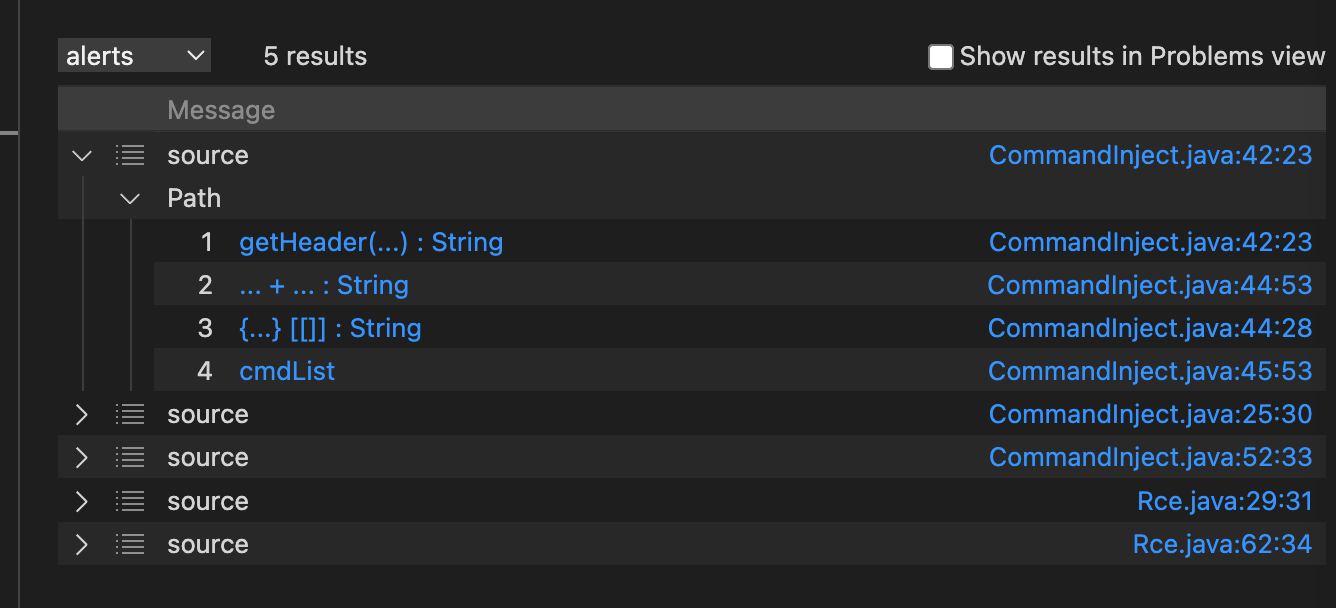
The isSanitizer Method
One of the findings in the demo above is a false positive. The parameter was actually filtered by a security function, but it was still detected. In this situation, we need to eliminate the false positive by using isSanitizer.
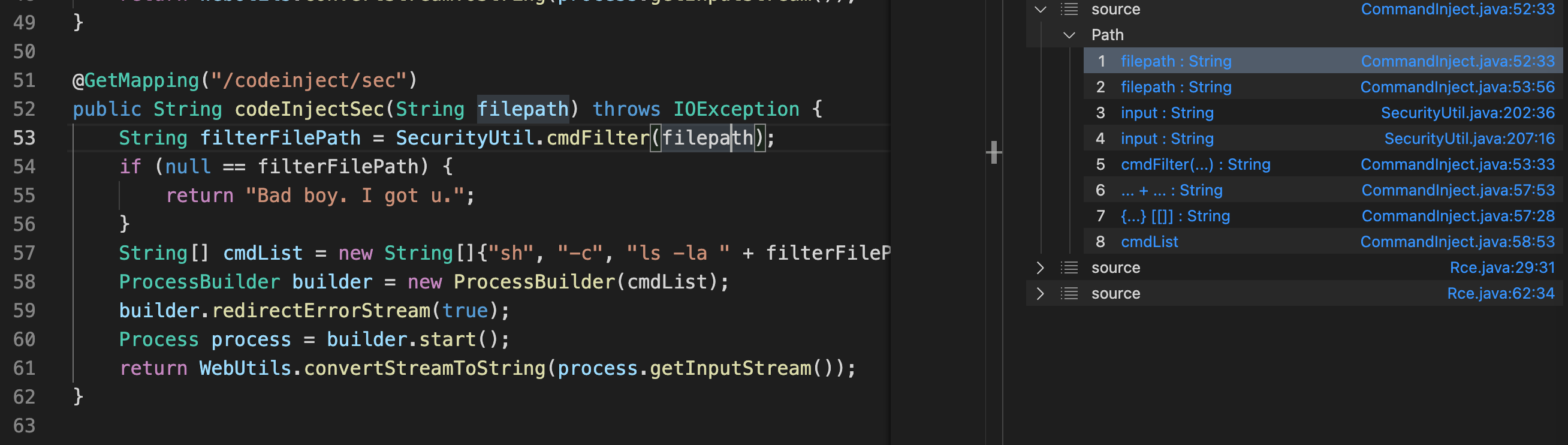
isSanitizer is a sanitization method provided by the CodeQL class TaintTracking::Configuration.
override predicate isSanitizer(DataFlow::Node node) {
    exists(...)
}
The isAdditionalTaintStep Method
The isAdditionalTaintStep method is provided by the CodeQL class TaintTracking::Configuration. Its prototype is:
override predicate isAdditionalTaintStep(DataFlow::Node node1, DataFlow::Node node2) {
    isTaintedString(node1.asExpr(), node2.asExpr())
  }
}
Its purpose is to force a controllable node
A to propagate to another node B, thereby making node B controllable as well.
Batch Scanning Commands
In addition to the VS Code extension for scanning, CodeQL also provides numerous command-line tools for integrating scans into projects.
For example:
codeql database analyze /Users/zy/Documents/project/codeql/vscode-codeql-starter-main/database/codeql_java-sec-code /Users/zy/Documents/project/codeql/vscode-codeql-starter-main/ql/java/ql/src/codeql-suites/java-security-extended.qls --format=csv --output=java-results.csvQuerying Methods of a Specified Class
import java

from Method method
where method.hasName("Deserialize")
and
method.getDeclaringType().hasQualifiedName("org.joychou.controller", "Fastjson")

select method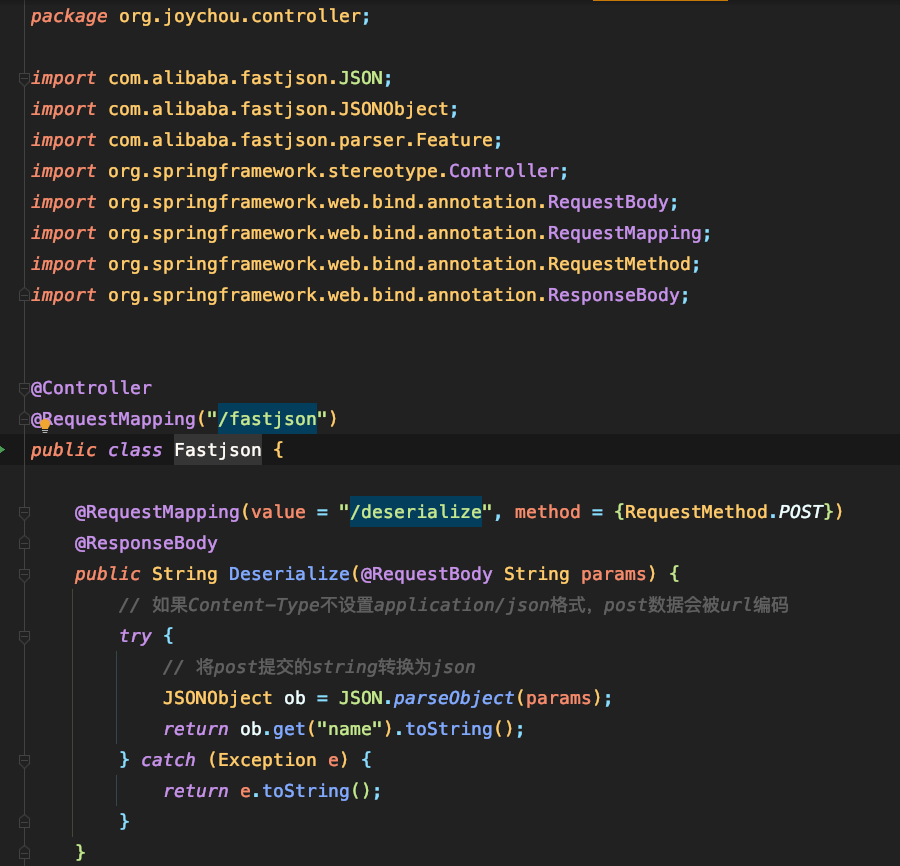
Querying by Method Name and Interface Name
For example, suppose I want to query the toObject methods of all subclasses of ContentTypeHandler.
import java

from Method method
where method.hasName("toObject") and method.getDeclaringType().getASupertype().hasQualifiedName("org.apache.struts2.rest.handler", "ContentTypeHandler")
select method