Binary Security - Assembly Basics
Definitions of number systems: binary consists of 0 and 1; octal consists of 0 through 7; decimal consists of 0 through 9; and hexadecimal consists of 0 through 9 and A through F. Units of measurement: 1 by…
Read in Chinese→Definitions of Number Systems
Binary: consists of two symbols, 0 and 1
Octal: consists of eight symbols, 0, 1, 2, 3, 4, 5, 6, and 7
Decimal: consists of ten symbols, 0, 1, 2, 3, 4, 5, 6, 7, 8, and 9
Hexadecimal: consists of sixteen symbols, 0, 1, 2, 3, 4, 5, 6, 7, 8, 9, A, B, C, D, E, and F
Units of Measurement:
1 byte = 8 bits, char
WORD = 2 BYTE = 16 bits, short int
DWORD = 4 BYTE = 32 bits
QWORD = 8 BYTE = 64 bits
1 KB = 1024 bytes = 8192 bits
1 MB = 1024 KB
1 GB = 1024 MB
1 TB = 1024 GB
| Signed | Unsigned | |
|---|---|---|
| byte | -128-127 | 0-255 |
| word | -32768-32767 | 0-65535 |
| DWORD | ||
| qword |
16-bit assembly: real mode. Internally, a 16-bit processor can process stored data with a maximum length of 16 bits.
32-bit assembly: protected mode. Internally, a 32-bit processor can process stored data with a maximum length of 32 bits.
64-bit assembly: protected mode. Internally, a 64-bit processor can process stored data with a maximum length of 64 bits.
| Bit Width | General-Purpose Registers | Extensions |
|---|---|---|
| 16-bit general-purpose registers | AX, BX, CX, DX, SI, DI, BP, SP | R8W, R9W, R10W, R11W, R12W, R13W, R14W, R15W |
| 32-bit general-purpose registers | EAX, EBX, ECX, EDX, ESI, EDI, EBP, ESP | R8D, R9D, R10D, R11D, R12D, R13D, R14D, R15D |
| 64-bit general-purpose registers | RAX, RBX, RCX, RDX, RSI, RDI, RBP, RSP | R8, R9, R10, R11, R12, R13, R14, R15 |
Common 32-Bit Registers
Eight general-purpose registers
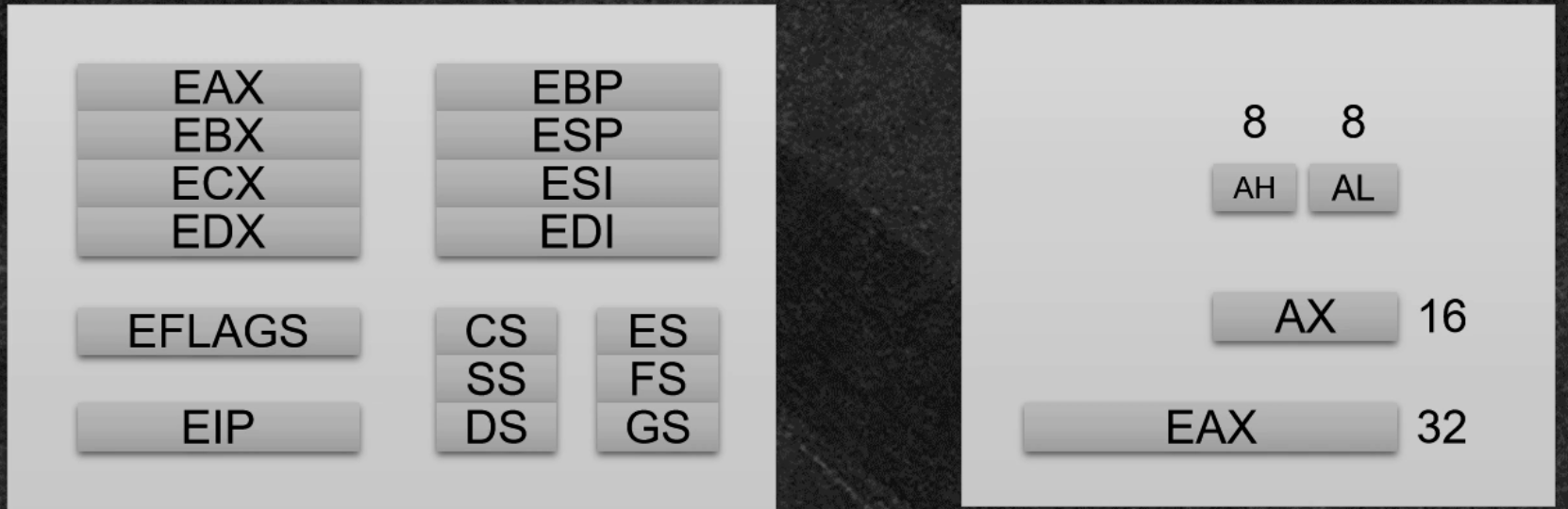
Eight general-purpose registers:
EAX is the “accumulator.” It accumulates operand and result data, and return values and operation results are generally stored here.
EBX is the “base” register, which stores the base address during memory addressing.
ECX is the counter and is the implicit counter for repeat (REP)-prefixed instructions and the LOOP instruction.
EDX is the destination register, used to store partial multiplication results and part of a dividend in division.
EDI is the destination index register: the destination pointer for string operations and a data pointer for the ES segment.
ESI is the source index register: the source pointer for string operations and a data pointer for the SS segment.
ESP: the extended stack pointer register. It contains a pointer that always points to the top of the uppermost stack frame
on the system stack.
EBP: the extended base pointer register. It contains a pointer that always points to the bottom of the uppermost stack frame
on the system stack.
Some of these can also be split into smaller parts for processing.
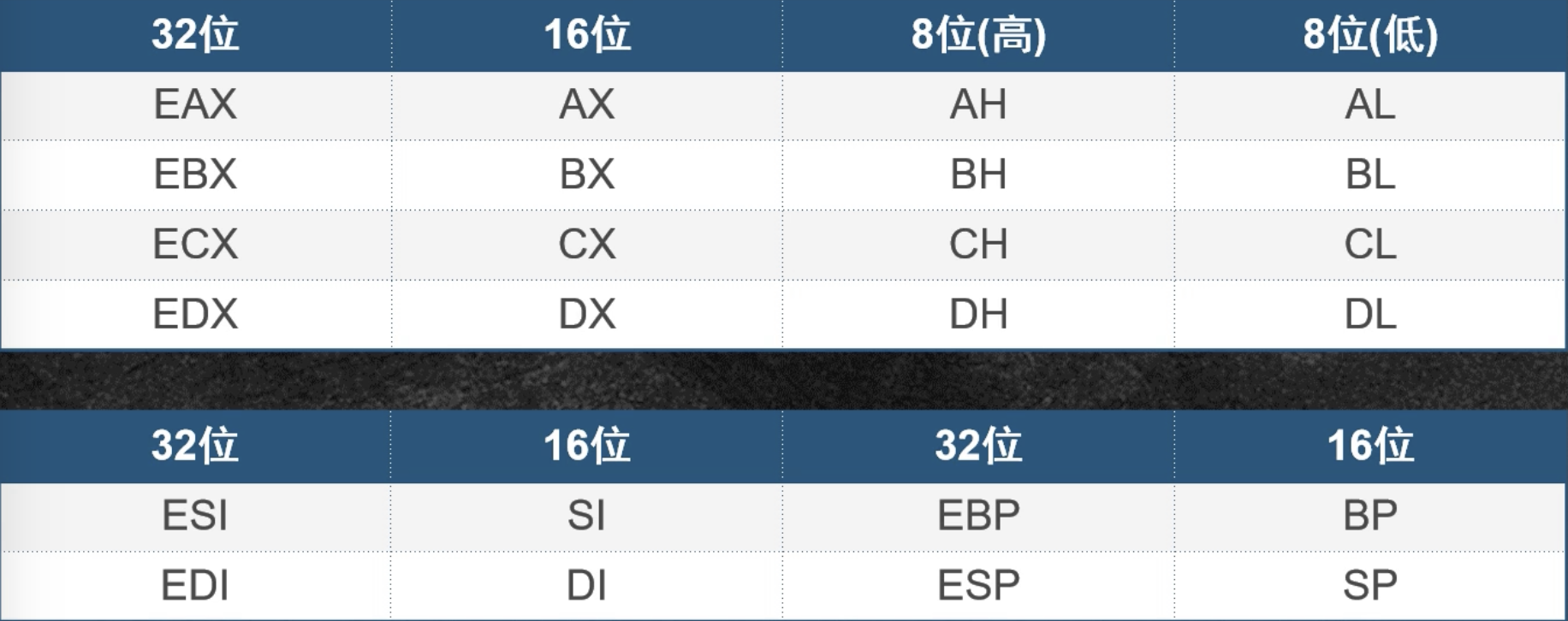
EIP: the Extended Instruction Pointer register. It contains a pointer that always points to the address of the next
instruction awaiting execution.
It can be said that controlling the contents of the EIP register means controlling the process—wherever we make EIP point, the CPU will
execute the instructions there.
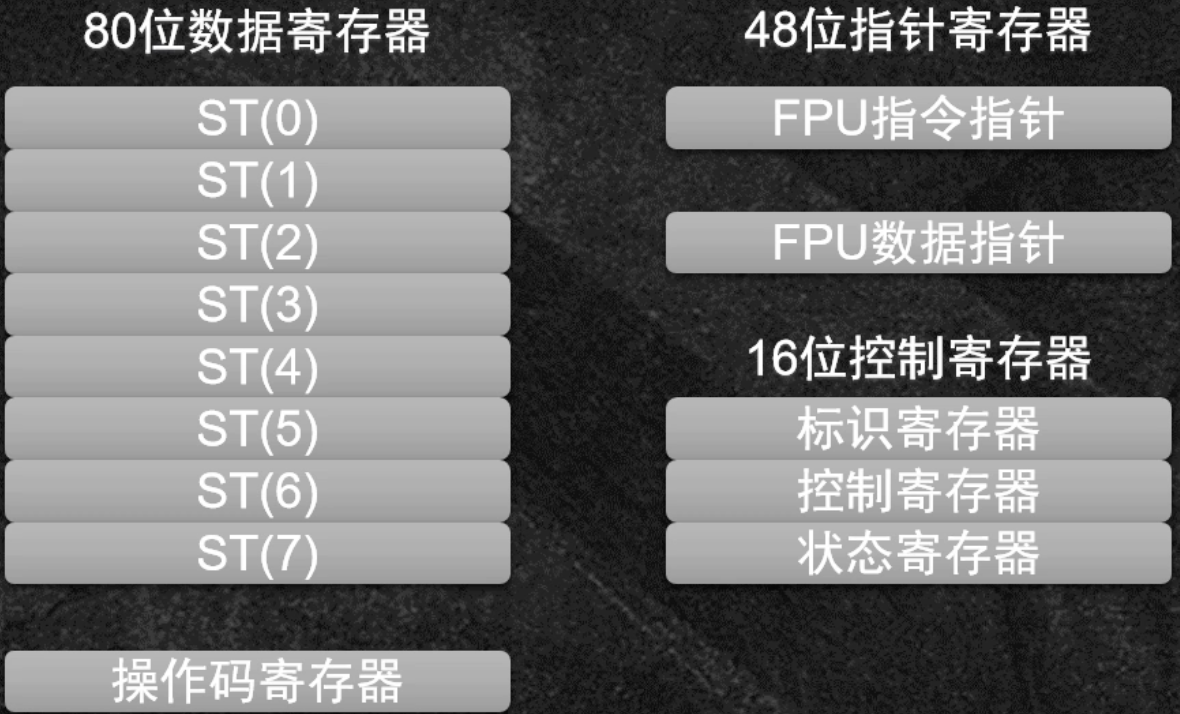
XMM registers: floating-point registers
EFLAGS register: contains independent binary bits used to control CPU operations or reflect the results of certain CPU operations. Some instructions can test and control these individual processor flag bits.
The status flags in the EFLAGS register (bits 0, 2, 4, 6, 7, and 11) indicate the results of arithmetic instructions such as ADD, SUB, MUL, and DIV. These status flags work as follows:
Internal Data Types
Integers
- BYTE: 8-bit
- SBYTE: 8-bit signed
- WORD: 16-bit signed
- SWORD: 16-bit signed
- DWORD: 32-bit signed
- SDWORD: 32-bit signed
- FWORD: 48-bit far pointer in protected mode
- QWORD: 64-bit integer
- TBYTE: 80-bit integer
Real numbers
- REAL4: 32-bit short real
- REAL8: 64-bit long real
- REAL10: 80-bit extended real
Pseudo-instructions
- db: 8-bit integer = char; can store ASCII codes
- dw: 16-bit integer
- dd: 32-bit integer
Big-Endian and Little-Endian
First, let us review the basic concepts:
-
Big-endian mode: the most significant byte is stored at the lower memory address
-
Little-endian mode: the most significant byte is stored at the higher memory address
mov arr,01234567h
Storage
Big-endian: 01 23 45 67
Little-endian: 67 45 23 01
Instruction Set
Arithmetic Operations
Addition
Format: ADD OPRD1,OPRD2
Function: adds two numbers
The result of an addition instruction affects CF, SF, OF, PF, ZF, and AF.
OPRD1 and OPRD2 cannot both be memory operands.
————————————————————————————————
Add-with-carry instruction ADC
Format: ADC OPRD1,OPRD2
Function: OPRD1 = OPRD1 + OPRD2 + CF
Subtraction
Subtraction instruction SUB
Format: SUB OPRD1,OPRD2
Function: subtracts two operands, namely subtracting OPRD2 from OPRD1 and storing the result in OPRD1. Its instruction types and effects on the flags are the same as those of the ADD instruction. Note that an immediate value cannot be used as the destination operand, two memory operands cannot be subtracted directly, and the operands may be 8-bit or 16-bit unsigned or signed numbers.
————————————————————————————————
Subtract-with-borrow instruction SBB
Format: SBB OPRD1,OPRD2
Function: subtracts the two operands and then subtracts the CF carry flag, namely OPRD1 = OPRD1 - OPRD2 - CF, with the result stored in OPRD1.
Multiplication
Unsigned multiplication instruction MUL
Format: MUL OPRD
The two multiplicands must both be either 8-bit or 16-bit. This gives 8-bit multiplication and 16-bit multiplication.
For 8-bit multiplication, one number is stored in AL by default, and the other number is stored in another 8-bit register or a byte-sized memory location.
mul 8-bit register ; the result is stored in AX
For 16-bit multiplication, one number is stored in AX by default, and the other number is stored in another 16-bit register or a word-sized memory location.
mul 16-bit register ; the result is stored in DX, AX
8-bit multiplication produces a 16-bit number, and the result is stored in AX.
16-bit multiplication produces a 32-bit number. The low 16 bits are stored in AX, and the high 16 bits are stored in DX.
————————————————————————————————
Signed multiplication instruction IMUL
Function: performs multiplication
OPRD is a general-purpose register or memory operand.
This instruction affects the CF and OF flags.#### Division
Unsigned division instruction DIV
Format: DIV OPRD
Function: performs division on two unsigned binary numbers
The div instruction is a division instruction. In 100001/100, 100001 is the dividend and 100 is the divisor. Its general format is: div reg or div memory location. The reg or memory location stores the divisor, which may be either 8-bit or 16-bit.
Dividend: stored in AX or in DX and AX by default. If the divisor is 8-bit, the dividend is 16-bit and is stored in AX by default. If the divisor is 16-bit, the dividend is 32-bit and is stored in DX and AX, with DX holding the high 16 bits and AX holding the low 16 bits.
————————————————————————————————
Signed division instruction IDIV
Format: IDIV OPRD
Function: performs binary division on two signed numbers
For example, a 16-bit dividend is stored in two 8-bit registers, AH:AL; the quotient is stored in AL and the remainder in AH.
For example, a 32-bit dividend is stored in sixteen 8-bit registers, DX:AX; the quotient is stored in AX and the remainder in DX.
For example, a 64-bit dividend is stored in thirty-two 8-bit registers, EDX:EAX; the quotient is stored in RAX and the remainder in EDX.
For example, a 128-bit dividend is stored in sixty-four 8-bit registers, RDX:RAX; the quotient is stored in RAX and the remainder in RDX.
Increment
Increment-by-one instruction INC (INCrement by 1)
Format: INC OPRD
Decrement
Decrement-by-one instruction DEC (Decrement by 1)
Format: DEC OPRD
LOOP
Loop-control instruction LOOP
Format: loop label
Function: equivalent to
dec cx
Jnz
That is, first decrement CX by 1, then determine whether CX is 0. If it is not 0, jump to the entry point indicated by the label that follows; if it is 0, continue sequential execution.
MOV Instruction
Data-transfer instruction MOV
Format: MOV OPRD1,OPRD2
Function: transfers a source operand to the destination operand, namely OPRD1<–OPRD2
Notes:
OPRD1 is the destination operand and may be a register, memory location, or accumulator.
OPRD2 is the source operand and may be a register, memory location, accumulator, or immediate value.
MOVS(move string)
The movs instruction is one of the few assembly instructions for which both operands may be memory operands. In development, MOVS is typically used to copy a sequence of characters.
String-transfer instruction MOVS
Format: MOVS OPRD1,OPRD2
Function: OPRD1<—OPRD2
Notes: OPRD2 is the symbolic address of the source string, and OPRD1 is the symbolic address of the destination string.
LEA
Effective-address transfer instruction
Format: LEA OPRD1,OPRD2
Function: transfers the effective address specified by the source operand to the designated register.
OPRD1 must be a register.
XCHG
Data-exchange instruction
Format: XCHG OPRD1,OPRD2, where OPRD1 is the destination operand and OPRD2 is the source operand.
Function: exchanges the positions of the two operands; this instruction exchanges the source operand OPRD2 with the destination operand OPRD1.
TEST
Format: TEST OPRD1,OPRD2
Function: OPRD1 and OPRD2 have the same meanings as in the AND instruction, and a bitwise ‘AND‘ operation is performed on the two operands.
Difference: the result of the ‘AND‘ operation is not written to the destination operand. This instruction does not modify the contents of either operand; it only updates the flags after performing the logical AND operation.
CALL Instruction
Procedure-call instruction
Format: CALL OPRD
Function: procedure-call instruction
Equivalent to:
push eip
amp OPRD
RETN Instruction
Return instruction, equivalent to:
pop eip
jmp eip
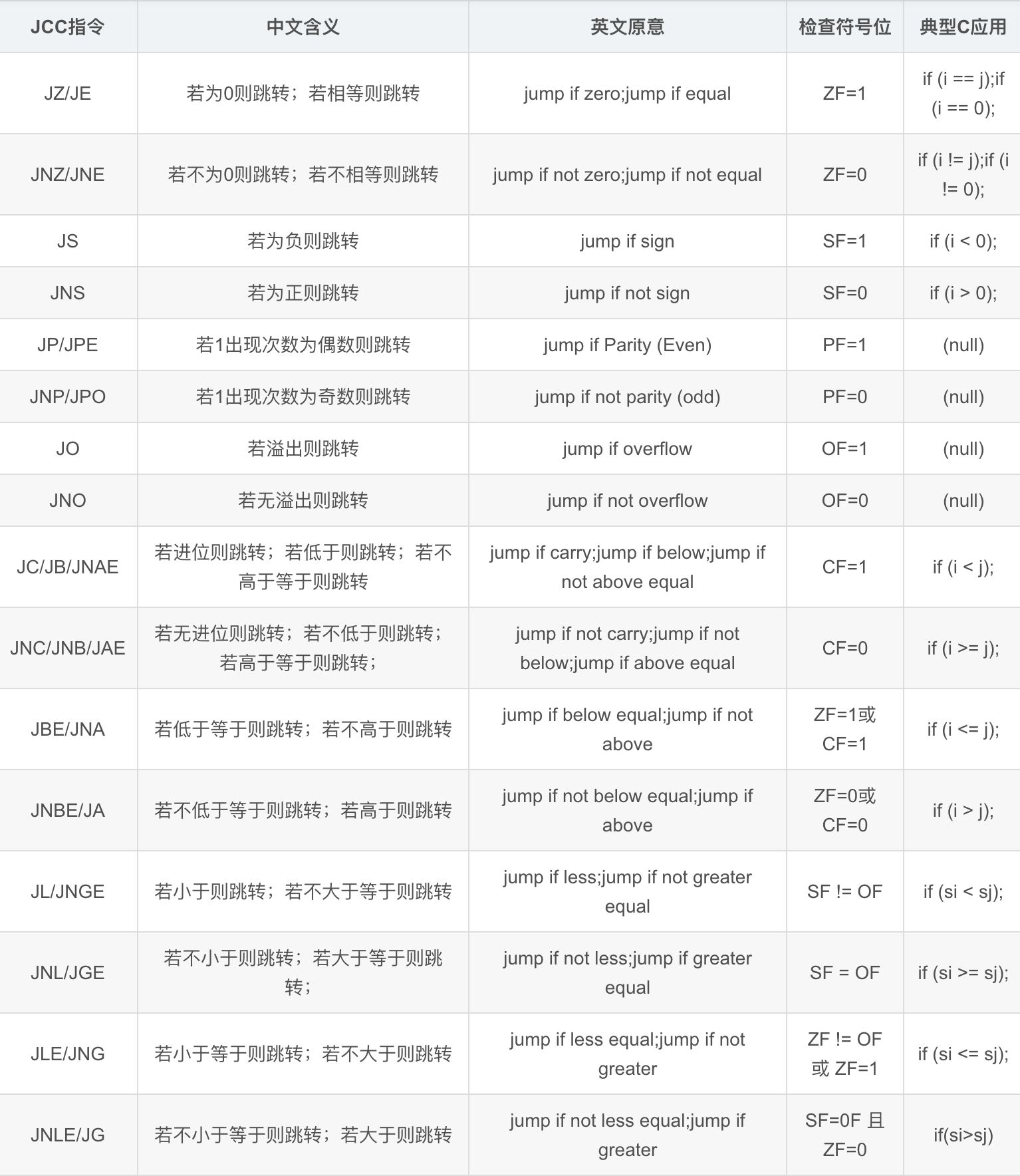
Common JCC Instructions
JMP: unconditional jump
JZ/JE: ZF = 1(jump When Zero and jump When Equal) equal to 0 or equal
JNZ(jump no Zero)and JNE(jump no Equals ) ZF=0 not equal to 0 or not equal
When comparing two signed numbers, relative magnitude is expressed using greater and less:
JG before > after Jump if greater
JL before < after Jump if less
JL = JNGE (jump if less, or not greater equal)
JGB and JLE are branch instructions used to compare signed numbers:
JGE branch condition (Jump if greater or equal): JGE al, bl; jumps when the signed contents of AL are greater than or equal to BL.
JLE branch condition (Jump if less or equal): JLE al, bl; jumps when the signed contents of AL are less than or equal to BL.
When comparing two unsigned numbers, relative magnitude is expressed using below or above:
JBE/JNA (jump if below or equal, or not above) branches when the comparison result is <=
JBE/JNA: CF = 1/ZF = 1; jump if below or equal, or not above
JNBE/JA (jump if not below or equal, or above)
JNBE/JA: CF = 0 / ZF = 0; jump if not below or equal / above
JL/JNGE: SF != OF; jump if less / not greater than or equal
JNL/JGE: SF = OF; jump if not less / greater than or equal
Stack Operation Instructions
PUSH: push instruction. In 32-bit assembly, ESP is first decremented by 4 to reserve space, and then the content to be pushed is placed on the stack.
POP: pop instruction. In 32-bit assembly, the data at the top of the stack is first popped into the specified destination, and then ESP is incremented by 4 to release the space.
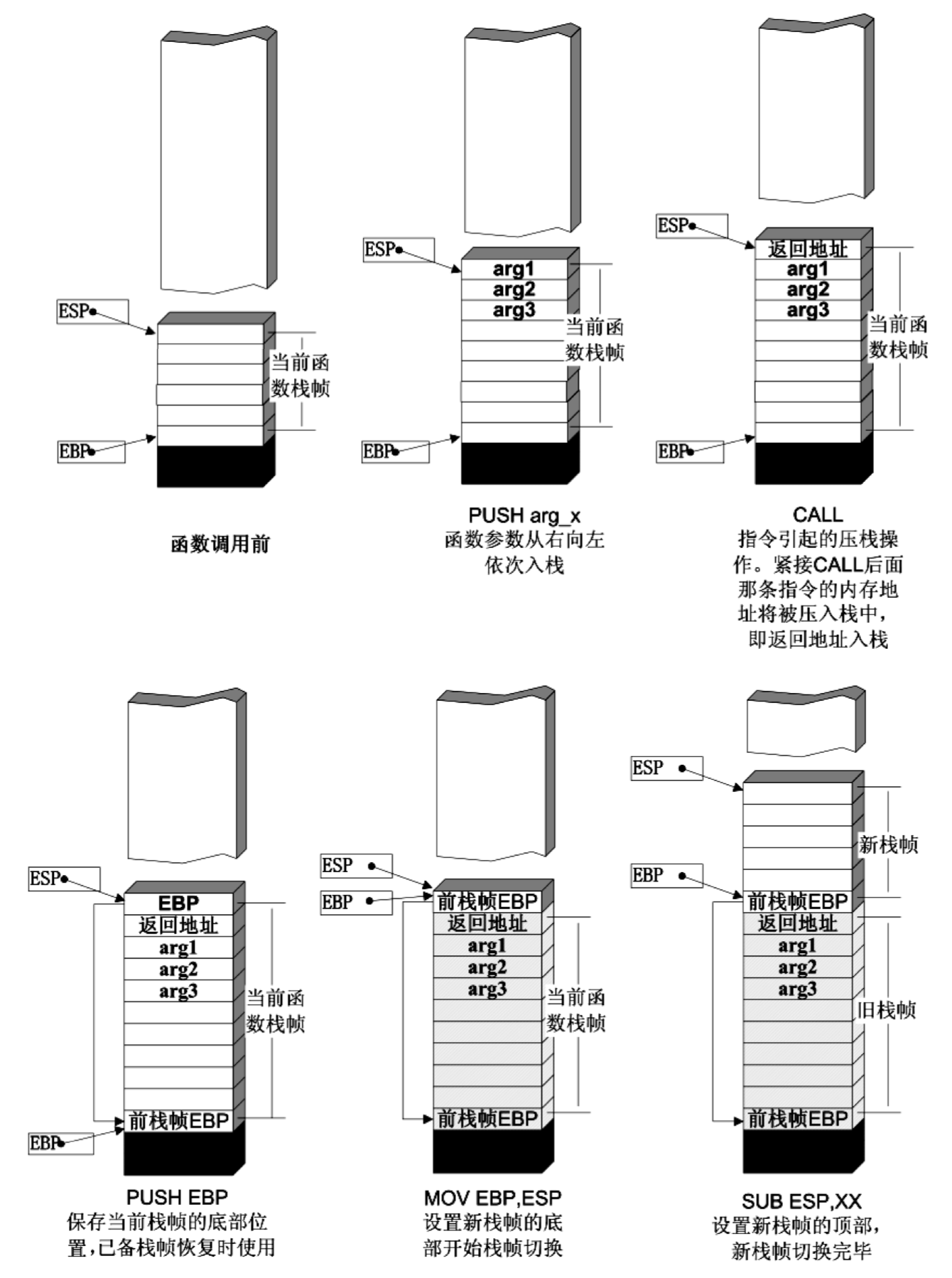
A function stack frame generally contains the following important types of information.
(1) Local variables: memory space allocated for the function’s local variables.
(2) Stack-frame state values: save the top and bottom of the previous stack frame (in practice, only the bottom of the previous stack frame is saved, since the top of the previous stack frame
can be calculated through stack balancing), allowing the previous stack frame to be restored after the current frame is popped.
(3) Function return address: saves the “breakpoint” information from before the current function call, namely the instruction location before the function call,
so that execution can resume in the code area preceding the function call when the function returns.
Function Calls
A Function Call Generally Includes the Following Steps
(1) Push arguments onto the stack: push the arguments onto the system stack one by one from right to left.
(2) Push the return address onto the stack: push the address of the instruction following the call instruction in the current code area onto the stack, so execution can continue when the function returns.
(3) Code-area jump: the processor jumps from the current code area to the entry point of the called function.
(4) Stack-frame adjustment: specifically includes the following.
Save the current stack-frame state value for later use when restoring this stack frame (push EBP onto the stack);
switch from the current stack frame to the new stack frame (load the ESP value into EBP and update the bottom of the stack frame);
allocate space for the new stack frame (subtract the required amount of space from ESP, raising the top of the stack);
for the __stdcall calling convention, the instruction sequence used during a function call is roughly as follows:```asm
;func(a,b,c)
;假设该函数有 3 个参数,将从右向左依次入栈
push 参数 c push 参数 b push 参数 a call 函数地址
;call 指令将同时完成两项工作: ;1)向栈中压入当前指令在内存中的位置,即保存返回地址。 ;2)跳转到所调用函数的入口地址函数入口处
;下面是进入函数call之后: push ebp ;保存旧栈帧的底部 mov ebp,esp ;设置新栈帧的底部(栈帧切换) sub esp,xxx ;设置新栈帧的顶部(抬高栈顶,为新栈帧开辟空间)
## The Steps for Returning from a Function Are as Follows

Three steps:

\(1\) Save the return value: the function’s return value is usually stored in the EAX register.

\(2\) Pop the current stack frame and restore the previous stack frame.
具体包括:
在堆栈平衡的基础上,给 ESP 加上栈帧的大小,降低栈顶,回收当前栈帧的空间。
将当前栈帧底部保存的前栈帧 EBP 值弹入 EBP 寄存器,恢复出上一个栈帧。
将函数返回地址弹给 EIP 寄存器。
\(3\) Jump: use the function return address to jump back to the calling function and continue execution.
## Diagram:
# Assembly Exercise: Pop Up a Dialog Box
Basic knowledge—assembly code structure.586 代表指令集 .MODEL flat,stdcall 调用约定 内存 常用win32
includelib user32.lib
.data 已经定义数据段 可读可写 .data? 未定义的数据段 可读可写 .code 代码段 .const 常量数据段 .stack 堆栈段 自动分配 可读可写可执行
.data Number DWORD 0
```asm
.586
.MODEL flat,stdcall
option casemap:none

include windows.inc
include user32.inc
include kernel32.inc
includelib user32.lib
includelib kernel32.lib

.data
text db "zeo",0

.code
main proc
	INVOKE MessageBox,0,offset text,0,0
	INVOKE ExitProcess,0
main ENDP
END main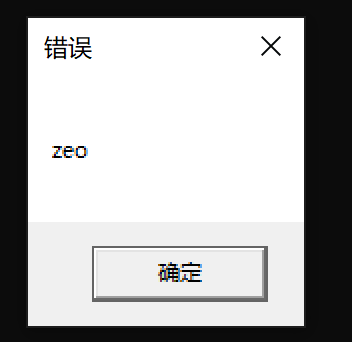
Formatted input and output (printf and scanf)
.586
.MODEL flat,stdcall
option casemap:none

include windows.inc
include user32.inc
include kernel32.inc
include msvcrt.inc

includelib user32.lib
includelib kernel32.lib
includelib msvcrt.lib

.data
text db "zeo",0
Hello db "HelleWord!",0
szformat db "%s",0

.code
main proc
	lea eax,Hello
	push eax
	push offset szformat
	call crt_scanf
	add esp,8
	push offset Hello
	;push offset szformat
	call crt_printf
	add esp,4
	call ExitProcess
	add esp,4
main ENDP
END main