Java Code Auditing: Files, File Uploads, File Reading, and Directory Traversal
A self-study article on Java code auditing that examines file path traversal, insecure file uploads, arbitrary file reading, and directory traversal, along with relevant audit functions and remediation approaches.
Read in Chinese→0x00 Prerequisites
I am teaching myself Java code auditing, mostly studying on my own. It is somewhat like working behind closed doors and learning through search engines, but I still want to document and share the process to make future review and reflection easier. If I eventually manage to learn something, I will reorganize my thoughts and provide other self-learners with a useful approach. This is why I created the following series of articles on self-studying Java code auditing.
0x01 File Path Traversal
Overview:
- Many file-related vulnerabilities arise from issues with file paths. In many cases, the path is controllable, compounded by unusual programming logic.
- If the vulnerable path is controllable, it can provide many other avenues for exploitation.
- Attackers can use
../to upload files to any specified directory or perform directory traversal.
Sample Code:
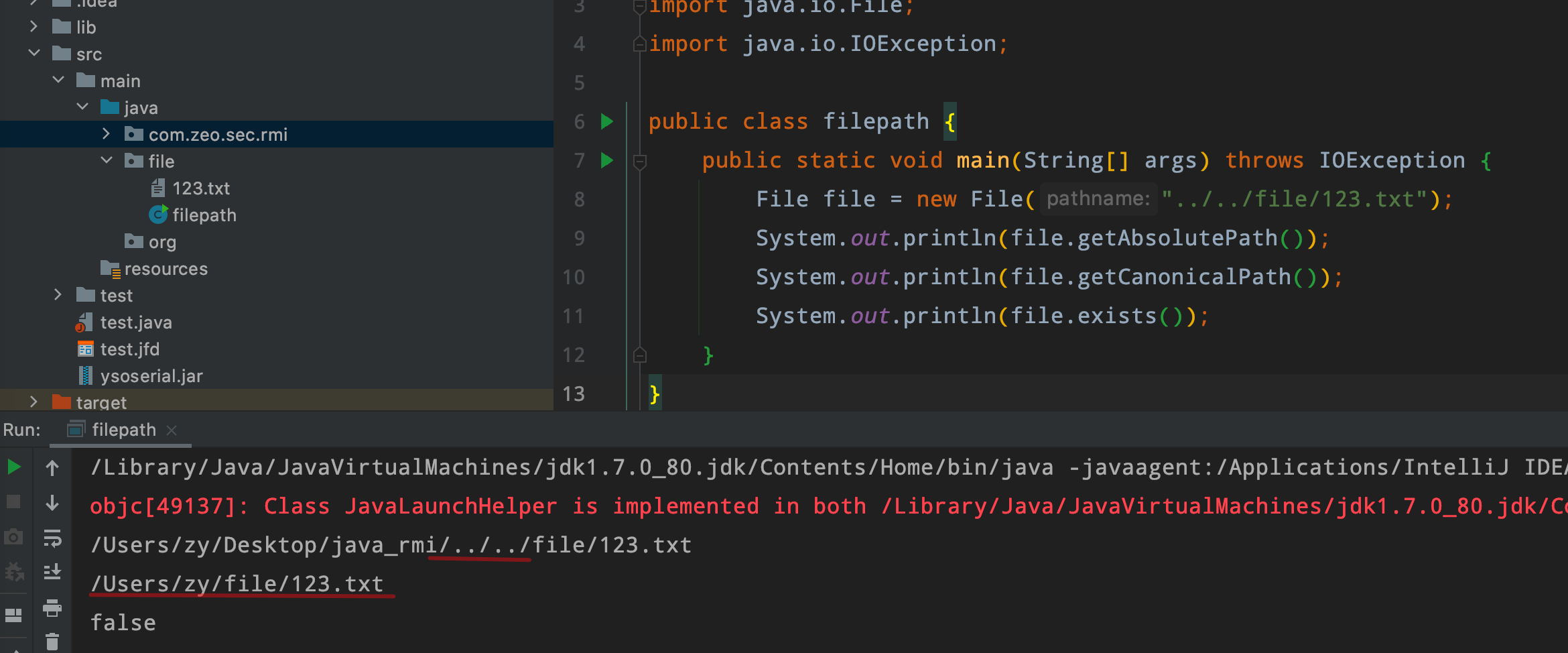
The ../ in the middle can make the file path insecure.
package file;

import java.io.File;
import java.io.IOException;

public class filepath {
    public static void main(String[] args) throws IOException {
        File file = new File("../../file/123.txt");
        System.out.println(file.getAbsolutePath());
        System.out.println(file.getCanonicalPath());
        System.out.println(file.exists());
    }
}
Potential Directory Traversal:
A file is opened and its contents are then read. The filename comes from an input parameter. If this parameter is not filtered, any file on the local filesystem may be read.
文件读取有问题,别在里面拼接
val result = Source.fromFile("public/" + value).getLines().mkString // Weak point

修复:要在外面拼接好
filename = "public/" + FilenameUtils.getName(value)
val result = Source.fromFile(filename).getLines().mkString
0x02 File Upload
Overview:
During file uploads, failure to validate the uploaded file’s extension may allow users to upload webshell files such as JSP and JSPX files.
During code auditing, pay particular attention to whether the uploaded file type is validated securely enough.
Vulnerability Examples:
No filtering at all
Uploading with the JDK’s native stream operations
public String FileUpload(MultipartFile file){
        String fileName = file.getOriginalFilename();
        if (fileName==null) {
            return "file is error";
        }
  			//目录拼接
        String filePath = "/static/images/uploads/"+fileName;
        if (!file.isEmpty()) {
            try {
              	//转化字节流
                byte[] bytes = file.getBytes();
              	//创建file对象 转化为BufferedOutputStream对象
                BufferedOutputStream stream =
                        new BufferedOutputStream(new FileOutputStream(new File(filePath)));
                //写入流
                stream.write(bytes);
                //关闭流
                stream.close();
                return "OK";
            } catch (Exception e) {
                return e.getMessage();
            }
        } else {
            return "You failed to upload " + file.getOriginalFilename() + " because the file was empty.";
        }
    }
Uploading with wrapper classes commonly used by frameworks
private static String UPLOADED_FOLDER = "/tmp/";

public String FileUpload(@RequestParam("file") MultipartFile file,RedirectAttributes redirectAttributes) {
        //检测文件是否存
        if (file.isEmpty()) {
            // 赋值给uploadStatus.html里的动态参数message
            redirectAttributes.addFlashAttribute("message", "Please select a file to upload");
            return "redirect:/file/status";
        }

        try {
            // 获取文件,上传
          	// 获取字节流,放入数字
            byte[] bytes = file.getBytes();
             //获取文件路径,目录拼接  	/TMP/ + Filename
            Path path = Paths.get(UPLOADED_FOLDER + file.getOriginalFilename());
          	 //文件写入
            Files.write(path, bytes);

          	 //回显路径
            redirectAttributes.addFlashAttribute("message",
                    "You successfully uploaded '" + UPLOADED_FOLDER + file.getOriginalFilename() + "'");

        } catch (IOException e) {
            redirectAttributes.addFlashAttribute("message", "upload failed");
            e.printStackTrace();
            return "redirect:/file/status";
        }

        return "redirect:/file/status";
    }
```## Functions to Audit

Java has a particularly large number of file-operation functions. Some use native byte or character streams.

Java is stream-based, and many APIs are wrappers built on top of streams. If you are unfamiliar with them, you can simply search for `file` and then inspect the filtering conditions.

1.  The JDK's native `java.io.FileInputStream`

2.  The JDK's native `BufferedOutputStream`

3.  The JDK's various native `OutputStream` classes; any stream operation may be relevant

4.  The `org.apache.commons.io.FileUtils` class provided by Apache Commons IO

Refer to the article by the Director.

## Remediation

 -    Use an allowlist to validate uploaded file types, size limits, and MIME types
 -    Use the allowlist with fileName.substring\(fileName.lastIndexOf\("."\)\); to check the file extension
 -    There are also wrapper classes for images, such as `BufferedImage`, `Image`, and `Graphics`; try passing the file directly to them```
BufferedImage bi = ImageIO.read(file);
0x02 File Reading
Overview:
In Java, reading and writing are essentially integrated, using stream input and output.
This vulnerability mainly needs to be combined with the first issue: path traversal.
Code:
@GetMapping("/path_traversal/")
public String getImage(String filepath) throws IOException {
File f = new File(filepath);
if (f.exists() && !f.isDirectory()) {
		//读取文件
    byte[] data = Files.readAllBytes(Paths.get(filepath));
    return new String(Base64.encodeBase64(data));
} else {
    return "File doesn't exist or is not a file.";
}
```## Functions to Audit

1.  The JDK's native `java.io.RandomAccessFile` class

2.  The JDK's native `InputStream` classes

3.  The `org.apache.commons.io.FileUtils` class provided by Apache Commons IO

4.  The `java.nio.channels.AsynchronousFileChannel` class introduced in JDK 1.7 for non-blocking asynchronous file reading based on NIO

5.  The `java.nio.file.Files` class introduced in JDK 1.7 for reading files based on NIO

    Common methods include `Files.readAllBytes` and `Files.readAllLines`

    Refer to the article by the blog author.

## Remediation:

Filter directory traversal keywords.

# 0x01 Directory Traversal

## Overview:

For directory traversal, the main considerations are the application logic and whether the results can be returned in the response.

The dedicated file.listFiles\(\) function can be used to handle this.

## Code:```java
package file;

import java.io.File;
import java.io.FileFilter;

public class filepath {
    public static void main(String[] args) {
        String path = "/Users/zy/Desktop/java_rmi/src/main/java/";		//要遍历的路径
        File file = new File(path);		//获取其file对象
        func(file);
    }

    private static void func(File file){
        File[] fs = file.listFiles();
        for(File f:fs){
            if(f.isDirectory())	//若是目录,则递归打印该目录下的文件
                func(f);
            if(f.isFile())		//若是文件,直接打印
                System.out.println(f);
        }
    }
}