Using Process Pools and Thread Pools
Concept of a process: First, a process is an entity. Each process has its own address space, generally including a text region, data region, and stack region. The text region stores the code executed by the processor; the data region stores variables and dynamically allocated memory used during process execution; the stack region stores instructions and local variables for active procedure calls...
Read in Chinese→Concept of a Process
First, a process is an entity. Each process has its own address space, generally including a text region, data region, and stack region. The text region stores the code executed by the processor; the data region stores variables and dynamically allocated memory used during process execution; the stack region stores instructions and local variables for active procedure calls.
Second, a process is a “program in execution.” A program is an inanimate entity. It becomes an active entity only when the processor gives it life—that is, when the operating system executes it—and this active entity is called a process.[3]
A process is one of the most fundamental and important concepts in an operating system. The concept was introduced after multiprogramming systems emerged in order to characterize the dynamic conditions within a system and describe the behavior of the programs running within it. All multiprogramming operating systems are built around processes.
Reasons for Introducing Processes
- To improve resource utilization and system processing capacity. Modern computer systems are multiprogramming systems, meaning that multiple programs execute concurrently.
- To optimize system resources, facilitate computer scheduling, and prevent disorder in system operations.
Process Parallelism and Concurrency
Parallelism: Parallelism means that two tasks execute at the same time. For example, in a race, two people continuously run forward at the same time. (There are sufficient resources—for example, three threads running on a quad-core CPU.)
Concurrency: Concurrency means that when resources are limited, two tasks take turns using those resources. For example, only one person can pass through a section of road—a single-core CPU resource—at a time. After A proceeds for a while, A yields it to B; when B is finished, it is given back to A. They use it alternately in order to improve efficiency.
Diagram of parallelism

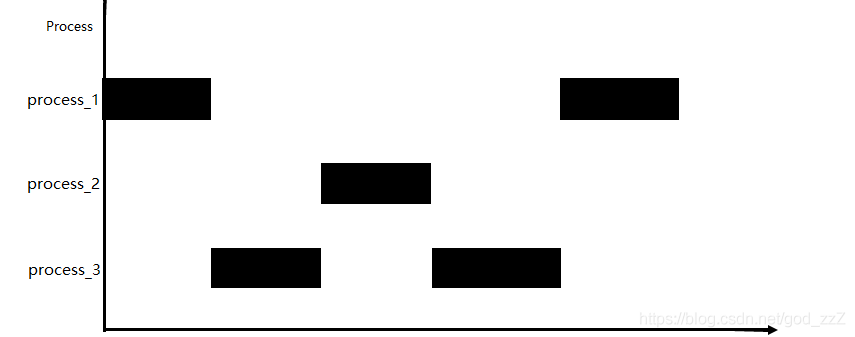
II. Processes and Threads
- Processes
A program is merely a collection of code, whereas a process refers to the execution of that program. It is important to emphasize that executing the same program twice still creates two processes.
Process: a resource management unit (container).
Thread: the smallest unit of execution; threads are managed by processes.
A process is a single dynamic execution of a program on a data set. A process generally consists of three parts: the program, the data set, and the process control block. The program we write describes which functions the process must perform and how to perform them. The data set contains the resources required while the program is executing. The process control block records the external characteristics of the process and describes changes during its execution. The system can use it to control and manage the process, and it is the only indication through which the system recognizes the existence of the process.
-
Threads
Threads were introduced to reduce the overhead of context switching, improve system concurrency, and overcome the limitation that a process can perform only one task, thereby making concurrency within a process possible.
A thread is also called a lightweight process. It is a basic CPU execution unit and the smallest unit in program execution. It consists of a thread ID, program counter, register set, and stack. The introduction of threads reduces the overhead of concurrent program execution and improves the concurrency performance of operating systems. Threads do not have their own system resources. -
Relationship Between Threads and Processes
In a traditional operating system, each process has an address space and, by default, one thread of control.
Multithreading—the use of multiple threads of control—means that multiple threads of control exist within a single process and control that process’s address space.
A process merely groups resources together; it is only a resource unit, or resource collection. Threads are the actual units of execution on the CPU.
The relationship between processes and threads:
(1) A thread can belong to only one process, while a process can have multiple threads but must have at least one thread.
(2) Resources are allocated to processes, and all threads in the same process share all of that process’s resources.
(3) CPU time is allocated to threads; in other words, threads are what actually run on the CPU.
I. Why Introduce Thread Pools?
Python already has the threading module, so why are thread pools still needed?
When writing a web crawler, you need to control the number of threads crawling simultaneously. If 20 threads are created while only three are allowed to run at the same time, all 20 threads still need to be created and destroyed. Creating threads consumes system resources. Is there a better solution?
In fact, only three threads are needed. Each thread is assigned a task, while the remaining tasks wait in a queue. When a thread completes its task, a queued task can be assigned to that thread for continued execution.
How to Use a Thread Pool
pip install threadpool```java
pool = ThreadPool(poolsize)
requests = makeRequests(some_callable, list_of_args, callback)
[pool.putRequest(req) for req in requests]
pool.wait()
The first line defines a thread pool, indicating that no more than `poolsize` threads can be created.

The second line calls `makeRequests` to specify the function that will run in multiple threads, along with the function’s parameters and callback function. The callback function can be omitted; its default is none. In other words, `makeRequests` requires only two parameters to run.

The third line is somewhat unusual: it places all requests to be executed in multiple threads into the thread pool.

```java
[pool.putRequest(req) for req in requests]等同于

  for req in requests:

     pool.putRequest(req)
The fourth line waits for all threads to finish their work before exiting.
- My test example: thread pool
# _*_ coding:utf-8 _*_


import time
import threadpool
import os

def run(fn):
  #fn: 函数参数是数据列表的一个元素
  time.sleep(2)
  print("进程ID",os.getpid())
  print(fn*fn)


'''
(1)引入threadpool模块

(2)定义线程函数

(3)创建线程 池threadpool.ThreadPool()

(4)创建需要线程池处理的任务即threadpool.makeRequests()

(5)将创建的多个任务put到线程池中,threadpool.putRequest

(6)等到所有任务处理完毕theadpool.pool()
'''

if __name__ == "__main__":
  testFL = [1,2,3,4,5,6]
  print ('单进程:') #顺序执行(也就是串行执行,单进程)
  s = time.time()
  for fn in testFL:
    run(fn)
  t1 = time.time()
  print ("顺序执行时间:", int(t1 - s))


  print ('多个线程并发:')

  pool = threadpool.ThreadPool(3)

  调用makeRequests创建了要开启多线程的函数
  requests = threadpool.makeRequests(run,testFL)

  # 将所有要运行多线程的请求扔进线程池
  for req in requests:
      pool.putRequest(req)
  pool.wait() #等待所有的线程完成工作后退出

  t2 = time.time()
  print ("并行执行时间:", int(t2-t1))
- Process pool
# -*- coding: utf-8 -*-
import time
from multiprocessing import Pool
import os

def run(fn):
  #fn: 函数参数是数据列表的一个元素
  time.sleep(2)
  print("进程ID",os.getpid())
  print(fn*fn)

if __name__ == "__main__":
  testFL = [1,2,3,4,5,6]
  print ('单进程:') #顺序执行(也就是串行执行,单进程)
  s = time.time()
  for fn in testFL:
    run(fn)
  t1 = time.time()
  print ("顺序执行时间:", int(t1 - s))

  print ('多个进程,并行执行:') #创建多个进程,并行执行
  pool = Pool(3)  #创建拥有10个进程数量的进程池
  #testFL:要处理的数据列表,run:处理testFL列表中数据的函数
  pool.map(run, testFL)

  pool.close()#关闭进程池,不再接受新的进程
  pool.join()#主进程阻塞等待子进程的退出
  t2 = time.time()
  print ("并行执行时间:", int(t2-t1))