Secure Development1 min read
Beautifying prettytable Output in Python and Adding a Progress Bar
Python can use the prettytable module to display content in polished tables, and progressbar can add a progress bar for an iterator or list.
Read in Chinese→- Use Python’s prettytable Module to Display Content in Polished Tables
- It is also very easy to use.
- First, install it.
pip install PrettyTable- Import the module.
import prettytable as ptHere is an example:
import prettytable as pt
# 添加表头
table = pt.PrettyTable(["URL", "参数", "沙雕"])
# add_row 添加一行数据
table.add_row(["http://aaa.com", "raskv", "123123"])
table.add_row(["http://bbb.com", "susd", "123123"])
table.add_row(["http://ccc.com", "pwd", "Ym15"])
# 默认居中对齐
# 设置"值"列,局左对齐 left首字母
table.align["值"] = 'l'
print(table)
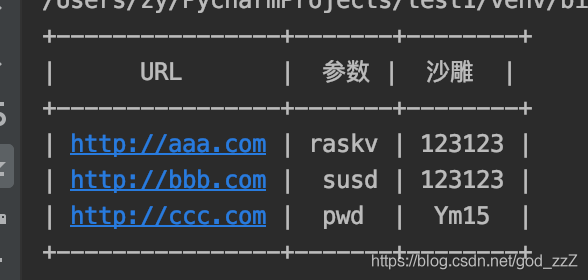
```The output looks pretty good:
```
from prettytable import PrettyTable
table = PrettyTable()
# add_column 添加一列数据
table.add_column('===', ["URL", "参数", "值"])
table.add_column('第1列', ["http://aaa.com", "raskv", "dEBxcS5j"])
table.add_column('第2列', ["http://bbb.com", "su", "626d5633583231794c6d4e6"])
table.add_column('第3列', ["http://ccc.com", "pwd", "Ym1WM1gyMXlMbU5"])
# 设置"第3列",局右对齐 right首字母
table.align["第3列"] = 'r'
print(table)Progress Bar
import time
import progressbar
This can be an iterator or a list
p = progressbar.ProgressBar()

my_list = [1, 2, 3, 4, 5]
my_list.append([6, 7, 8, 9])

for i in p(my_list):
    # do something
    print(i)
    time.sleep(1)